

 Veri paketi
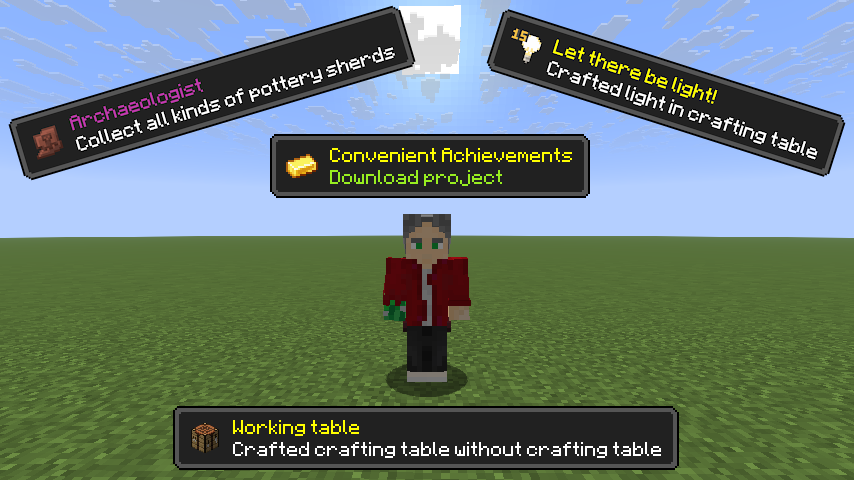
Convenient Achievements
This project aims to ensure that players who lack the usual vanilla advancements can further complete the advancements that we provide to you. There are both easy and difficult advancements, up to secret challenges.

How does it work?
To unlock the new advancements tab, you only need to get a gold ingot in any way.

Development assistance
If you have any ideas to improve or add new achievements, you can always contact our Discord channel or on the GitHub page.
ㅤㅤㅤㅤㅤㅤ ㅤㅤㅤㅤㅤ
Note from the developer: I cannot guarantee that the achievements I have added may remain in the future. Due to special reasons, some achievements may be changed or completely changed in the future for balance.
Convenient Achievements nasıl kurulur
With Millida Launcher
Install Millida Launcher
The launcher is free: download it at millida.net/launcher and sign in with any nickname.
Click “Install” on this page
The launcher opens and installs the data pack for Minecraft 1.19–1.21.8 automatically.
Launch the game
A profile with it appears in the launcher: click “Play”.
Manually
Download the archive
Pick the file Convenient Achievements v1.10.1_1.21.5x.zip (32 KB) for your game version.
New world: “Data Packs”
When creating a world, click “Data Packs”, drag the archive into the window, then move it to “Selected”.
Existing world: the datapacks folder
Put the archive into saves/<world>/datapacks and type /reload in game.
On a server
Archive goes into the server world’s datapacks
The world/datapacks folder on the server; players do not need to install anything.
Reload the data
Type /reload in the server console or restart the server.
Use the “To server” button
On Millida Hosting, the button at the top of the page uploads the file to your server and restarts it for you.
Sürümler
Bağımlılıklarla
| Minecraft | Yükleyici | Dosya | Tarih | İşlemler |
|---|---|---|---|---|
| 1.21.1 | Veri paketi | 1.21.133.5 KB | ||
| 1.20.4 | Veri paketi | 1.20.427.6 KB | ||
| 1.20.4 | Veri paketi | 1.20.427.5 KB | ||
| 1.21.8 | Veri paketi | 1.21.832 KB | ||
| 1.21.4 | Veri paketi | 1.21.432 KB | ||
| 1.21.4 | Veri paketi | 1.21.432.2 KB | ||
| 1.21.7 | Veri paketi | 1.21.732.2 KB | ||
| 1.21.4 | Veri paketi | 1.21.430.9 KB |
Çalışması için gerekenler
- Dependencyisteğe bağlı
Yorumlar
Convenient Achievements için ilk puanı sen ver


