

Minecraft 1.20.1, 1.21.1 కోసం Ores Aura రిసోర్స్ ప్యాక్
ఈ ప్యాక్ మైనింగ్ సమయంలో ఖనిజాలను గుర్తించడం సులభం మరియు వేగవంతం చేస్తుంది, ముఖ్యంగా చీకటి గుహలలో.
- డౌన్లోడ్లు
- 65 డౌన్లోడ్లు
- వ్యూలు
- 300 వ్యూలు
- అప్డేట్ చేయబడింది
- అప్డేట్ చేయబడింది 26.09.2026
- 1.20 — 26.3
 వెనిల్లా గేమ్
- క్లయింట్
Aura Ores
Simple Glowing Ores
What is this?
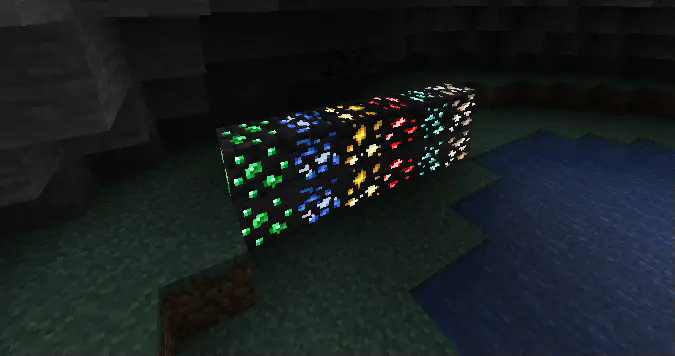
Aura Ores is a resource pack that adds an emissive glow to ores. It keeps the standard Vanilla textures but makes them visible in the dark, making mining easier without needing to place torches everywhere.
Requirements
Important: For the ores to glow, you must install a mod that supports connected/emissive textures. Without these, the pack will look like default Minecraft.
Mod Loader - Requirement
Fabric - Continuity (Recommended) or OptiFabric Forge / Neo - OptiFine
Note: If using Continuity, make sure "Emissive Textures" is enabled in the resource pack settings.
Features
Feature - Description
High Visibility - Spot Diamonds, Gold, and Iron easily in the dark. Vanilla Style - Retains the original ore textures; only the colored parts glow. Lightweight - Simple texture changes with minimal performance impact.
Check Out My Other Mods
If you find Aura Ores useful, check out my utility mods:
Mod Name - Description
FPS Overlay - A lightweight, customizable FPS counter. Elytra End - End style elytra Right Click Harvest - Harvest crops instantly just by right-clicking. Tools Durability - Warns you before your tools break. Biome Notifier - Shows the biome name when you enter a new area.
View my full profile
Installation
How to Install (Click to Expand)
- Download the Aura Ores .zip file.
- Do not unzip it.
- Place the file into your .minecraft/resourcepacks folder.
- Launch the game and go to Options > Resource Packs.
- Move Aura Ores to the Selected column (Right side).
- Important: Ensure it is placed above any other texture packs.
Ores Aura ఎలా ఇన్స్టాల్ చేయాలి
With Millida Launcher
Install Millida Launcher
The launcher is free: download it at millida.net/launcher and sign in with any nickname.
Click “Install” on this page
The launcher opens and installs the resource pack for Minecraft 1.20–26.3 automatically, together with its dependencies: Continuity.
Launch the game
A profile with it appears in the launcher: click “Play”.
Manually
Download the archive
Pick the file Ores Aura.zip (617 KB) for your game version. No need to unpack it.
Put it in the resourcepacks folder
The easiest way: “Options”, then “Resource Packs”, then “Open Pack Folder”, and drag the archive there.
Enable the pack
In the same window, move the pack to the right-hand “Selected” column and click “Done”.
వెర్షన్లు
డిపెండెన్సీలతో
| Minecraft | లోడర్ | ఫైల్ | తేదీ | చర్యలు |
|---|---|---|---|---|
| 26.3 | — | 26.3617 KB 12 | ||
| 26.2 | — | 26.2617 KB 6 | ||
| 26.1 | — | 26.1617 KB 2 | ||
| 1.21.11 | — | 1.21.11617 KB 10 |
ఇది రన్ అవ్వడానికి కావాల్సినవి
- Continuityఅవసరం
సమీక్షలు
Ores Auraకు మొదటి రేటింగ్ ఇవ్వండి


