

Minecraft 1.21.130 కోసం Enchantment Guide రిసోర్స్ ప్యాక్
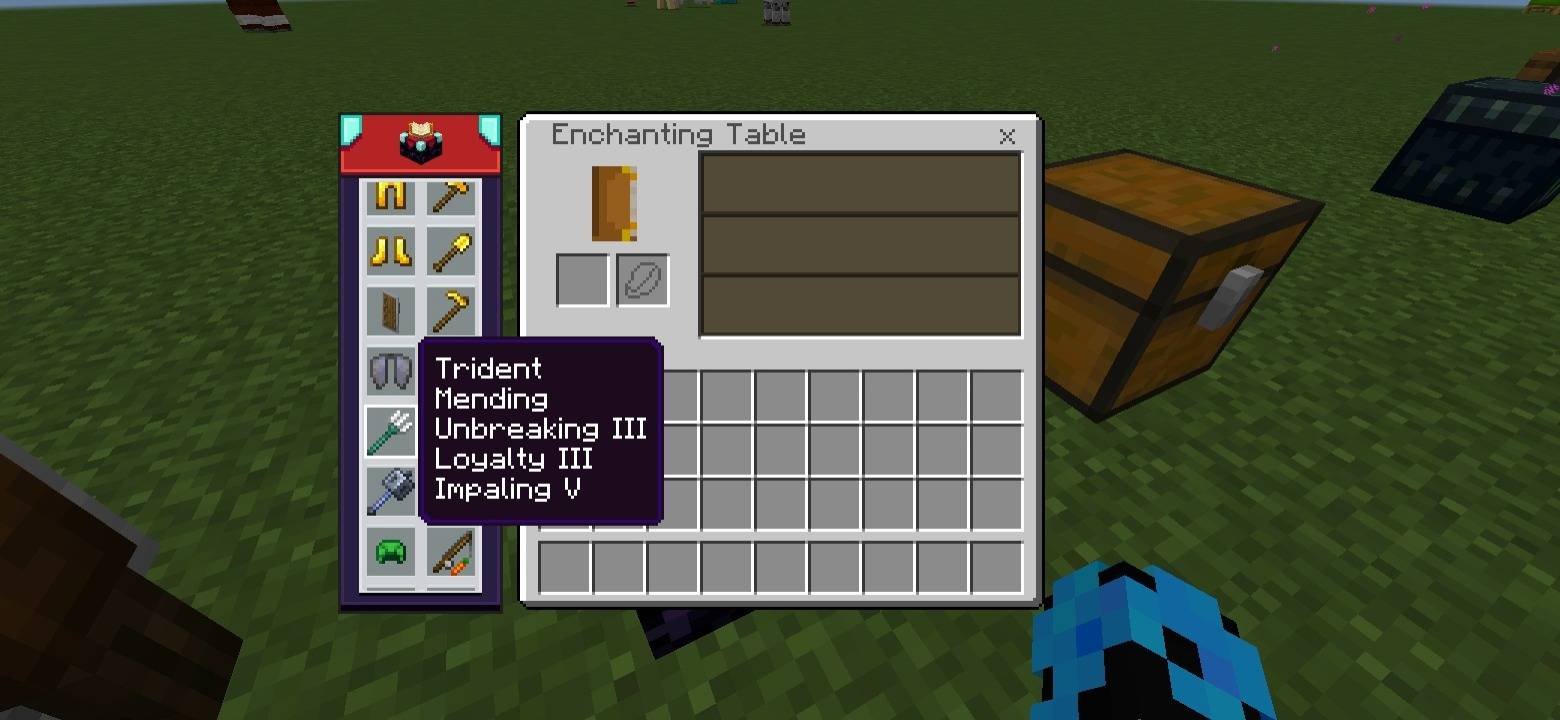
ఎంచాంట్మెంట్ గైడ్ ప్యాక్ టూల్స్, ఆయుధాలు మరియు కవచాల కోసం ఉత్తమ ఎంచాంట్మెంట్లను చూపిస్తుంది. సిఫార్సు చేసిన ఎంచాంట్మెంట్లు మరియు వాటి ఉపయోగాలను చూడటానికి గైడ్లోని ఐటమ్లపై హోవర్ చేయండి లేదా క్లిక్ చేయండి. సులభమైన Minecraft ఆట కోసం యాన్విల్ మరియు ఎంచాంట్మెంట్ టేబుల్లో పనిచేస్తుంది.
Enchantment Guide
This interactive guide shows the best enchantments for tools, weapons, and armor. Click or hover on any item to see its recommended enchantments.
Tip: For more details about what each enchantment does, click the Enchantment Table icon at the top-center of the guide.
Features
- Interactive guide for all tools, weapons, and armor
- Click or hover on an item to see recommended enchantments
- View detailed info about each enchantment via the Enchantment Table icon
- Works directly inside the anvil and enchantment table
- Simple and easy-to-use for Minecraft players
Standalone Pack: This is a standalone pack of NeBux UI+.
Credit: The idea of this pack is inspired from NotNicto's pack.
Compatible with Pocket UI?: Yes
If you enjoy my packs and want to support me, you can do so on Ko-fi:
nebux18

Enchantment Guide ఎలా ఇన్స్టాల్ చేయాలి
With Millida Launcher
Install Millida Launcher
The launcher is free: download it at millida.net/launcher and sign in with any nickname.
Click “Install” on this page
The launcher opens and installs the resource pack for Minecraft 1.21.130 automatically.
Launch the game
A profile with it appears in the launcher: click “Play”.
Manually
Download the archive
Pick the file Enchantment_Guide.mcpack (2.8 MB) for your game version. No need to unpack it.
Put it in the resourcepacks folder
The easiest way: “Options”, then “Resource Packs”, then “Open Pack Folder”, and drag the archive there.
Enable the pack
In the same window, move the pack to the right-hand “Selected” column and click “Done”.
వెర్షన్లు
డిపెండెన్సీలతో
| Minecraft | లోడర్ | ఫైల్ | తేదీ | చర్యలు |
|---|---|---|---|---|
| 1.21.130 | — | Enchantment_Guide.mcpack2.8 MB |
సమీక్షలు
Enchantment Guideకు మొదటి రేటింగ్ ఇవ్వండి


