

Minecraft 1.20.1, 1.21.1 కోసం Distinct Dyes రిసోర్స్ ప్యాక్
అన్ని రంగులకు వేర్వేరు టెక్స్చర్ను ఇస్తుంది, వాటిని సులభంగా గుర్తించవచ్చు. రిసోర్స్ప్యాక్లను సపోర్ట్ చేసే ఏ వెర్షన్కైనా పనిచేస్తుంది (1.6.1+)! రంగు గుర్తింపు లోపం ఉన్నవారికి ఉపయోగకరం.
- వ్యూలు
- 45 వ్యూలు
- అప్డేట్ చేయబడింది
- అప్డేట్ చేయబడింది 03.09.2026
- 1.6.1 — 26.1.2
 వెనిల్లా గేమ్
- క్లయింట్
A resourcepack that changes every dye by improving its color, as well as giving every single one a unique texture
This resourcepack works for any version over 1.6.1. On versions below 1.14, bonemeal, lapis, ink sacs and cocoa beans have different textures, as the black, white and brown dye weren't added until 1.14 Above 1.14 the only thing changed is the dyes.
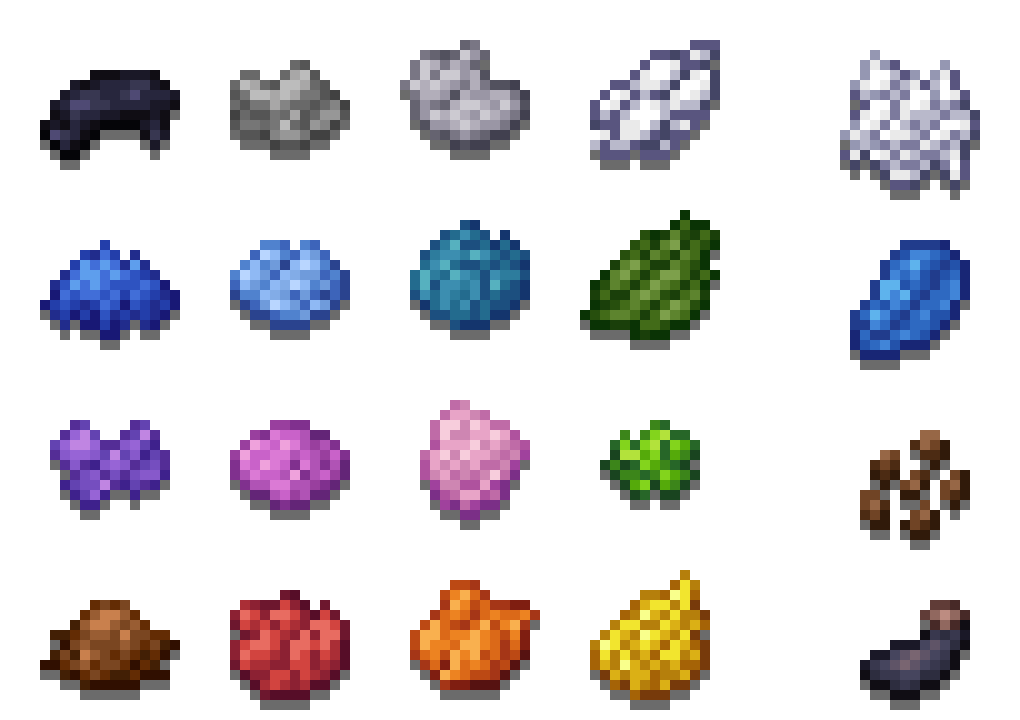
The one file provided works for all supported versions.
I publish all of my resourcepacks for free, and ad revenue is usually around 3$ per month from all of them combined, so any donations are very appreciated.

Distinct Dyes ఎలా ఇన్స్టాల్ చేయాలి
With Millida Launcher
Install Millida Launcher
The launcher is free: download it at millida.net/launcher and sign in with any nickname.
Click “Install” on this page
The launcher opens and installs the resource pack for Minecraft 1.6.1–26.1.2 automatically.
Launch the game
A profile with it appears in the launcher: click “Play”.
Manually
Download the archive
Pick the file §cDistinct §dDyes.zip (20 KB) for your game version. No need to unpack it.
Put it in the resourcepacks folder
The easiest way: “Options”, then “Resource Packs”, then “Open Pack Folder”, and drag the archive there.
Enable the pack
In the same window, move the pack to the right-hand “Selected” column and click “Done”.
వెర్షన్లు
డిపెండెన్సీలతో
| Minecraft | లోడర్ | ఫైల్ | తేదీ | చర్యలు |
|---|---|---|---|---|
| 26.1 | — | 26.119.5 KB | ||
| 1.12.2 | — | 1.12.219.5 KB | — |
FAQ
Which Minecraft versions does Distinct Dyes work on?
There are files for 1.6.1–26.1.2, 85 versions in total. The newest is 26.1.2.
Does Distinct Dyes need mods?
No, the resource pack works in the plain game without loaders: put it into the resourcepacks folder and enable it in the options.
Where can I download Distinct Dyes safely?
On this page: the file §cDistinct §dDyes.zip (20 KB) is stored on Millida’s server, with no link shorteners. SHA-1 checksum: 8ef6157a9b3e31265fa700d9d522f7c5dc2cc2d7.
సమీక్షలు
Distinct Dyesకు మొదటి రేటింగ్ ఇవ్వండి



