

Minecraft 1.20.1, 1.21.1 కోసం Cursed Fog షేడర్లు
మీ నరాలను కదిలించే భయానక, ఉద్రిక్త షేడర్లు.
 Fabric
 OptiFine
Cursed Fog షేడర్ల గురించి
EN 🌐

ABOUT:
Hi, I'm LoLip_p! I developed this shader to create a tense and eerie atmosphere, perfect for horror modpacks. I would be delighted if it were included in your projects. It features a CRT mask, various video artifacts, noise effects, and more. If any effects don't match your preferences, all parameters are fully customizable, allowing you to easily toggle settings on or off. Support the author on Patreon.

SCREENSHOT:
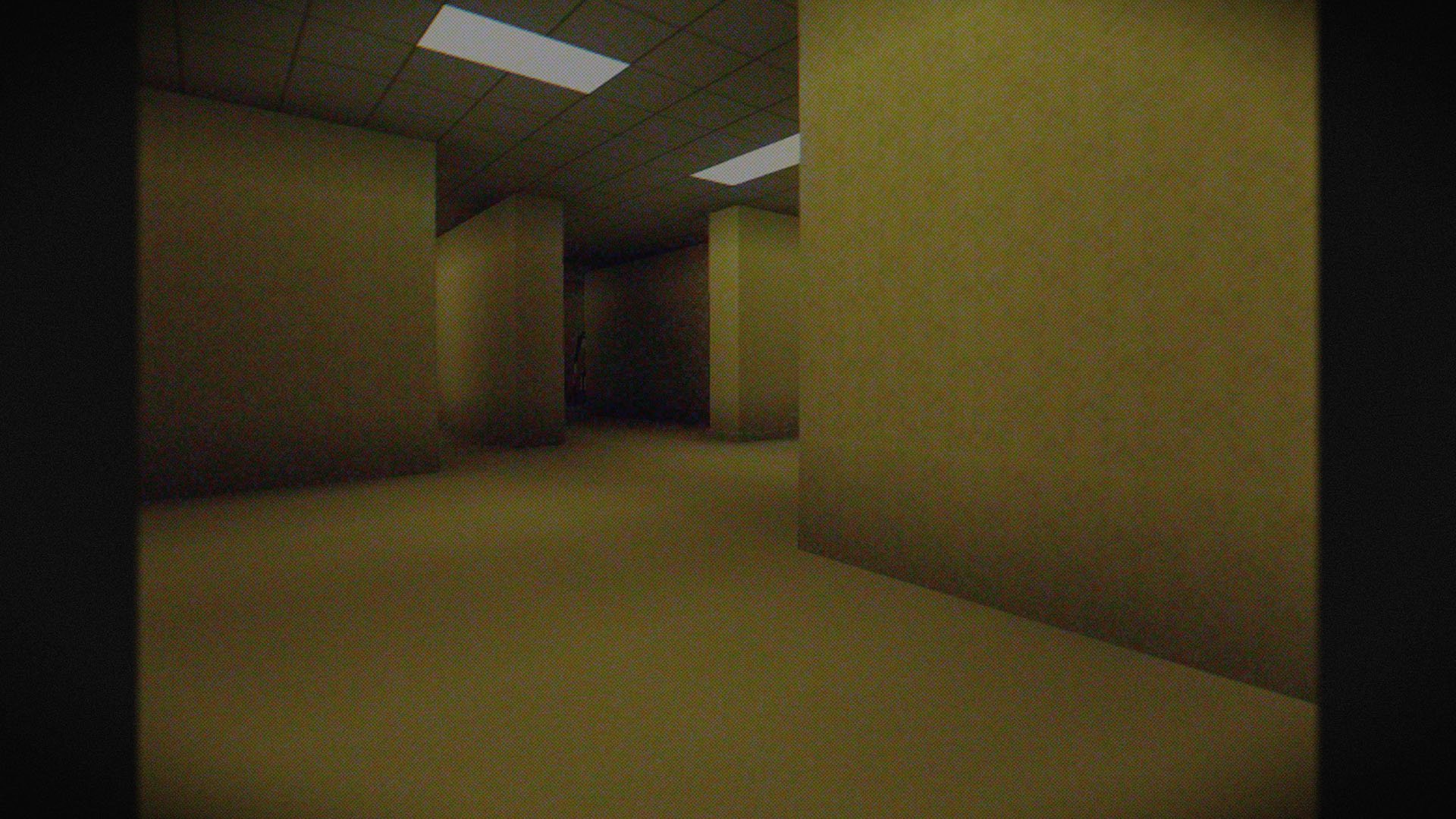
LINKS:
- Discord (Discuss, Bug Reports, Etc.)
- YouTube
- Telegram
INSTALL THE SHADERS
- Download Client Which Supports Installing Shaders Such As Optifine And Iris
- Download The Shaders
- Copy Shaders to /.minecraft/shaderpacks
- Launch Minecraft, Go To Options --> Video Settings --> Shaders
- Choose Cursed Fog
DEMO VIDEO
RU 🐻
- Discord (Discuss, Bug Reports, Etc.)
- YouTube
- Telegram
CH 🐉
关于:
你好,我是LoLip_p!我开发了这款着色器,旨在营造紧张诡异的氛围,特别适合恐怖模组合集。若能将其纳入您的项目,我将深感荣幸。它包含CRT滤镜、多种视频伪影、噪点效果等特色功能。若某些效果不符合您的偏好,所有参数均可自由调整,您可轻松启用或禁用各项设置。支持作者请访问 Patreon.
屏幕截图:
链接:
- Discord (Discuss, Bug Reports, Etc.)
- YouTube
- Telegram
安装着色器
- 下载支持安装着色器的客户端(如Optifine和Iris)
- 下载着色器资源包
- 将着色器复制到 /.minecraft/shaderpacks 目录
- 启动Minecraft,进入选项 --> 视频设置 --> 着色器
- 选择 诅咒雾
演示视频
DE 🍺
ÜBER:
Hallo, ich bin LoLip_p! Ich habe diesen Shader entwickelt, um eine spannende und unheimliche Atmosphäre zu schaffen, die perfekt für Horror-Modpacks geeignet ist. Ich würde mich sehr freuen, wenn er in Ihren Projekten verwendet würde. Er verfügt über eine CRT-Maske, verschiedene Videoartefakte, Rauscheffekte und vieles mehr. Wenn Ihnen bestimmte Effekte nicht gefallen, können Sie alle Parameter vollständig anpassen und die Einstellungen ganz einfach ein- oder ausschalten. Unterstützen Sie den Autor auf Patreon.
SCREENSHOT:
LINKS:
- Discord (Discuss, Bug Reports, Etc.)
- YouTube
- Telegram
INSTALLIEREN SIE DIE SHADER
- Client herunterladen, der die Installation von Shadern wie Optifine und Iris unterstützt
- Shader herunterladen
- Shader nach /.minecraft/shaderpacks kopieren
- Minecraft starten, zu Optionen --> Videoeinstellungen --> Shader gehen
- Cursed Fog auswählen
Cursed Fog ఎలా ఇన్స్టాల్ చేయాలి
With Millida Launcher
Install Millida Launcher
The launcher is free: download it at millida.net/launcher and sign in with any nickname.
Click “Install” on this page
The launcher opens and installs the shaders for Minecraft 1.8.9–26.3 automatically.
Launch the game
A profile with it appears in the launcher: click “Play”.
Manually
Install Iris or OptiFine
Without a shader mod the game cannot see shaders. Install it for the same Minecraft version.
Download the shader archive
Pick the file Cursed Fog - V1.0.10.zip (73 KB) and do not unpack it.
Put it in the shaderpacks folder
“Options”, then “Video Settings”, then “Shader Packs”, then “Open Shader Pack Folder”, and drag the archive there.
Select the shaders
In the same window, click the pack name and “Apply”.
వెర్షన్లు
డిపెండెన్సీలతో
| Minecraft | లోడర్ | ఫైల్ | తేదీ | చర్యలు |
|---|---|---|---|---|
| 26.3 | Iris, OptiFine | 26.373.1 KB 389 | ||
| 1.17.1 | Iris, OptiFine | 1.17.166.5 KB | ||
| 1.15.2 | Iris, OptiFine | 1.15.266.5 KB | ||
| 1.14.4 | Iris, OptiFine | 1.14.466.5 KB | ||
| 26.2 | Iris, OptiFine | 26.266.5 KB | — | |
| 26.1 | Iris, OptiFine | 26.166.5 KB | — | |
| 1.21.11 | Iris, OptiFine | 1.21.1166.5 KB | — | |
| 1.21.1 | Iris, OptiFine | 1.21.166.5 KB 1 | — |
FAQ
Which Minecraft versions does Cursed Fog work on?
There are files for 1.8.9–26.3, 66 versions in total. The newest is 26.3.
What do I need to run Cursed Fog?
Shaders are loaded through Iris or OptiFine: without one of them the game cannot see them.
Where can I download Cursed Fog safely?
On this page: the file Cursed Fog - V1.0.10.zip (73 KB) is stored on Millida’s server, with no link shorteners. SHA-1 checksum: 1a46478d3b318a2e5887ae0187c3e72789c94729.
సమీక్షలు
Cursed Fogకు మొదటి రేటింగ్ ఇవ్వండి


