

Minecraft 1.20.1, 1.21.1 కోసం BVSF షేడర్లు
బలహీన PC ల కోసం BVS యొక్క వేగవంతమైన వెర్షన్!
 Fabric
 OptiFine
BVSF షేడర్ల గురించి
EN 🌐

ABOUT:
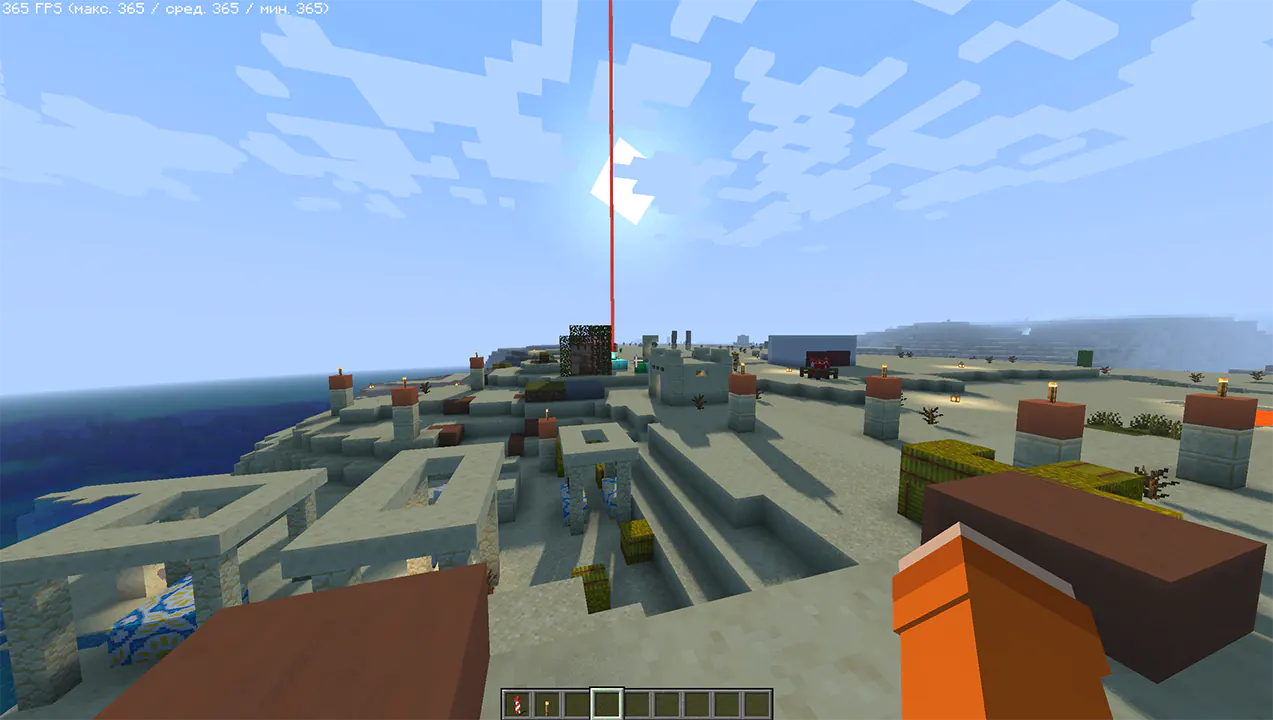
Hi, I'm LoLip_p! I'm the developer of the BVS shader, which is a vanilla preserving shader for minecraft. It is quite productive, but still some users have even weaker computers, for this reason I created a new version of the shader: BVSF (F - Fast) is a faster, but less functional version of BVS. It lacks such effects as DoF, SSR, PBR and others. With this version you will be able to squeeze out many times more fps compared to the regular version!
Performance: 360 FPS+
- 2K (2560x1440)
- 10 chunks
- GPU: RX 580 (8GB)
- CPU: Ryzen 5 1500X
SCREENSHOT:
LINKS:
- Discord (Discuss, Bug Reports, Etc.)
- Telegram
- YouTube
INSTALL THE SHADERS
- Download Client Which Supports Installing Shaders Such As Optifine And Iris
- Download The Shaders
- Copy Shaders to /.minecraft/shaderpacks
- Launch Minecraft, Go To Options --> Video Settings --> Shaders
- Choose BVSF - Best Vanilla Shader (FAST)
RU 🐻
- 2K (2560x1440)
- GPU: RX 580 (8GB)
- CPU: Ryzen 5 1500X
- Telegram
- YouTube
- Выберите BVSF - Best Vanilla Shader (FAST).
CH 🐉
关于:
大家好,我是LoLip_p!我是BVS着色器的开发者,这是款保留原版风格的Minecraft着色器。虽然性能相当出色,但考虑到部分用户电脑配置更低,我特别推出了新版着色器:BVSF(F - Fast)是BVS的轻量化版本,在保留核心功能的同时去除了景深、镜面反射、PBR等特效。使用此版本可获得比标准版高出数倍的帧率!
性能测试:360 FPS+
- 2K分辨率(2560x1440)
- 10个区块
- GPU:RX 580 (8GB)
- CPU:锐龙5 1500X
帧率截图:
相关链接:
- Discord (讨论区、错误报告等)
- Telegram
- YouTube
着色器安装指南
- 下载支持安装着色器的客户端(如Optifine或Iris)
- 下载着色器资源包
- 将着色器文件复制至 /.minecraft/shaderpacks 目录
- 启动Minecraft,进入选项 → 视频设置 → 着色器
- 选择 BVSF - 最佳原版着色器(快速版)
BVSF ఎలా ఇన్స్టాల్ చేయాలి
With Millida Launcher
Install Millida Launcher
The launcher is free: download it at millida.net/launcher and sign in with any nickname.
Click “Install” on this page
The launcher opens and installs the shaders for Minecraft 1.8.9–26.3 automatically.
Launch the game
A profile with it appears in the launcher: click “Play”.
Manually
Install Iris or OptiFine
Without a shader mod the game cannot see shaders. Install it for the same Minecraft version.
Download the shader archive
Pick the file BVSF - Best Vanilla Shader 1.9.3 (FAST).zip (41 KB) and do not unpack it.
Put it in the shaderpacks folder
“Options”, then “Video Settings”, then “Shader Packs”, then “Open Shader Pack Folder”, and drag the archive there.
Select the shaders
In the same window, click the pack name and “Apply”.
వెర్షన్లు
డిపెండెన్సీలతో
| Minecraft | లోడర్ | ఫైల్ | తేదీ | చర్యలు |
|---|---|---|---|---|
| 26.3 | Iris, OptiFine | 26.340.9 KB 34 | ||
| 26.2 | Iris, OptiFine | 26.240.8 KB | ||
| 1.21.10 | Iris, OptiFine | 1.21.1041.4 KB | ||
| 1.21.8 | Iris, OptiFine | 1.21.841.8 KB | ||
| 1.21.5 | Iris, OptiFine | 1.21.542.3 KB |
FAQ
Which Minecraft versions does BVSF work on?
There are files for 1.8.9–26.3, 66 versions in total. The newest is 26.3.
What do I need to run BVSF?
Shaders are loaded through Iris or OptiFine: without one of them the game cannot see them.
Where can I download BVSF safely?
On this page: the file BVSF - Best Vanilla Shader 1.9.3 (FAST).zip (41 KB) is stored on Millida’s server, with no link shorteners. SHA-1 checksum: 03c3181498d9185e1aefff8c04df8656a402f3a5.
సమీక్షలు
BVSFకు మొదటి రేటింగ్ ఇవ్వండి


