
Minecraft 1.20.1, 1.21 కోసం Individual Signs ప్లగిన్
దానిని చూస్తున్న ప్రతి ఆటగాడికి సైన్లపై వచనాన్ని విడివిడిగా భిన్నంగా ప్రదర్శిస్తుంది.
Description
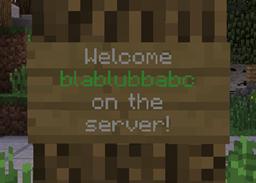
This plugin displays the text on signs for each player individual differently.
By default this plugin only replaces [PLAYER] on signs with the name and [DISPLAY] with the nick name of the player looking at it. The permission nodes to create signs containing those tags are insigns.create.player and insigns.create.display.
However InSigns also includes an API for developers of other plugins to easily add own player-specific sign content.
This plugin could for example be used for individual greeting signs at your spawn. Your players will be amazed to see their own name on a sign!
IMPORTANT
This plugin needs ProtocolLib to work. Make sure you have installed the right version of ProtocolLib. This plugin should stay compatible with further versions of minecraft and bukkit as long as ProtocolLib doesn't have to change anything on it's API which InSigns is relying on, and the minecraft protocol isn't changing anything sign-related.
Quick Presentation by VariationVault
For plugin developers: easy-to-use API
Here is a small example of how you can use this in your own plugin to display player-specific values on signs. 1.) First of all: add the IndividualSigns jar to your build path (just like you do it with the bukkit.jar) 2.) You can then create a listener which listens for the SignSendEvent (just like you create listeners for bukkit events): This event gets called every time the server is about to update the sign contents for a player. 3.) The event provides easy methods to get the current sign text and to change it:
- getPlayer() - Gets the player which receives the sign packet.
- getLocation() - Gets the location of the sign which text is being sent.
- getLine(int index) - Gets the line of text at the specified index (0-3). The lines are in json format.
- setLine(int index, String line) - Sets the line of text at the specified index. Has to be in proper json format.
- isModified() - Whether or not this event was modified by some plugin.
- setCancelled(boolean cancelled) - If the event is cancelled the sign contents won't get updated for the affected player, leaving it at their current content (blank if all SignSendEvents get cancelled).
- isCancelled() - Checks whether or not some plugin cancelled this event already.
Example usage of the event to replace "[PLAYER]" with the player's name:
1 2 3 4 5 6 7 8 9 10 11 12 13 14 15 16
public class SignSendListener implements Listener { public SignSendListener(Plugin plugin) { Bukkit.getServer().getPluginManager().registerEvents(this, plugin); } @EventHandler(priority = EventPriority.NORMAL, ignoreCancelled = true) public void onSignSend(SignSendEvent event) { for (int i = 0; i < 4; i++) { String line = event.getLine(i); if (line.contains("[PLAYER]")) { event.setLine(i, line.replace("[PLAYER]", event.getPlayer().getName())); } } } }
That's it. The InSigns-Plugin will handle all the needed packet manipulation for you.
Some other useful utilities provided by InSigns are:
- The SimpleChanger class which can be used to easily create a listener for simple key->value replacements and permission checks during sign creation. Example for the built-in [PLAYER] -> playerName replacement:
1 2 3 4 5 6 7 8 9 10 11 12 13 14 15 16 17
@Override public void onEnable() { Plugin insignsPlugin = getServer().getPluginManager().getPlugin("InSigns"); if ((insignsPlugin != null) && insignsPlugin.isEnabled()) { // Replaces "[PLAYER]" with the player's name on signs and checks for the 'insigns.create.player' permission whenever a player tries to create a sign with "[PLAYER]" on it new SimpleChanger(this, "[PLAYER]", "insigns.create.player") { @Override public String getValue(Player player, Location location) { return player.getName(); } }; getLogger().info("Plugin 'InSigns' found. Using it now."); } else { getLogger().info("Plugin 'InSigns' not found. Additional sign features disabled."); } }
Plugins using InSigns
- Paintball War Edition - Offering individual paintball statistics signs.
- ScoreboardStats - Offering some individual general statistics signs.
Let me know if your plugin uses InSigns and you want to be mentioned here.
Statistics
This plugin uses bStats to collect anonymous usage statistics to determine the how many servers are using the plugin and with which minecraft versions it is used with the most. All collected information can be publicly viewed here: https://bstats.org/plugin/bukkit/InSigns
You can disable bStats for all plugins on your server by editing the file plugins/bStats/config.yml, or alternatively disable it only for IndividualSigns by setting 'metrics-stats' to 'false' inside InSigns' config.
Donations
If you like this plugin, consider supporting its development by making a donation. Thanks in advance!
Individual Signs ఎలా ఇన్స్టాల్ చేయాలి
A server on Paper or Spigot
The plugin runs on the server core for Minecraft 1.20.1–1.21; players do not need to install anything.
File goes into the plugins folder
Download the file IndividualSigns-2.9.2.jar (58 KB) and put it into the server’s plugins folder.
Restart the server
On startup the plugin creates its own settings folder in plugins.
Use the “To server” button
On Millida Hosting, the button at the top of the page uploads the file to your server and restarts it for you.
Minecraft 1.21 runs on Java 21: with a different Java version the game may close right after launch.
వెర్షన్లు
డిపెండెన్సీలతో
| Minecraft | లోడర్ | ఫైల్ | తేదీ | చర్యలు |
|---|---|---|---|---|
| 1.20.6 | — | IndividualSigns v2.9.258.4 KB |
FAQ
Which Minecraft versions does Individual Signs work on?
There are files for 1.20.1–1.21, 7 versions in total. The newest is 1.21.
Do players need to install Individual Signs?
No, the plugin goes only on the server, into the plugins folder: players do not need to download anything.
Which Java does Individual Signs need?
Minecraft 1.21 runs on Java 21. If the game closes right after launch, the usual cause is the wrong Java version in the profile settings.
Where can I download Individual Signs safely?
On this page: the file IndividualSigns-2.9.2.jar (58 KB) is stored on Millida’s server, with no link shorteners. SHA-1 checksum: 938e8f7094ca55cfab4a05018f3e0dc1060f5f5d.
సమీక్షలు
Individual Signsకు మొదటి రేటింగ్ ఇవ్వండి


