
Health-Heads ప్లగిన్ గురించి
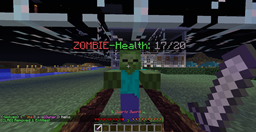
You know those plugins that display a mobs health in the chat? there pretty cool. but they can fill you chat with spam causing you to lose important messages! So why not display the health above the mobs head?
Features:
- Easy to use.
- very little lagg.
- Uses TagAPI
- Colored name tags that display what mob it is aswell as health
- Modify Text Above Mobs head
- Can chose Type of bar
- Health above players heads (With TAGAPI)
- Right Clicking Mob will make there name go away
- Fixed Health Meter glitching out. and displaying random health
Commands:
- none
How To use:
Simple! when the mob takes damage the health bar will display above its head!
Config File:
Type: custom/bar bar displays there HP as a Bar custom uses MobNameTag: as a name MobNameTag: (note: only works if you have: Type: custom)
- Default is: MOBNAME*&aHealth:*&6HEALTH/MAX
- Word Replacments: (Note: must be in capitals)
- MOBNAME: displays the Mobs name
- HEALTH: Displays the mobs health
- MAX: displays mobs MAX health
- *:Puts a space
- Put These symbols to make Colors!: Color-Guide
Latest Downloads:
Click Here!
Up Coming Features:
- Cool downs.
- more accurate health meters
- open for requests as long as it isnt about making it work with other plugins
Player Name Tags:
Download the latest version! then install TagAPI: TagAPI Download Page
Thanks For all the downloads!
Just a Note:
- Player skins will not be displayed if PlayerName tags over there heads are enabled. this is a MoJang Cilent issue.
Health-Heads ఎలా ఇన్స్టాల్ చేయాలి
A server on Paper or Spigot
The plugin runs on the server core for Minecraft 1.5.0–1.5.1; players do not need to install anything.
File goes into the plugins folder
Download the file Health.jar (5 KB) and put it into the server’s plugins folder.
Restart the server
On startup the plugin creates its own settings folder in plugins.
Use the “To server” button
On Millida Hosting, the button at the top of the page uploads the file to your server and restarts it for you.
Minecraft 1.5.1 runs on Java 8: with a different Java version the game may close right after launch.
వెర్షన్లు
డిపెండెన్సీలతో
| Minecraft | లోడర్ | ఫైల్ | తేదీ | చర్యలు |
|---|---|---|---|---|
| 1.5.1 | — | Health-Headsv1.15.2 KB | ||
| 1.5.0 | — | Health-Headsv1.05 KB |
FAQ
Which Minecraft versions does Health-Heads work on?
There are files for 1.5.1, 1.5.0. The newest is 1.5.1.
Do players need to install Health-Heads?
No, the plugin goes only on the server, into the plugins folder: players do not need to download anything.
Which Java does Health-Heads need?
Minecraft 1.5.1 runs on Java 8. If the game closes right after launch, the usual cause is the wrong Java version in the profile settings.
Where can I download Health-Heads safely?
On this page: the file Health.jar (5 KB) is stored on Millida’s server, with no link shorteners. SHA-1 checksum: c1ddb49c4c2eb3458225daa58c9b1182590a0899.
సమీక్షలు
Health-Headsకు మొదటి రేటింగ్ ఇవ్వండి



