
GlobalMarket ప్లగిన్ గురించి
GlobalMarket is a global market system. It allows players to buy and sell items via a convenient in-game interface. It's similar WoW's Auction House or Runescape's Grand Exchange. I created this plugin awhile ago (back in the days of WebAuction, it's what inspired me) for private use, but I've decided to release it to the public. This plugin requires Vault and ProtocolLib, other than that, just drop it in plugins (make sure you have Vault plus a supported economy plugin installed) and start trading!
Features
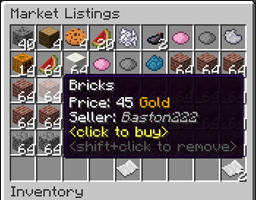
- Players can put any item up for sale using a dead simple in-game GUI system (see below)
- Uses ProtocolLib for proper item serialization that supports Bukkit, Spigot, and Cauldron
- Real time interface, all trades show up immediately without having to 'refresh' or close the GUI
- No maintenance or admin interaction required
- Mailbox system that allows you to set up market areas or auction houses (not currently in 2.0.0)
- A built in price guide that compiles average prices from previous transactions (not currently in 2.0.0)
Latest Dev Build
Development builds of this project can be acquired at the following continuous integration server. These builds have not been approved by the BukkitDev staff. Use them at your own risk.
http://build.survivorserver.com/job/GlobalMarket%202.0.0/ Changelog
Usage
The Interface This is a display of all current listings, you click an item to buy it. You can shift+click to remove a listing if you own it, or if you have the "globalmarket.listingsadmin" permission. Listings automatically expire after 1 week (configurable). You can use /market to access the menu.
Stock When you purchase an item it will be sent to your stock. Stock is an entirely optional system but is suggested to be enabled, as disabling it will disable certain other features like /market send. The stock system can hold a configurable amount of stacks of items in a configurable amount of slots. Once you place an item in your stock, you can list it to be sold to other players. Players can also send items to other players' stock via /market send if they have the "globalmarket.command.send" permission.
Server Listings You can create 'infinite listings' that do not expire and can't be bought out. Create them with /market createinf <price> <[amount]>. There's a dedicated section to server listings in the Market menu. You'll need the "globalmarket.command.createserverlisting" permission to do this. Or you can disable this system all-together in the config.
Commands
Command Description Permission
/market Opens the Market menu. globalmarket.use
/market ? Shows command help. <no permission>
/market send <player> <[amount]> Sends the item you're holding to <player>'s stock. Amount is optional. globalmarket.command.send
/market createinf <price> <[amount]> Creates a server listing. Amount is optional. globalmarket.command.createserverlisting
/market reload Reloads config.yml globalmarket.command.reload
Permissions
- globalmarket.use - base permission, required to use /market
- globalmarket.listingsadmin - ability to remove all listings
- globalmarket.command.send - ability to use /market send
- globalmarket.command.createserverlisting - ability to use /market createinf
- globalmarket.command.reload - ability to use /market reload
Config
All config values have comments that explain what they do in config.yml, how convenient for me! If you wish to blacklist items from being used on the Market, there is blacklist.json. You can add material values with meta values:
- APPLE:0 - blacklist apples
- INK_SAC:-1 - blacklist all dies
If you're running Cauldron, you can do things like:
- oredict:ingotSteel - blacklist any item with an OreDictionary value matching ingotSteel
- extracells:storage.component:-1 - blacklist all ExtraCells storage cells
Locale
Virtually every string in the plugin is editable via the "en_US.json" file, inside the plugin's JAR. It's pretty straightforward to edit. Don't replace or edit the %s or %1$s's, these are variables. For example, "Item sold: %s" would appear as "Item sold: Cobblestone" in-game. You can add/edit colors by typing & plus a color code. So light green (the color code is a) would be &a. You can find color codes here: http://ess.khhq.net/mc/
You can also create an entirely different language set, name it something like ch_CN.json, stick it in the server's JAR, and change the appropriate config value in config.yml to use it.
Source
https://github.com/Dasfaust/GlobalMarket
That's all for now. Sorry if things are unclear, I'll be updating this page with more information periodically. If you're stuck just add a reply and I'll do my best to help!
GlobalMarket ఎలా ఇన్స్టాల్ చేయాలి
A server on Paper or Spigot
The plugin runs on the server core for Minecraft 1.4.7–1.9; players do not need to install anything.
File goes into the plugins folder
Download the file GlobalMarket-2.0.0.28.jar (1.1 MB) and put it into the server’s plugins folder.
Restart the server
On startup the plugin creates its own settings folder in plugins.
Use the “To server” button
On Millida Hosting, the button at the top of the page uploads the file to your server and restarts it for you.
Minecraft 1.9 runs on Java 8: with a different Java version the game may close right after launch.
వెర్షన్లు
డిపెండెన్సీలతో
| Minecraft | లోడర్ | ఫైల్ | తేదీ | చర్యలు |
|---|---|---|---|---|
| 1.9 | — | GlobalMarket 2.0.0.28 Beta1.1 MB | ||
| 1.6.2 | — | GlobalMarket v1.2.273.2 KB |
FAQ
Which Minecraft versions does GlobalMarket work on?
There are files for 1.9, 1.8, 1.6.2, 1.5.2, 1.4.7. The newest is 1.9.
Do players need to install GlobalMarket?
No, the plugin goes only on the server, into the plugins folder: players do not need to download anything.
Which Java does GlobalMarket need?
Minecraft 1.9 runs on Java 8. If the game closes right after launch, the usual cause is the wrong Java version in the profile settings.
Where can I download GlobalMarket safely?
On this page: the file GlobalMarket-2.0.0.28.jar (1.1 MB) is stored on Millida’s server, with no link shorteners. SHA-1 checksum: c310e1314930b7b47ac07b1fc2b985e9ddf5c040.
సమీక్షలు
GlobalMarketకు మొదటి రేటింగ్ ఇవ్వండి


