
Minecraft 1.3.2 కోసం Force Resource Pack ప్లగిన్
నిర్దిష్ట టెక్స్చర్ ప్యాక్ను ఉపయోగించమని క్లయింట్లను బలవంతం చేయండి.
Force Resource Pack v1
Pages
Permissions | Commands | Config
Warning: This plugin is currently unstable, We are attempting to fix it
Want to stop x-ray texture packs? Force Everybody to use same texture? Use special textures and have everybody see? This Plugin is for you!
Formerly Force Texture Pack
ATTENTION: I have just taken over this project, and will be attempting to fix this plugin over the summer! Sincerely, Blue_Mustache
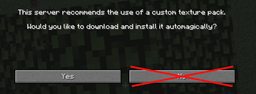
Want to stop users saying no to downloading your texture pack?
Fear no more, This plugin provides a Texture Pack Download Server. If the Client Refuses to download from the server and tries to do something, They will be instantly kicked!
Want to stop x-ray texture packs?
The perfect solution is forcing them to use your texture pack!
Will this work on the spot?
Nope! You need to install the texture pack to the texturepack.zip in your server folder (Where your Bukkit.jar is!) You will also need to port forward 5000 so that your texture pack can be accessed by other players (Unless It's a LAN server!)
Is there a config file?
Not at this point in time, We are looking for configurable options. If you have a suggestion drop me one!
My minecraft host doesn't allow me to port forward 5000
We are looking into a alternative (Won't be as efficient)
Do i need to set a texturepack= in my server.properties?
Nope! Our plugin automatically does the hard work!
Will this stop bots?
Not at the current point in time, It only stops movement.
Will this stop hacked clients?
This plugin will only prevent other texture packs on login.
Will this work on high capacity servers?
This will work on any server (Providing your server can hold up to it!), We have a special system to queue requests if it becomes overloaded!
Do i need Spout etc?
Nope! This plugin works perfectly in vanilla
FAQ
How does it work?
[REDACTED] Nothing here, keep on movin.
Planned Features
- No Socket Server Capabilities
- Multiworld textures
Current Bugs
- Everything *
Force Resource Pack ఎలా ఇన్స్టాల్ చేయాలి
A server on Paper or Spigot
The plugin runs on the server core for Minecraft 1.3.2; players do not need to install anything.
File goes into the plugins folder
Download the file ForceTexture.jar (20 KB) and put it into the server’s plugins folder.
Restart the server
On startup the plugin creates its own settings folder in plugins.
Use the “To server” button
On Millida Hosting, the button at the top of the page uploads the file to your server and restarts it for you.
Minecraft 1.3.2 runs on Java 8: with a different Java version the game may close right after launch.
వెర్షన్లు
డిపెండెన్సీలతో
| Minecraft | లోడర్ | ఫైల్ | తేదీ | చర్యలు |
|---|---|---|---|---|
| 1.3.2 | — | ForceTexture v1.0220.3 KB |
సమీక్షలు
Force Resource Packకు మొదటి రేటింగ్ ఇవ్వండి


