
Minecraft 26.1.2 కోసం Wraith Waystones మోడ్
రవాణా చేయడానికి మెరుగైన మార్గం
- డౌన్లోడ్లు
- 4 డౌన్లోడ్లు
- వ్యూలు
- 22 వ్యూలు
- అప్డేట్ చేయబడింది
- అప్డేట్ చేయబడింది 17.10.2026
- 1.16.3 — 26.1.2
 Fabric
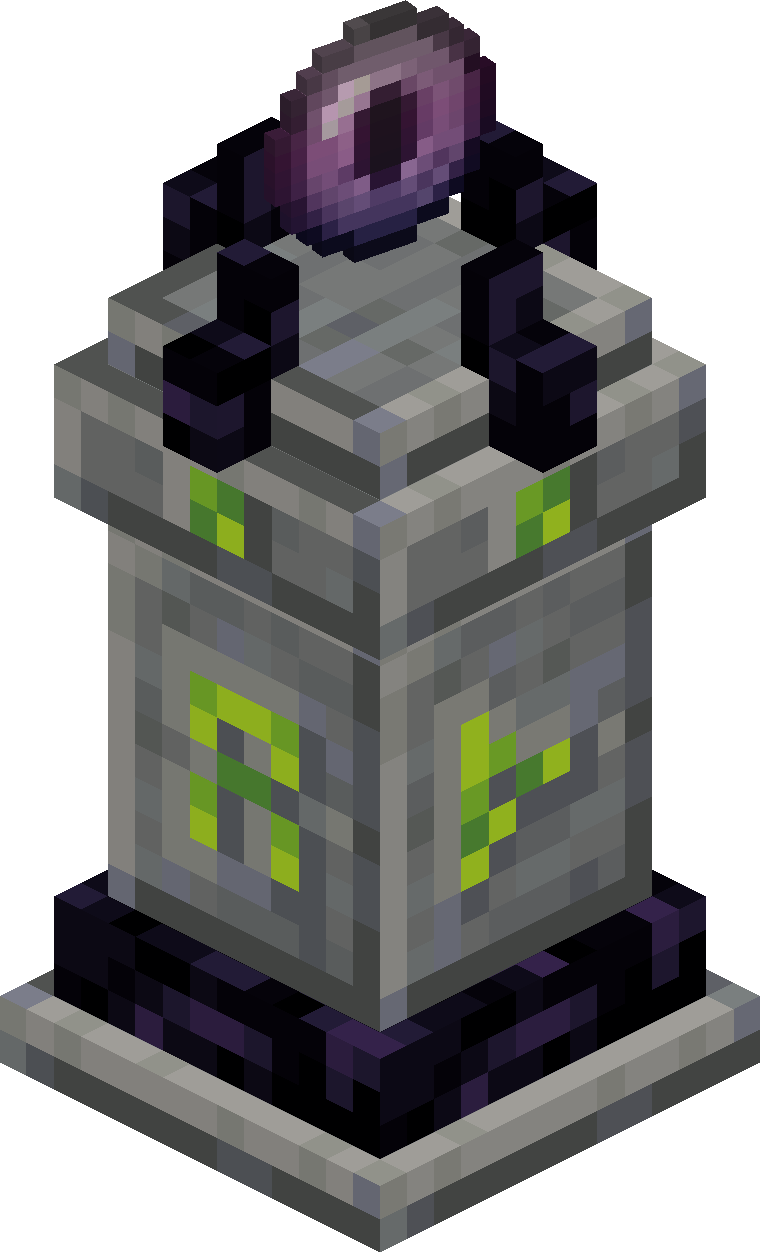
రవాణా కోసం మెరుగైన మార్గాన్ని జోడిస్తుంది.
ఒక Waystone ను యాక్సెస్ చేయడం దానిని "కనుగొనబడినది"గా గుర్తిస్తుంది, ఇతర కనుగొనబడిన (లేదా గ్లోబల్) Waystones మధ్య టెలిపోర్ట్ చేయడానికి మిమ్మల్ని అనుమతిస్తుంది.
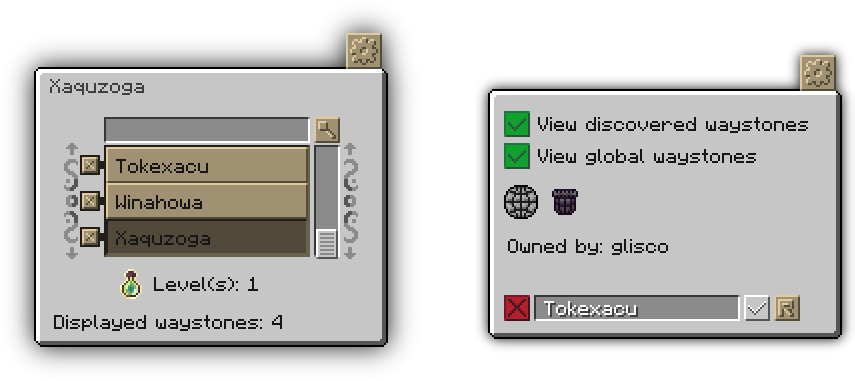
మీరు ఒక waystone ను ఉంచినట్లయితే, లేదా యజమాని లేని waystone ను యాక్సెస్ చేసినట్లయితే, మీరు ఆ waystone యొక్క "యజమాని" అవుతారు.
Waystone యజమానులు అప్పుడు కాన్ఫిగ్ ఇంటర్ఫేస్లో waystone పేరును మార్చవచ్చు మరియు దాని గ్లోబల్ విజిబిలిటీని టోగుల్ చేయవచ్చు, అలాగే ఆటగాళ్ళు బ్లాక్ను shift-right-click చేయడం ద్వారా దానికి టెలిపోర్ట్ చేసినప్పుడు waystone లో నిల్వ చేయబడిన అన్ని వస్తువులను తిరిగి క్లెయిమ్ చేయవచ్చు. వస్తువులను తీసివేసే ఎంపిక కాన్ఫిగ్లలో డిఫాల్ట్గా నిలిపివేయబడి ఉంటుంది. Waystones విరిగినప్పుడు (sneaking చేస్తున్నప్పుడు) వాటి మొత్తం డేటాను సేవ్ చేసే ఎంపిక కూడా ఉంటుంది, ఈ ఎంపికను కాన్ఫిగ్ ఫైల్లో కూడా టోగుల్ చేయవచ్చు.
Waystones గ్రామాలలో సహజంగా కూడా ఉత్పత్తి అవుతాయి (డిఫాల్ట్ సెట్టింగ్లతో ఒక గ్రామానికి ఒకటి), ఇందులో Repurposed Structures నుండి వచ్చినవి కూడా ఉన్నాయి.

Abyss Watcher waystones ను క్రాఫ్ట్ చేయడానికి, అలాగే దానిని right click చేయడం ద్వారా ఇతర waystones కు టెలిపోర్ట్ చేయడానికి ఉపయోగించబడుతుంది, ఉపయోగించినప్పుడు వస్తువు వినియోగించబడుతుంది.

Empty Waystone Scroll మీరు కనుగొన్న అన్ని waystones ను దానిలో నిల్వ చేయడానికి ఉపయోగించబడుతుంది. నిండిన waystone scroll ను ఉపయోగించడం ద్వారా దానిని ఉపయోగించే ఆటగాడికి నిల్వ చేయబడిన అన్ని waystones కనుగొనబడతాయి. అలాగే Scroll of Infinite Knowledge కూడా ఉంది, ఇది సాధారణ పరిస్థితుల్లో creative-only మరియు ఉపయోగించినప్పుడు ప్రపంచంలోని అన్ని Waystones ను మీరు కనుగొనేలా చేస్తుంది.

Local Void ఒక waystone పై right click చేయడం దానిని ఆ waystone కు బైండ్ చేస్తుంది. మరెక్కడైనా right click చేయడం ఆటగాడిని బైండ్ చేయబడిన స్థానానికి టెలిపోర్ట్ చేస్తుంది, అది ఉన్నంత వరకు, ఉచితంగా (కాన్ఫిగర్ చేయదగినది), ఉపయోగించినప్పుడు వస్తువు అదృశ్యమవుతుంది (కాన్ఫిగర్ చేయదగినది). shift-right click చేయడం ద్వారా వస్తువును రీసెట్ చేయవచ్చు.

Pocket Wormhole Abyss Watcher మాదిరిగానే, ఇది ఆటగాళ్ళను ఎక్కడి నుండైనా టెలిపోర్టేషన్ ఇంటర్ఫేస్ను తెరవడానికి అనుమతిస్తుంది, కానీ టెలిపోర్టేషన్ సమయంలో వస్తువు నాశనం చేయబడదు.

Void Totem Local Void మాదిరిగానే, Void Totem ను ఒక Waystone కు బైండ్ చేయవచ్చు. బైండ్ చేయబడినది ధరించి ఉండగా మీరు చనిపోతే, అది మిమ్మల్ని బైండ్ చేయబడిన Waystone కు టెలిపోర్ట్ చేస్తుంది. అది బైండ్ చేయబడకపోతే, మీరు కనుగొన్న వాటిలో ఒకదాన్ని యాదృచ్ఛికంగా ఎంచుకుంటుంది. లేకపోతే, ఇది సాధారణ Totem of Undying లాగా పనిచేస్తుంది.
Crafting Recipes
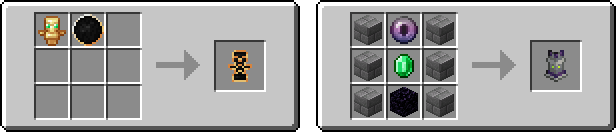
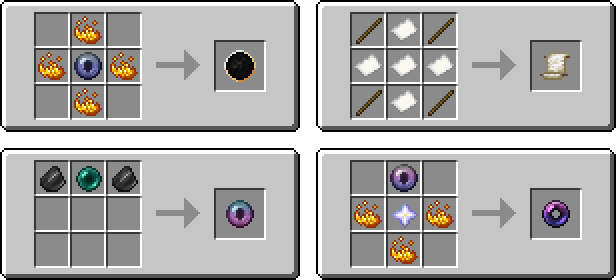
Cost type (item, health, xp, level, hunger, none), Cost Amount, గ్రామాలలో ఉత్పత్తి చేసే ఎంపిక, (డిఫాల్ట్గా ఆన్), అలాగే ఇతర సెట్టింగ్లు మొదటిసారి మోడ్తో గేమ్ను ప్రారంభించినప్పుడు ఉత్పత్తి అయ్యే కాన్ఫిగ్లో ఇక్కడ ఉంటాయి:
{Minecraft install directory}/config/waystones/config.json (pre v3.0.0)
{Minecraft install directory}/config/fwaystones/config.json (v3.0.0+)
Videos
English
German
Spanish
Polish
Development Discord:
Wraith Waystones ఎలా ఇన్స్టాల్ చేయాలి
With Millida Launcher
Install Millida Launcher
The launcher is free: download it at millida.net/launcher and sign in with any nickname.
Click “Install” on this page
The launcher opens and installs the mod for Minecraft 1.16.3–26.1.2 on Fabric automatically.
Launch the game
A profile with it appears in the launcher: click “Play”.
Manually
Install Fabric
The loader must match the game version of the mod file, for example Minecraft 26.1.2. After installing it, a separate profile appears in your launcher.
Download the file for your version
In the version list above, pick the file wraith-waystones-3.3.6+mc26.1.jar (455 KB) for your game version.
Put it in the mods folder
The folder is inside .minecraft (Windows: %appdata%\.minecraft\mods). If it does not exist, create it.
Launch the loader profile
Open “Mods” in the main menu: Wraith Waystones should be in the list.
వెర్షన్లు
డిపెండెన్సీలతో
| Minecraft | లోడర్ | ఫైల్ | తేదీ | చర్యలు |
|---|---|---|---|---|
| 26.1 | Fabric | Wraith Waystones 3.3.6 - MC26.1455 KB 4 | ||
| 1.19 | Fabric | Fabric Waystones 2.6.0 Convert331 KB | ||
| 1.16.3 | — | Waystones-1.0.261.9 KB |
FAQ
Which Minecraft versions does Wraith Waystones work on?
There are files for 26.1.2, 26.1.1, 26.1, 1.19, 1.16.3. The newest is 26.1.2.
Is Wraith Waystones for Forge or Fabric?
Only for Fabric: 1.19–26.1.2. There are no files for Forge or NeoForge: a mod for another loader will not start.
Does Wraith Waystones need other mods?
The author lists no required dependencies: the Fabric loader is enough.
Where can I download Wraith Waystones safely?
On this page: the file wraith-waystones-3.3.6+mc26.1.jar (455 KB) is stored on Millida’s server, with no link shorteners. SHA-1 checksum: 93178f5131732e4307e9d1ccf6d3e88bacbec716.
సమీక్షలు
Wraith Waystonesకు మొదటి రేటింగ్ ఇవ్వండి


