
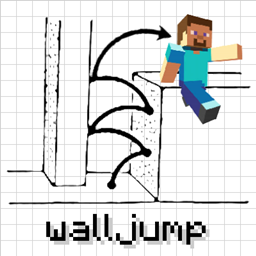
Minecraft 1.16.5, 1.18.2 కోసం Wall-Jump! [FORGE] మోడ్
గోడ నుండి గోడకు దూకండి! వాల్ జంప్, డబుల్ జంప్, స్పీడ్ జంప్, ఫెన్స్ జంప్, మొదలైనవి.
- డౌన్లోడ్లు
- 4 డౌన్లోడ్లు
- వ్యూలు
- 32 వ్యూలు
- అప్డేట్ చేయబడింది
- అప్డేట్ చేయబడింది 17.10.2026
- 1.16.4 — 1.18.2
 Forge
Forge
Wall-Jump! [FORGE] మోడ్ గురించి
Minecraft 1.19-1.21.4 కోసం Wall-Jump TXF
Minecraft లో గోడ నుండి గోడకు ప్లాట్ఫారమింగ్! ఈ మోడ్ ఆటకు వాల్ జంపింగ్ మరియు డబుల్ జంపింగ్ను జోడిస్తుంది.
Wall Cling: ఒక గోడ వైపు దూకి, వాల్ జంప్ కీ (LSHIFT) ను నొక్కి పట్టుకోండి. తరువాత...
Wall Jump: గోడకు క్లింగ్ చేస్తున్నప్పుడు, W ను పట్టుకోండి మరియు వాల్ జంప్ చేయడానికి LSHIFT ను వదిలేయండి.
Double Jump: మీ ప్రయోజనం కోసం ఉపయోగించగల ఐచ్ఛిక మధ్య-గాలి జంప్.
మీరు Wall-Jump మోడ్ కోసం ఒక మ్యాప్ లేదా వీడియో తయారు చేసి, దానిని ఇక్కడ జాబితా చేయాలనుకుంటే, నాకు సందేశం పంపడానికి సంకోచించకండి!
కొన్ని కాన్ఫిగరేషన్ ఎంపికలు:
- Wall-Jump కీ (డిఫాల్ట్గా LSHIFT, కానీ SPACE కూడా బాగా పనిచేస్తుంది)
- Wall-Jump సమయంలో ప్రయోగించే ఎత్తు మరియు దూరం
- డబుల్ జంపింగ్ (డిఫాల్ట్గా ఆఫ్, కానీ ఇది నిజంగా సరదా ఫీచర్)
- సింగిల్-వాల్ జంపింగ్ (ఒకే గోడను ఉపయోగించి పైకి ఎక్కండి)
- ఫాల్ డ్యామేజ్ కోసం కనీస దూరం (చిన్న పతనాలు మిమ్మల్ని నెమ్మదించవు)
- నేలపై స్ప్రింట్ చేస్తున్నప్పుడు మరియు గ్లైడింగ్ చేస్తున్నప్పుడు వేగ పెంపు
- వాల్-జంపింగ్, డబుల్-జంపింగ్ మరియు స్పీడ్-బూస్టింగ్ కోసం ఎన్చాంట్మెంట్లు
(మోడ్ ఇన్స్టాల్ చేసిన సర్వర్లు క్లయింట్లను సర్వర్ కాన్ఫిగ్ ఉపయోగించమని బలవంతం చేస్తాయి) ఆటలో మోడ్ను కాన్ఫిగర్ చేయడానికి Configured మోడ్ను ఉపయోగించండి!
ఈ అద్భుతమైన కదలిక ఆధారిత మోడ్లను చూడండి...
Elenai Dodge: ఆటకు బహుళ-దిశాత్మక డాడ్జింగ్ మెకానిక్ను జోడిస్తుంది! Elenai Dodge 2: ఆటకు మరింత మెరుగైన డాడ్జింగ్ మెకానిక్స్ను జోడిస్తుంది! GoProne: డిమాండ్పై క్రాలింగ్ మోడ్లోకి ప్రవేశించడానికి ఒక కీబైండ్ను జోడిస్తుంది! Move Plus: లెడ్జ్ గ్రాబింగ్, డాడ్జింగ్ మరియు క్రాలింగ్ను జోడిస్తుంది!
Wall-Jump! [FORGE] ఎలా ఇన్స్టాల్ చేయాలి
With Millida Launcher
Install Millida Launcher
The launcher is free: download it at millida.net/launcher and sign in with any nickname.
Click “Install” on this page
The launcher opens and installs the mod for Minecraft 1.16.4–1.18.2 on Forge automatically.
Launch the game
A profile with it appears in the launcher: click “Play”.
Manually
Install Forge
The loader must match the game version of the mod file, for example Minecraft 1.18.2. After installing it, a separate profile appears in your launcher.
Download the file for your version
In the version list above, pick the file walljump-forge-1.18.1-1.3.7.jar (81 KB) for your game version.
Put it in the mods folder
The folder is inside .minecraft (Windows: %appdata%\.minecraft\mods). If it does not exist, create it.
Launch the loader profile
Open “Mods” in the main menu: Wall-Jump! [FORGE] should be in the list.
Minecraft 1.18.2 runs on Java 17: with a different Java version the game may close right after launch.
వెర్షన్లు
డిపెండెన్సీలతో
| Minecraft | లోడర్ | ఫైల్ | తేదీ | చర్యలు |
|---|---|---|---|---|
| 1.18.1 | Forge | walljump-forge-1.18.1-1.3.7.jar81.2 KB 2 | ||
| 1.16.5 | — | walljump-forge-1.16.4-1.3.7.jar82.5 KB 2 |
FAQ
Which Minecraft versions does Wall-Jump! [FORGE] work on?
There are files for 1.18.2, 1.18.1, 1.18, 1.16.5, 1.16.4. The newest is 1.18.2.
Is Wall-Jump! [FORGE] for Forge or Fabric?
Only for Forge: 1.18–1.18.2. There are no files for Fabric or NeoForge: a mod for another loader will not start.
Does Wall-Jump! [FORGE] need other mods?
The author lists no required dependencies: the Forge loader is enough.
Which Java does Wall-Jump! [FORGE] need?
Minecraft 1.18.2 runs on Java 17. If the game closes right after launch, the usual cause is the wrong Java version in the profile settings.
Where can I download Wall-Jump! [FORGE] safely?
On this page: the file walljump-forge-1.18.1-1.3.7.jar (81 KB) is stored on Millida’s server, with no link shorteners. SHA-1 checksum: 8d2baf2c28043815b2b1cdb66d6d9b1ef721e2c4.
సమీక్షలు
Wall-Jump! [FORGE]కు మొదటి రేటింగ్ ఇవ్వండి


