

Minecraft 1.20.1, 1.21.1 కోసం Spud's shops మోడ్
నిర్బంధాలు లేని UIతో సరళమైన మరియు అలంకారిక షాప్ మోడ్.
 NeoForge
 Forge
ForgeA decorative and versatile shop mod with an unrestrictive UI.
This mod is aimed at modded public servers.
Update 1.8 for both 1.20.1 and 1.21.1 is released!
1.8.1 brings better GUI textures, polish for 1.7 and coloured rug shops. There is now a GUI texture for every wood type. Spanish has also been added to the translations.

Update 1.7 is released!
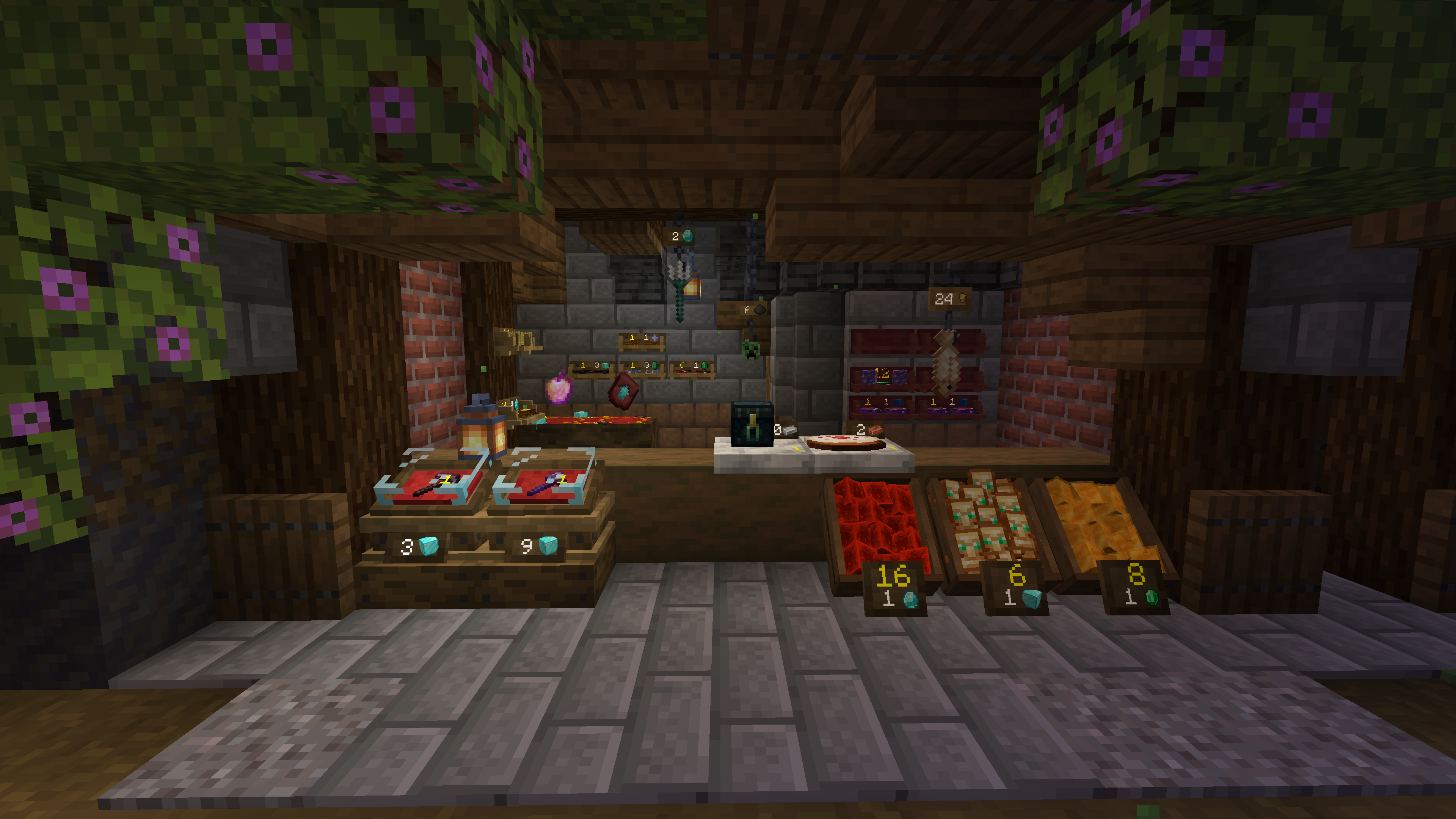
1.7 Is a (comparatively) enourmous update. It features 5 new types of shops (not inculding varients!), all with a unique style. We now have the following:

Trader's Crate:
A simple, rustic wooded box.
Chain Hook:
A dangling hook, perfect for fish or.. heads?
Magic Rug:
A mystical rug with levetation properties. Your items will gently tumble in the air.
Shelves
Two shops in one! Just like slabs you can chose to have the top, bottom or both!
Windowsill
A plain slab of stone, perfect for the counter in a bakery.
Display case (the original)
Now with adjusted height! A fancy glass case with a dyeable cushion for your precious goods.
You can now hire other players!
Using the contract scrolls and permissions/settings screen, you can give other players a role.
Get the other player to right click with a contract scroll to sign it, then take their contract and add it to your shop in the permission row of your choice. To remove someone's permissions, simply remove their contract from your shop. You can also remove your own if neccecary.
- OWNER
Full access, they can edit the trade, break the shop, and change permissions for anyone (including other owners)
- MANAGER
Full inventory access. They can add and remove Supervisors and Clerks but noone higher ranked. They cannot edit the shop's trade or break the shop.
- SUPERVISOR
Full inventory access, however they cannot edit any permissions.
- CLERK
They can only insert stock and cannot take any items out.
Further Update notes:
- swappable wood type
- better handling of cushion colours
- visual indicator of depreciated shop
- remodeled base of original shop for adjusted height
- Improved security
- QOL tweaks to trading interface
Finally, I do applogise but I was not able to transfer the cushion colours from 1.6 to 1.7+. This means if you have dyed your shops, they will have been reverted to red and will need to be dyed again.
Functionality
- The shop is indestructible to everyone but the owner or creative players (server admins).
- The slots for setting the trade do not use your items.
- Shops are bound to the player who places them.
- Payment is automatically taken from a customer's inventory.
Security and testing
This mod is under active use on a modded public server for more in-depth and realistic testing. Farwater Create
Contact
For bug reports, please submit via Github. For everything else, I suggest Discord. Find me in Farwater Create - mod-dev or DM me @the_spud Spoilers available in the channel above.
Planned features:
- support for higher versions
- global stock checking
- Server config:
payment types toggleable stock insertion
- CC integration
- Larger than single-stack trades
Spud's shops ఎలా ఇన్స్టాల్ చేయాలి
With Millida Launcher
Install Millida Launcher
The launcher is free: download it at millida.net/launcher and sign in with any nickname.
Click “Install” on this page
The launcher opens and installs the mod for Minecraft 1.20.1–1.21.11 on Forge or NeoForge automatically.
Launch the game
A profile with it appears in the launcher: click “Play”.
Manually
Install Forge or NeoForge
The loader must match the game version of the mod file, for example Minecraft 1.21.11. After installing it, a separate profile appears in your launcher.
Download the file for your version
In the version list above, pick the file spudaciousshops-1.10.2-neoforge-1.21.1.jar (895 KB) for your game version and loader.
Put it in the mods folder
The folder is inside .minecraft (Windows: %appdata%\.minecraft\mods). If it does not exist, create it.
Launch the loader profile
Open “Mods” in the main menu: Spud's shops should be in the list.
On a server
A server on Forge or NeoForge
The mod only works on a server with the same loader and game version, for example 1.21.11.
File goes into the server’s mods folder
Stop the server, put the mod file into the mods folder and start the server again.
Use the “To server” button
On Millida Hosting, the button at the top of the page uploads the file to your server and restarts it for you.
Minecraft 1.21.11 runs on Java 21: with a different Java version the game may close right after launch.
వెర్షన్లు
డిపెండెన్సీలతో
| Minecraft | లోడర్ | ఫైల్ | తేదీ | చర్యలు |
|---|---|---|---|---|
| 1.21.1 | NeoForge | 1.21.1895 KB | ||
| 1.20.1 | Forge | 1.20.1916 KB 1 | ||
| 1.21.11 | NeoForge | 1.21.11895 KB | ||
| 1.20.1 | Forge | 1.20.1916 KB | ||
| 1.20.1 | Forge, NeoForge | 1.20.1815 KB | ||
| 1.20.1 | Forge, NeoForge | 1.20.1814 KB | ||
| 1.20.1 | Forge, NeoForge | 1.20.1803 KB | ||
| 1.20.1 | Forge, NeoForge | 1.20.1803 KB |
FAQ
Which Minecraft versions does Spud's shops work on?
There are files for 1.20.1–1.21.11, 13 versions in total. The newest is 1.21.11.
Is Spud's shops for Forge or Fabric?
There are files for Forge: 1.20.1 and for NeoForge: 1.20.1–1.21.11. There are no files for Fabric: a mod for another loader will not start.
Does Spud's shops need other mods?
The author lists no required dependencies: the Forge or NeoForge loader is enough.
Does Spud's shops work on a server?
Yes. Spud's shops works both in singleplayer and on a server.
Which Java does Spud's shops need?
Minecraft 1.21.11 runs on Java 21. If the game closes right after launch, the usual cause is the wrong Java version in the profile settings.
Where can I download Spud's shops safely?
On this page: the file spudaciousshops-1.10.2-neoforge-1.21.1.jar (895 KB) is stored on Millida’s server, with no link shorteners. SHA-1 checksum: f2774758f2eb51b2afcd32fff0bd571ba2fee977.
సమీక్షలు
Spud's shopsకు మొదటి రేటింగ్ ఇవ్వండి


