
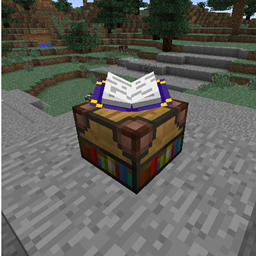
Minecraft 1.10.2 కోసం Simple Achievements మోడ్
అనుకూలీకరించగల "చెక్లిస్ట్" శైలి విజయాలు
Simple Achievements మోడ్ గురించి
ఈ మాడ్ ఆటగాడు తయారు చేసి, చదవగలిగే మరియు పరస్పరం చర్య జరిపే పుస్తకంలో జాబితా చేయబడే విజయాల జాబితాను నిర్వచించడానికి మిమ్మల్ని అనుమతిస్తుంది.
పుస్తకంలోని విజయాలు అనేక ఫార్మాటింగ్ ఎంపికలను కలిగి ఉంటాయి మరియు అనేక విభిన్న మార్గాల్లో రూపొందించబడతాయి.
ఇది వివిధ విజయాలను కలిగి ఉన్న సర్వర్లకు మద్దతు ఇస్తుంది, సర్వర్ నుండి వచ్చిన అన్ని విజయాలు ఆటగాళ్లు లాగిన్ అయినప్పుడు క్లయింట్కు పంపబడతాయి.
ఈ మాడ్ BaconDonut యొక్క SkyFactory మాడ్ప్యాక్లో చోటు పొందింది.
విజయాలను జోడించడానికి, మొదట మీరు "divConfig.json" లో వివిధ ఫార్మాటింగ్ ప్రీసెట్లను నిర్వచించాలి. ఫైల్లో డిఫాల్ట్గా కొన్ని ఉదాహరణ ఫార్మాటింగ్ సెట్టింగ్లు ఉన్నాయి.
తర్వాత, achievementList.txt లో, ప్రతి లైన్లో టెక్స్ట్ నమోదు చేసి, తర్వాత "::" మరియు ఆ తర్వాత div నంబర్ రాయడం ద్వారా విజయాలను జోడించండి. ఫైల్లో డిఫాల్ట్గా కొన్ని ఉదాహరణలు ఉన్నాయి.
చివరగా, ఆటలో ఉండగానే విజయాలను రిఫ్రెష్ చేయడానికి ఒక కమాండ్ జోడించబడింది. /flushAchievements ను అమలు చేయండి, డేటా రీసెట్ అయి ఫైళ్ల నుండి మళ్లీ చదవబడుతుంది.
ఆనందించండి!
Simple Achievements ఎలా ఇన్స్టాల్ చేయాలి
With Millida Launcher
Install Millida Launcher
The launcher is free: download it at millida.net/launcher and sign in with any nickname.
Click “Install” on this page
The launcher opens and installs the mod for Minecraft 1.7.10–1.10.2 automatically.
Launch the game
A profile with it appears in the launcher: click “Play”.
Manually
Download the file for your version
In the version list above, pick the file SimpleAchievements-MC1.9.4-1.2.2-28.jar (129 KB) for your game version.
Put it in the mods folder
The folder is inside .minecraft (Windows: %appdata%\.minecraft\mods). If it does not exist, create it.
Launch the loader profile
Open “Mods” in the main menu: Simple Achievements should be in the list.
Minecraft 1.10.2 runs on Java 8: with a different Java version the game may close right after launch.
వెర్షన్లు
డిపెండెన్సీలతో
| Minecraft | లోడర్ | ఫైల్ | తేదీ | చర్యలు |
|---|---|---|---|---|
| 1.9.4 | — | Simple Achievements MC1.9.4-1.2.2-28129 KB | ||
| 1.7.10 | — | SimpleAchievements-MC1.7.10-1.1.0-21.jar122 KB |
FAQ
Which Minecraft versions does Simple Achievements work on?
There are files for 1.10.2, 1.10, 1.9.4, 1.7.10. The newest is 1.10.2.
Which Java does Simple Achievements need?
Minecraft 1.10.2 runs on Java 8. If the game closes right after launch, the usual cause is the wrong Java version in the profile settings.
Where can I download Simple Achievements safely?
On this page: the file SimpleAchievements-MC1.9.4-1.2.2-28.jar (129 KB) is stored on Millida’s server, with no link shorteners. SHA-1 checksum: d321720366f0aedef28c38da6f4c9c91592c0bd7.
సమీక్షలు
Simple Achievementsకు మొదటి రేటింగ్ ఇవ్వండి


