

 Fabric
 Forge

Important
playerAnimator and Cloth Config) must be installed to use this mod.
About
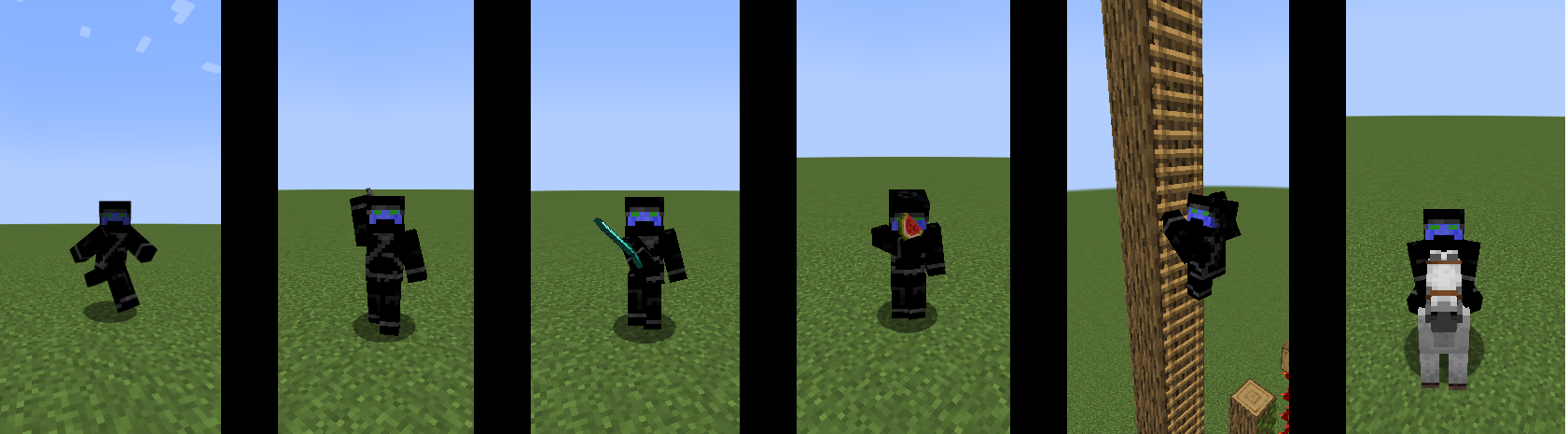
A client side mod that adds cool animations to the player.
Compatibility
- Can I use Fresh Animations?
- Yes
- Can I use Eating Animations?
- Also Yes
- What about Not Enough Animations?
- Yes, as of version 1.1.1 animations should work
What if I want to make my own animations?
- This mod supports resource packs and animations that are compatible with player animator / emotecraft
- See the template resource pack here
Planned Features
- More animations when using different items
- Better compatibility with other mods
Known Issues
- Is incompatible with many mods' custom animations
- Report compatibility issues here
Links
Issues
Source
Discord
Modrinth
Curseforge
Serious Player Animations ఎలా ఇన్స్టాల్ చేయాలి
With Millida Launcher
Install Millida Launcher
The launcher is free: download it at millida.net/launcher and sign in with any nickname.
Click “Install” on this page
The launcher opens and installs the mod for Minecraft 1.20–1.21.1 on Fabric or Forge automatically, together with its dependencies: Cloth Config API, playerAnimator.
Launch the game
A profile with it appears in the launcher: click “Play”.
Manually
Install Fabric or Forge
The loader must match the game version of the mod file, for example Minecraft 1.21.1. After installing it, a separate profile appears in your launcher.
Download the file for your version
In the version list above, pick the file seriousplayeranimations-1.2.0.jar (156 KB) for your game version and loader.
Put it in the mods folder
The folder is inside .minecraft (Windows: %appdata%\.minecraft\mods). If it does not exist, create it. Required dependencies go there too: Cloth Config API, playerAnimator.
Launch the loader profile
Open “Mods” in the main menu: Serious Player Animations should be in the list.
Serious Player Animations works on the player’s side only: there is no need to install it on a server.
Minecraft 1.21.1 runs on Java 21: with a different Java version the game may close right after launch.
వెర్షన్లు
డిపెండెన్సీలతో
| Minecraft | లోడర్ | ఫైల్ | తేదీ | చర్యలు |
|---|---|---|---|---|
| 1.21.1 | Fabric | 1.21.1156 KB 2 | ||
| 1.20.4 | Fabric | 1.20.4156 KB 2 | ||
| 1.20.4 | Forge | 1.20.4286 KB 2 | ||
| 1.20.4 | Forge | 1.20.4259 KB | ||
| 1.20.4 | Fabric | 1.20.4128 KB | ||
| 1.20.4 | Fabric | 1.20.4122 KB | ||
| 1.20.4 | Fabric | 1.20.4123 KB | ||
| 1.20.4 | Fabric | 1.20.4123 KB |
ఇది రన్ అవ్వడానికి కావాల్సినవి
- Cloth Config APIఅవసరం
- playerAnimatorఅవసరం
- Mod Menuఐచ్ఛికం
FAQ
Which Minecraft versions does Serious Player Animations work on?
There are files for 1.21.1, 1.20.4, 1.20.3, 1.20.2, 1.20.1, 1.20. The newest is 1.21.1.
Is Serious Player Animations for Forge or Fabric?
There are files for Fabric: 1.20–1.21.1 and for Forge: 1.20–1.20.4. There are no files for NeoForge: a mod for another loader will not start.
What does Serious Player Animations need to work?
Required: Cloth Config API, playerAnimator. Without them the mod will not start: dependencies go into the same mods folder. Optional: Mod Menu.
Do I need to install Serious Player Animations on a server?
No. Serious Player Animations works on the player’s side only: there is no need to install it on a server.
Which Java does Serious Player Animations need?
Minecraft 1.21.1 runs on Java 21. If the game closes right after launch, the usual cause is the wrong Java version in the profile settings.
Where can I download Serious Player Animations safely?
On this page: the file seriousplayeranimations-1.2.0.jar (156 KB) is stored on Millida’s server, with no link shorteners. SHA-1 checksum: 100e4921ebd0367eee882b8d75311d0b20efda3f.
సమీక్షలు
Serious Player Animationsకు మొదటి రేటింగ్ ఇవ్వండి


