

Minecraft 1.21.1 కోసం Realistic Torches మోడ్
కాన్ఫిగర్ చేయగల సమయం తర్వాత టార్చ్లు ఆరిపోయేలా చేస్తుంది.
- డౌన్లోడ్లు
- 4 డౌన్లోడ్లు
- వ్యూలు
- 30 వ్యూలు
- అప్డేట్ చేయబడింది
- అప్డేట్ చేయబడింది 17.10.2026
- 1.16.4 — 1.21.1
 Forge
Realistic Torches మోడ్ గురించి
రియలిస్టిక్ టార్చెస్
మైన్క్రాఫ్ట్ ఫోరమ్ - సోర్స్ కోడ్ - ఇష్యూ ట్రాకర్
రియలిస్టిక్ టార్చెస్ అనేది టార్చెస్ కాన్ఫిగర్ చేయగల సమయం తర్వాత ఆరిపోయేలా చేయడం ద్వారా ప్రారంభ ఆటను మరింత కష్టతరం చేస్తుంది, దీనివల్ల ఆటగాళ్లు ముందుగానే శాశ్వతమైన కాంతి మూలాల వైపు వెళ్లాలని ప్రోత్సహిస్తుంది.
ఫీచర్లు
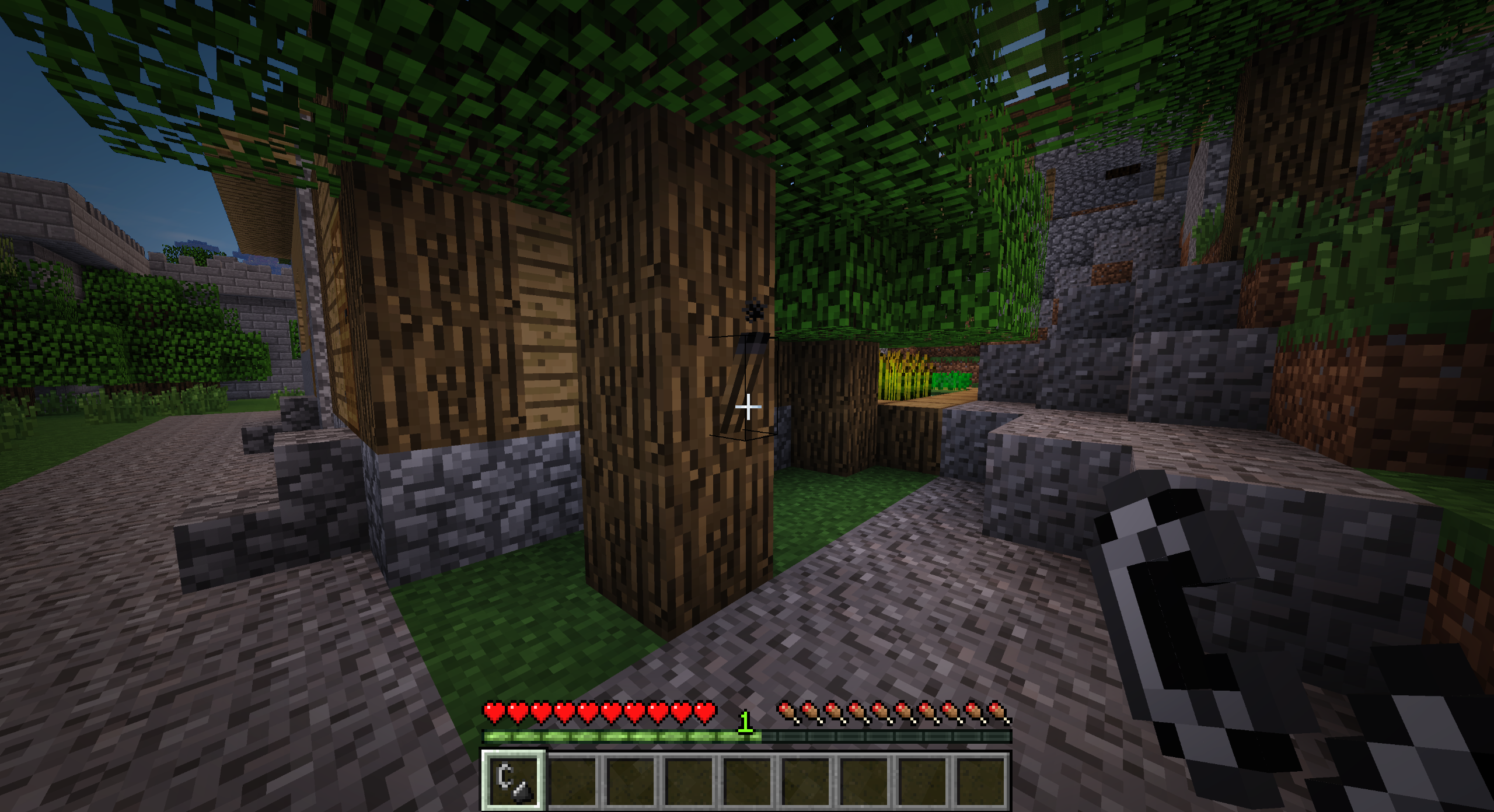
- టార్చెస్ ఇప్పుడు తయారు చేసిన తర్వాత వెలిగించబడవు, వాటిని మ్యాచ్బాక్స్ లేదా ఫ్లింట్ అండ్ స్టీల్తో వెలిగించాలి
- టార్చెస్ కాన్ఫిగర్ చేయగల సమయం తర్వాత ఆరిపోతాయి (డిఫాల్ట్గా 60 నిమిషాల నిజ సమయం)
- వర్షం పడినప్పుడు టార్చెస్ ఆరిపోతాయి
- వనిల్లా నిర్మాణాలలో ఉత్పత్తి అయ్యే టార్చెస్ వెలిగించని టార్చెస్తో భర్తీ చేయబడతాయి
- శాశ్వతంగా వెలిగించిన టార్చెస్ను గ్లోస్టోన్ ఉపయోగించి తయారు చేయవచ్చు
- సహజంగా కాంతిని విడుదల చేసే బ్లాక్లు మరియు ఐటమ్లు పట్టుకున్నప్పుడు కాంతిని విడుదల చేస్తాయి (1.14.4కి ముందు)
రెసిపీలు
వెలిగించని టార్చ్ (బొగ్గు లేదా కర్రబొగ్గు)
మ్యాచ్బాక్స్
వెలిగించిన టార్చ్ (షేప్లెస్, మ్యాచ్బాక్స్ డ్యామేజ్ తీసుకుంటుంది)
గ్లోస్టోన్ క్రిస్టల్ (బొగ్గు లేదా కర్రబొగ్గు)
గ్లోస్టోన్ పేస్ట్ (షేప్లెస్)
వనిల్లా టార్చ్ (గ్లోస్టోన్ క్రిస్టల్)
వనిల్లా టార్చ్ (గ్లోస్టోన్ పేస్ట్)
మాడ్ప్యాక్లు
అవును, మీరు ఈ మాడ్ను మీ మాడ్ప్యాక్లో ఉపయోగించవచ్చు.
సహాయం
మీరు ఈ మాడ్ను ఆస్వాదిస్తూ ప్రాజెక్ట్కు మద్దతు ఇవ్వాలనుకుంటే, PayPalలో విరాళం ఇవ్వడానికి సంకోచించకండి. మద్దతు చాలా అభినందనీయం!
స్పాన్సర్
ఈ ప్రాజెక్ట్కు BisectHosting స్పాన్సర్ చేస్తోంది. మీరు సర్వర్ కోసం చూస్తున్నట్లయితే, వారి హోస్టింగ్ ప్లాన్లను చూడండి మరియు చెక్అవుట్ సమయంలో ప్రోమో కోడ్ Chaos ఉపయోగించి మీ మొదటి నెలలో 25% తగ్గింపు పొందండి!
Realistic Torches ఎలా ఇన్స్టాల్ చేయాలి
With Millida Launcher
Install Millida Launcher
The launcher is free: download it at millida.net/launcher and sign in with any nickname.
Click “Install” on this page
The launcher opens and installs the mod for Minecraft 1.16.4–1.21.1 on Forge automatically.
Launch the game
A profile with it appears in the launcher: click “Play”.
Manually
Install Forge
The loader must match the game version of the mod file, for example Minecraft 1.21.1. After installing it, a separate profile appears in your launcher.
Download the file for your version
In the version list above, pick the file RealisticTorches-1.21.1-3.2.0.jar (55 KB) for your game version.
Put it in the mods folder
The folder is inside .minecraft (Windows: %appdata%\.minecraft\mods). If it does not exist, create it.
Launch the loader profile
Open “Mods” in the main menu: Realistic Torches should be in the list.
Minecraft 1.21.1 runs on Java 21: with a different Java version the game may close right after launch.
వెర్షన్లు
డిపెండెన్సీలతో
| Minecraft | లోడర్ | ఫైల్ | తేదీ | చర్యలు |
|---|---|---|---|---|
| 1.21.1 | Forge | RealisticTorches-1.21.1-3.2.0.jar55.1 KB 3 | ||
| 1.16.4 | — | RealisticTorches-1.16.4-3.1.1.jar57.4 KB 1 |
FAQ
Which Minecraft versions does Realistic Torches work on?
There are files for 1.21.1, 1.16.4. The newest is 1.21.1.
Is Realistic Torches for Forge or Fabric?
Only for Forge: 1.21.1. There are no files for Fabric or NeoForge: a mod for another loader will not start.
Does Realistic Torches need other mods?
The author lists no required dependencies: the Forge loader is enough.
Which Java does Realistic Torches need?
Minecraft 1.21.1 runs on Java 21. If the game closes right after launch, the usual cause is the wrong Java version in the profile settings.
Where can I download Realistic Torches safely?
On this page: the file RealisticTorches-1.21.1-3.2.0.jar (55 KB) is stored on Millida’s server, with no link shorteners. SHA-1 checksum: cb32cf296fe4c806c635a0ceb7cb23f29bc930a5.
సమీక్షలు
Realistic Torchesకు మొదటి రేటింగ్ ఇవ్వండి


