

Minecraft 1.12.2 కోసం Perfect Spawn మోడ్
ప్రతి డైమెన్షన్ యొక్క స్పాన్ పాయింట్ & డైమెన్షన్ను నియంత్రించడానికి అనుమతించే మోడ్.
Description
This mod allows map makers / server owners to change the respawn point & dimension of dimensions.
To use this mod you place a file called perfectspawn.json in the main minecraft / server directory or (in a singleplayer environment) in the main directory of a save. The file has to have this basic structure:
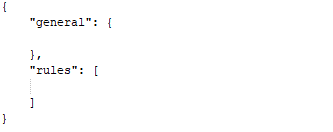
In the general section there is currently only one property you can set which is "initialSpawnDimension". This sets the dimension where a player who has never logged in before spawns initially.
This config would cause players to initially spawn in the nether when first joining the game.
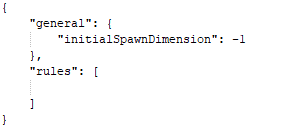
The rules array can contain multiple rules which control the settings for different dimensions.
Each rule has these properties:
- appliesTo: An array containing either dimension ids / names of dimensions types / full class names of world providers. This controls what dimensions this rule is applied to. "*" can be used as a special element of appliesTo which will apply this rule to all dimensions.
- canRespawnHere: Whether players can respawn in the dimensions this rule applies to.
- canSleepHere: Whether players can sleep in the dimensions this rule applies to. (If canRespawnHere is set to false this has no effect). This also allows sleeping in dimensions where you generally can't sleep (Like the Nether / End).
- spawnPoint: The position at which players will spawn in this dimension.
- respawnDimension: The dimension players will respawn in when dying in this dimension (If canRespawnHere is set to false)
Rules that come later in the rules array override values of rules that come earlier.
Here are some examples:
This changes the initial spawn dimension & the respawn dimension of all dimensions to the nether. It also moves the spawn point of the nether to "x: 5, y: 84, z: 10" and allows players to change their spawn point in the nether by sleeping.

With this players will initially spawn in the end at "x: 23, y: 40, z: 10". Once they die they will respawn in the overworld at "x: 9, y: 100, z: 0". When they die there they will respawn in the nether at "x: 500, y: 40, z: -500". Dying in the nether will just respawn them back at "x: 500, y: 40, z: -500". It isn't possible to sleep in the nether / end / overworld.
Issues
Please post about bugs on the github issue tracker and not on the curseforge post. Also make sure your json is valid before creating a bug report.
Info for older versions ( < 1.12.2):
This mod allows map makers / server owners to set the exact spawn point of a world. You can also specify the start dimension.
To use this mod you place a file called PerfectSpawn.json in the main minecraft / server directory or (in a singleplayer environment) in the main directory of a save. The file has to have the following format:
{ "spawnDimension": 1, "spawnX": 50, "spawnY": 70, "spawnZ": 60, "exactSpawn": true, "forceBed": true, "spawnProtection": true }
This config file sets the spawn point to X:50,Y:70,Z:60 in the end, enables beds, spawn protection and forces an exact spawn.
If you create a file you always have to specify spawnX,spawnY,spawnZ and spawnDimension. exactSpawn, spawnProtection and forceBed are optional and default to true.
- "exactSpawn" : Specifys whether players will respawn exactly at the specified spawn point.
- "forceBed": Specifys whether PerfectSpawn should force beds to be possible in the spawnDimension
- "spawnProtection" : Allows Spawn Protection in changed spawn dimensions.
A PerfectSpawn.json in a world directory overrides the one in the main dictionary.
You can use the command "/ps reload" to reload all config files and apply them instantly.
This mod class transforms all WorldProviders it finds, if you get a crash that only happens while using PerfectSpawn come to me first!
Instead of creating the json files manually you can also use the /ps set command to change the spawn ingame.
If you wanna add Perfect Spawn to a modpack / ship it with a map feel free to do so.
Perfect Spawn ఎలా ఇన్స్టాల్ చేయాలి
With Millida Launcher
Install Millida Launcher
The launcher is free: download it at millida.net/launcher and sign in with any nickname.
Click “Install” on this page
The launcher opens and installs the mod for Minecraft 1.12.2 automatically.
Launch the game
A profile with it appears in the launcher: click “Play”.
Manually
Download the file for your version
In the version list above, pick the file PerfectSpawn-MC1.12.2-2.1.jar (30 KB) for your game version.
Put it in the mods folder
The folder is inside .minecraft (Windows: %appdata%\.minecraft\mods). If it does not exist, create it.
Launch the loader profile
Open “Mods” in the main menu: Perfect Spawn should be in the list.
Minecraft 1.12.2 runs on Java 8: with a different Java version the game may close right after launch.
వెర్షన్లు
డిపెండెన్సీలతో
| Minecraft | లోడర్ | ఫైల్ | తేదీ | చర్యలు |
|---|---|---|---|---|
| 1.12.2 | — | PerfectSpawn-MC1.12.2-2.1.jar30.4 KB | ||
| 1.12.2 | — | PerfectSpawn-MC1.12.2-2.0.jar30.3 KB |
FAQ
Which Minecraft versions does Perfect Spawn work on?
Only Minecraft 1.12.2: there are no files for other versions.
Which Java does Perfect Spawn need?
Minecraft 1.12.2 runs on Java 8. If the game closes right after launch, the usual cause is the wrong Java version in the profile settings.
Where can I download Perfect Spawn safely?
On this page: the file PerfectSpawn-MC1.12.2-2.1.jar (30 KB) is stored on Millida’s server, with no link shorteners. SHA-1 checksum: 9f9b80b4bca5de11a779c4916a64d3c9292b14e7.
సమీక్షలు
Perfect Spawnకు మొదటి రేటింగ్ ఇవ్వండి


