
Minecraft 1.20.1, 1.21.1 కోసం Multi-Piston మోడ్
బహుళ-దిశాత్మక పిస్టన్ బ్లాక్
 NeoForge
 Forge
ForgeMulti-Piston మోడ్ గురించి
మల్టీ-పిస్టన్ అనేది Ldt-team రూపొందించిన మోడ్, ఇది minecolonies, structurize, blockout మరియు armory లను కూడా సృష్టించి నిర్వహిస్తుంది.
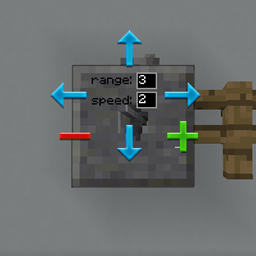
మల్టీ-పిస్టన్ ఆటలో ఒక మల్టీపిస్టన్ బ్లాక్ను జోడిస్తుంది, ఇది నిర్దిష్ట దిశ నుండి ఏదైనా బ్లాక్ను లాగి, నిర్దిష్ట వేగం మరియు పరిధితో ఏ దిశలోనైనా విసిరేయడానికి అనుమతిస్తుంది.
రెసిపీ:
అడ్డంగా:
నిలువుగా:
వంతెన:
కాన్ఫిగరేషన్:
తరచుగా అడిగే ప్రశ్నలు:
GUI ఎలా పనిచేస్తుంది?
- GUI తెరవడానికి బ్లాక్పై కుడి-క్లిక్ చేయండి.
- ఇన్పుట్ దిశపై కుడి-క్లిక్ చేయండి మరియు అవుట్పుట్ దిశపై ఎడమ-క్లిక్ చేయండి
- పరిధి మరియు వేగాన్ని సవరించండి, escape బటన్ ద్వారా GUI నుండి బయటకు వెళ్లండి.
పరిధిని ఎలా పెంచగలను?
- గరిష్ఠ పరిధి 10, అది వేరే రకమైన బ్లాక్ను చేరే వరకు
వేగాన్ని పెంచగలనా?
- 3 వరకు మాత్రమే, భవిష్యత్తులో ఎక్కువ మద్దతు ఇవ్వవచ్చు.
శబ్దాన్ని మార్చగలనా?
- భవిష్యత్తులో కూడా జోడించవచ్చు.
ఇది రెడ్స్టోన్తో పనిచేస్తుందా?
- అవును, ఇది సాధారణ పిస్టన్లలా బటన్లు, లివర్లు మరియు ఏదైనా రెడ్స్టోన్ ఇన్పుట్తో పనిచేస్తుంది.
Multi-Piston ఎలా ఇన్స్టాల్ చేయాలి
With Millida Launcher
Install Millida Launcher
The launcher is free: download it at millida.net/launcher and sign in with any nickname.
Click “Install” on this page
The launcher opens and installs the mod for Minecraft 1.18.2–1.21.1 on Forge or NeoForge automatically.
Launch the game
A profile with it appears in the launcher: click “Play”.
Manually
Install Forge or NeoForge
The loader must match the game version of the mod file, for example Minecraft 1.21.1. After installing it, a separate profile appears in your launcher.
Download the file for your version
In the version list above, pick the file multipiston-1.2.58-1.21.1.jar (33 KB) for your game version and loader.
Put it in the mods folder
The folder is inside .minecraft (Windows: %appdata%\.minecraft\mods). If it does not exist, create it.
Launch the loader profile
Open “Mods” in the main menu: Multi-Piston should be in the list.
Minecraft 1.21.1 runs on Java 21: with a different Java version the game may close right after launch.
వెర్షన్లు
డిపెండెన్సీలతో
| Minecraft | లోడర్ | ఫైల్ | తేదీ | చర్యలు |
|---|---|---|---|---|
| 1.20.1 | Forge | multipiston-1.20-0.0.47-snapshot.jar38.6 KB 10 | ||
| 1.21 | NeoForge | multipiston-1.2.58-1.21.1.jar33.3 KB 9 | ||
| 1.21 | NeoForge | multipiston-1.2.55-1.21.1-snapshot.jar32.6 KB | ||
| 1.20.1 | NeoForge, Forge | multipiston-1.20-1.2.43-RELEASE.jar37.8 KB | ||
| 1.20.4 | NeoForge | multipiston-1.20.4-1.2.37-ALPHA-universal.jar33 KB | ||
| 1.20.1 | Forge | multipiston-1.20-1.2.32-ALPHA.jar37.8 KB | ||
| 1.18.2 | — | multi-piston-1.18.2-1.2.13-ALPHA.jar50.1 KB |
FAQ
Which Minecraft versions does Multi-Piston work on?
There are files for 1.21.1, 1.21, 1.20.4, 1.20.1, 1.20, 1.18.2. The newest is 1.21.1.
Is Multi-Piston for Forge or Fabric?
There are files for Forge: 1.20–1.20.1 and for NeoForge: 1.20–1.21.1. There are no files for Fabric: a mod for another loader will not start.
Does Multi-Piston need other mods?
The author lists no required dependencies: the Forge or NeoForge loader is enough.
Which Java does Multi-Piston need?
Minecraft 1.21.1 runs on Java 21. If the game closes right after launch, the usual cause is the wrong Java version in the profile settings.
Where can I download Multi-Piston safely?
On this page: the file multipiston-1.2.58-1.21.1.jar (33 KB) is stored on Millida’s server, with no link shorteners. SHA-1 checksum: 2b63be739da24247328e4052ec91c928230d0390.
సమీక్షలు
Multi-Pistonకు మొదటి రేటింగ్ ఇవ్వండి


