
Minecraft 1.12.2, 1.14.4 కోసం More Overlays మోడ్
NEI ఓవర్లేలను తిరిగి తీసుకువస్తుంది
- డౌన్లోడ్లు
- 2 డౌన్లోడ్లు
- వ్యూలు
- 30 వ్యూలు
- అప్డేట్ చేయబడింది
- అప్డేట్ చేయబడింది 28.10.2026
- 1.9 — 1.14.4
 Forge
Forge
More Overlays మోడ్ గురించి
ఈ మోడ్ NEI నుండి కొన్ని ఓవర్లేలను జోడిస్తుంది.
క్లయింట్ సైడ్ మాత్రమే మోడ్!
అప్డేట్ / సమాచారం:
మీలో చాలామంది ఈ మోడ్ ఇంకా 1.14లో ఇరుక్కుపోయి ఉందని గమనించి ఉంటారు. గతంలో ఈ మోడ్ను అప్డేట్ చేయడానికి నేను ప్రయత్నాలు చేసినప్పటికీ, దానికి పూర్తి పునర్లేఖనం అవసరం. ప్రస్తుతం నేను Minecraft లో, ముఖ్యంగా Modded Minecraft లో అంతగా యాక్టివ్గా లేనందున, దాన్ని అప్డేట్ చేయడంపై నాకు పెద్దగా ఆసక్తి లేదు. క్షమించండి, RiDGo8 రూపొందించిన స్వతంత్రంగా అప్డేట్ చేసిన వెర్షన్ను ఇక్కడ చూడవచ్చు: https://www.curseforge.com/minecraft/mc-mods/more-overlays-updated
దయచేసి ఏవైనా సమస్యలు మరియు సూచనలను ఇక్కడ నివేదించండి (Github లోని Issue Page).
కామెంట్స్లోని సమస్యలు లేదా సూచనలను నేను గమనించకపోవచ్చు.
(Issue రాసే ముందు Mod / Modpack వెర్షన్ను తనిఖీ చేయండి)
ఓవర్లేలు:
- Chunk Boundaries
- Light Level / Mob spawns ( 16 block range )
- Item search (JEI ఇన్స్టాల్ చేసి ఉంటే మాత్రమే)
డిఫాల్ట్ కీలు:
- F9 : Chunk Boundaries
- F7 : Light Level / Mob spawns
- Item Search కోసం JEI Search Field పై డబుల్ క్లిక్ చేయండి
0.5 లేదా అంతకంటే పైన వెర్షన్లో మీరు కాన్ఫిగ్ను ఇన్గేమ్లో మార్చవచ్చు:
- Main Screen నుండి: Mods -> MoreOverlays -> Config
- Pause Menu నుండి: Mod Options... -> MoreOverlays -> Config [Minecraft 1.14.x లో పనిచేయదు ఎందుకంటే pause menu లో "Mod Options..." లేదు]
Mob Spawns / Light Level:
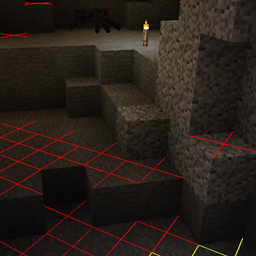
రాత్రి పూట రాక్షసులు స్పాన్ అవ్వగలిగితే బ్లాక్లపై పసుపు రంగు X ను, ఎప్పుడైనా స్పాన్ అవ్వడం సాధ్యమైతే ఎరుపు రంగు X ను చూపిస్తుంది.
Chunk Boundaries:
దీనికి మూడు మోడ్లు ఉన్నాయి, ఇది మూలల్లో ఎరుపు రేఖలను మరియు chunk మధ్యలో పసుపు రేఖను చూపిస్తుంది.
2వ మోడ్లో ఇది chunk అంచులపై ఆకుపచ్చ గ్రిడ్ను కూడా చూపిస్తుంది.
3వ మోడ్లో ఆకుపచ్చ గ్రిడ్ ఒక minecraft లేదా cubicchunks region ను రూపురేఖలు చేసి, సంబంధిత region save file ను ఎగువ ఎడమ మూలలో ప్రదర్శిస్తుంది. (minecraft 1.12.2 కోసం వెర్షన్ 1.15.0 నుండి)
Inventory Search:
JEI ఇన్స్టాల్ చేసి ఉంటే మాత్రమే పనిచేస్తుంది.
ఇది ఎనేబుల్ చేసి ఉంటే మీరు JEI లో ఐటమ్ల కోసం వెతకవచ్చు మరియు ప్రస్తుతం తెరిచి ఉన్న inventory లో ఫిల్టర్కు సరిపోలని అన్ని ఐటమ్లు నల్లబడతాయి.
1.10 కి ముందు (MC 1.10.2/1.11.2 కోసం) ఆ ఫీచర్ను ఎనేబుల్ చేయడానికి ఒక Keybinding ఉండేది.
1.10 నుండి ఆ ఫీచర్ను ఎనేబుల్ చేయడానికి మీరు JEI Search bar పై డబుల్ క్లిక్ చేయవచ్చు (NEI లో లాగానే).
ఇంటిగ్రేషన్
ఈ మోడ్ బగ్లను సరిచేయడానికి లేదా ఫీచర్లను జోడించడానికి కొన్ని ఇతర మోడ్లతో ఇంటిగ్రేట్ అవుతుంది.
- JustEnoughItems (by mezz): ఐటమ్లను హైలైట్ చేయడానికి JEI నుండి సెర్చ్ అల్గోరిథమ్ను ఉపయోగించేందున JEI ఇన్స్టాల్ చేసి ఉన్నప్పుడే Item Search పనిచేస్తుంది.
- Custom Mob Spawner (by DrZharks): ఆ మోడ్ అమలు చేసిన custom spawn handling ప్రకారం రాక్షసులు ఎక్కడ స్పాన్ అవ్వగలరో చూపించడానికి Light Overlay ఆ మోడ్తో ఇంటిగ్రేట్ అవుతుంది. (1.16.0 లో తాత్కాలికంగా తొలగించబడింది)
- OpenCubicChunks (by barteks2x): Region Overlays cubic chunks ఉపయోగించే save files ను చూపిస్తాయి. (Chunk & Region grids మెరుగుపరచాల్సి ఉంది)
- Mantle: స్క్రీన్పై కనిపించే స్థానంలో స్లాట్లను చూపించడానికి Item Search mantle లో భాగమైన GUI API తో ఇంటిగ్రేట్ అవుతుంది.
modpacks లో నా మోడ్ పంపిణీని నేను అనుమతిస్తాను. మీరు క్రెడిట్స్ ఇస్తే బాగుంటుంది
ఫైల్ను మళ్లీ అప్లోడ్ చేయడం అనుమతించబడుతుంది ( కానీ డౌన్లోడ్ ఉచితం అయితే మాత్రమే, ఎందుకంటే ఈ మోడ్ వాణిజ్యపరమైన ఉపయోగం Minecraft EULA కి విరుద్ధం, కానీ మీకు నచ్చిన దేనికైనా నా కోడ్ను ఉపయోగించవచ్చు)
దయచేసి మీ వెబ్సైట్లోని ఫైల్లను అప్డేట్ చేసి ఉంచడానికి ప్రయత్నించండి మరియు Mod మరియు Minecraft వెర్షన్ గురించి అబద్ధం చెప్పకండి. (MC 1.13 కోసం ఫైల్ లేకపోతే "More Overlays 1.12 / 1.13" అని Tile లో రాయకండి )
More Overlays ఎలా ఇన్స్టాల్ చేయాలి
With Millida Launcher
Install Millida Launcher
The launcher is free: download it at millida.net/launcher and sign in with any nickname.
Click “Install” on this page
The launcher opens and installs the mod for Minecraft 1.9–1.14.4 on Forge automatically.
Launch the game
A profile with it appears in the launcher: click “Play”.
Manually
Install Forge
The loader must match the game version of the mod file, for example Minecraft 1.14.4. After installing it, a separate profile appears in your launcher.
Download the file for your version
In the version list above, pick the file moreoverlays-1.16.1.jar (68 KB) for your game version.
Put it in the mods folder
The folder is inside .minecraft (Windows: %appdata%\.minecraft\mods). If it does not exist, create it.
Launch the loader profile
Open “Mods” in the main menu: More Overlays should be in the list.
Minecraft 1.14.4 runs on Java 8: with a different Java version the game may close right after launch.
వెర్షన్లు
డిపెండెన్సీలతో
| Minecraft | లోడర్ | ఫైల్ | తేదీ | చర్యలు |
|---|---|---|---|---|
| 1.14.4 | Forge | moreoverlays-1.16.1-mc1.14.4.jar67.6 KB | ||
| 1.12.2 | — | moreoverlays-1.15.1-mc1.12.2.jar50.1 KB 2 | ||
| 1.9 | — | moreoverlays-0.7-mc1.9.jar24.5 KB |
FAQ
Which Minecraft versions does More Overlays work on?
There are files for 1.14.4, 1.12.2, 1.9. The newest is 1.14.4.
Is More Overlays for Forge or Fabric?
Only for Forge: 1.14.4. There are no files for Fabric or NeoForge: a mod for another loader will not start.
Does More Overlays need other mods?
The author lists no required dependencies: the Forge loader is enough.
Which Java does More Overlays need?
Minecraft 1.14.4 runs on Java 8. If the game closes right after launch, the usual cause is the wrong Java version in the profile settings.
Where can I download More Overlays safely?
On this page: the file moreoverlays-1.16.1.jar (68 KB) is stored on Millida’s server, with no link shorteners. SHA-1 checksum: a49853b40c07c234bc36dbc125d55e2cd5eb23ab.
సమీక్షలు
More Overlaysకు మొదటి రేటింగ్ ఇవ్వండి


