

Minecraft 1.12.2, 1.21 కోసం Modpack Configuration Checker మోడ్
మోడ్ప్యాక్ సృష్టికర్తలు మోడ్ప్యాక్ క్రెడిట్లను ప్రదర్శించడానికి మరియు మోడ్ప్యాక్ సరిగ్గా సెటప్ చేయబడిందో లేదో ధృవీకరించడానికి అనుమతించే మోడ్.
 Forge
Forge Fabric
Modpack Configuration Checker మోడ్ గురించి
దయచేసి ఏవైనా బగ్లను ఇక్కడ ఇష్యూ ట్రాకర్లో నివేదించండి
Modpack Configuration Checker
Modpack Configuration Checker అనేది అత్యంత కాన్ఫిగర్ చేయగల మోడ్, ఇది మోడ్ప్యాక్ సృష్టికర్తలకు మోడ్ప్యాక్లను మెరుగ్గా మద్దతు ఇచ్చేలా Minecraftను అనుకూలీకరించడానికి అనుమతిస్తుంది. ఇది ప్రారంభంలో వెబ్పేజీలను ప్రదర్శించడం నుండి మోడ్ప్యాక్ వినియోగదారు మోడ్ప్యాక్కు తగినంత RAM కేటాయించారా అని తనిఖీ చేయడం వంటి ఫీచర్లను అనుమతిస్తుంది. ఈ మోడ్ మోడ్ప్యాక్ రచయితకు ఉన్న ఎంపికల సంఖ్యను గణనీయంగా విస్తరిస్తుంది.
ఈ మోడ్ను గేమ్ లోపల నుండి సులభంగా కాన్ఫిగర్ చేయవచ్చు (క్రింద సూచనలు). అయితే కాన్ఫిగరేషన్ లేకుండా Modpack Configuration Checker మోడ్ప్యాక్కు కనీసం 2gb RAM కేటాయించబడిందని ధృవీకరిస్తుంది, ఇది పనితీరును బాగా పెంచుతుంది మరియు క్రాష్లను తగ్గిస్తుంది.
మోడ్ అందించే కొన్ని ఫీచర్లు:
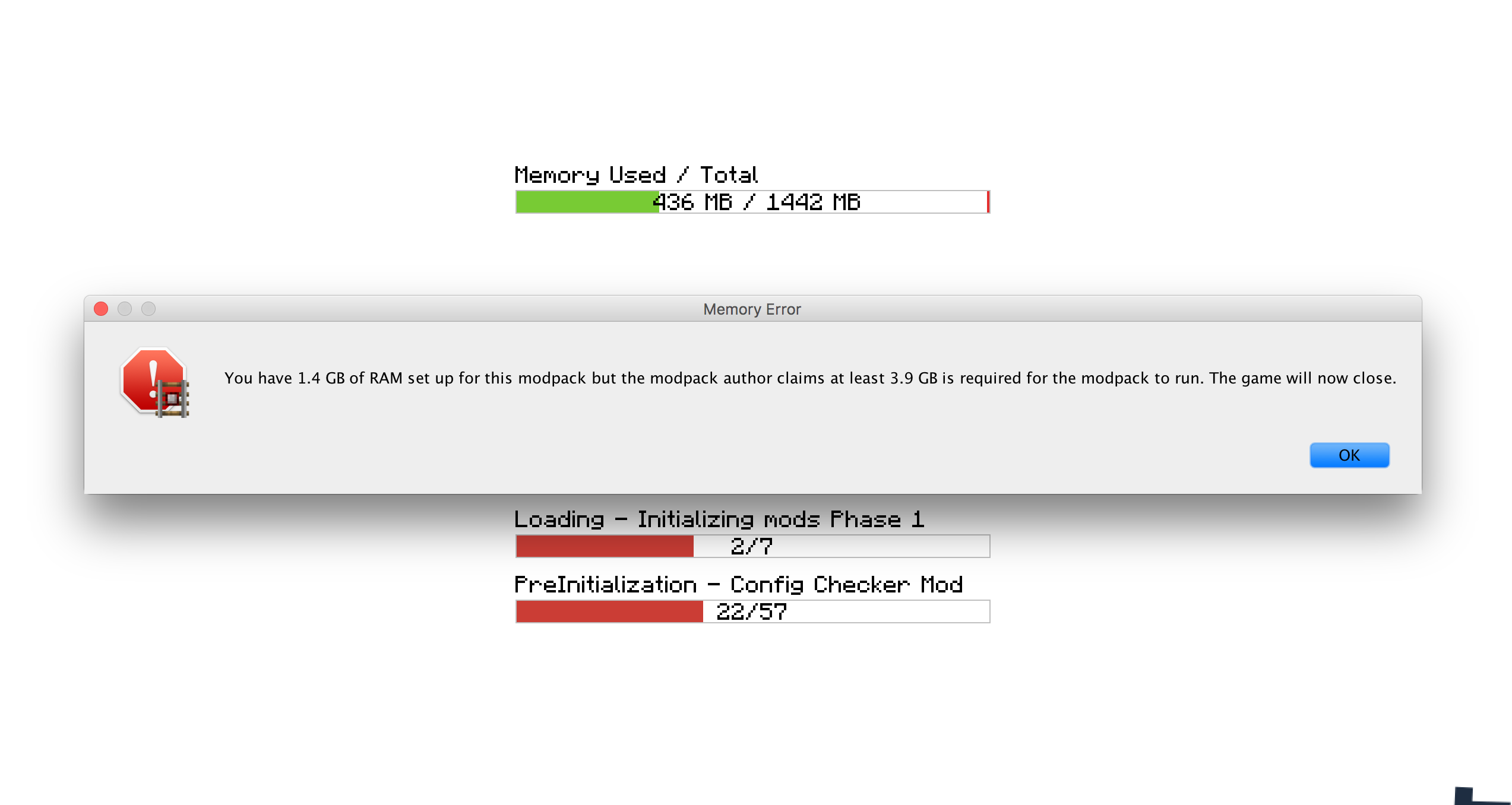
- మోడ్ప్యాక్ అమలు కావడానికి అవసరమైన RAM మొత్తాన్ని సెట్ చేయడం. ఈ అవసరం తీరకపోతే అది వినియోగదారుని హెచ్చరించి గేమ్ను మూసివేస్తుంది.
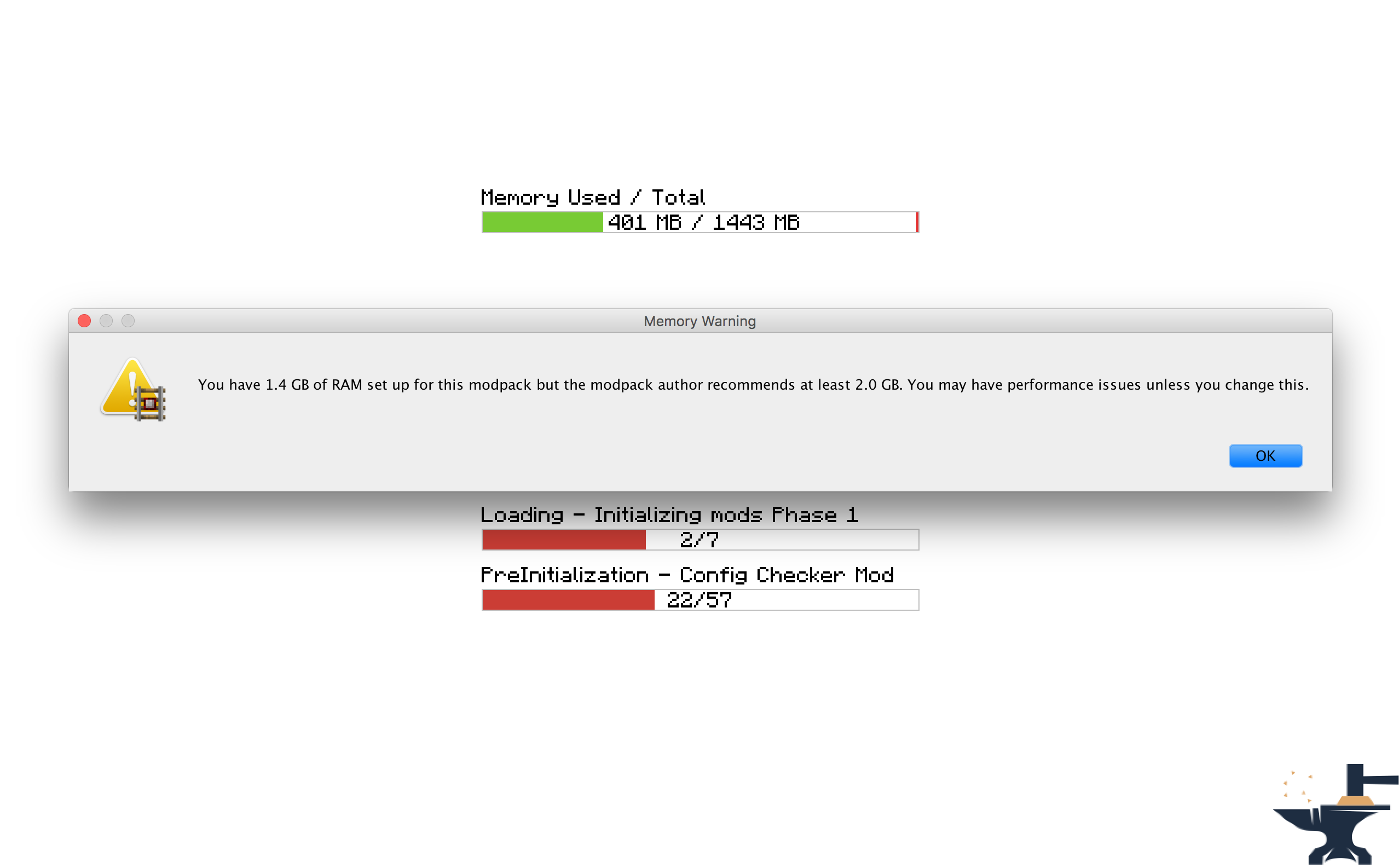
- మోడ్ప్యాక్ అమలు కావడానికి సిఫార్సు చేయబడిన RAM మొత్తాన్ని సెట్ చేయడం. ఈ అవసరం తీరకపోతే వినియోగదారు హెచ్చరించబడతారు.
- గేమ్ ప్రారంభమైనప్పుడు తెరవాల్సిన వెబ్సైట్ను సెట్ చేయడం. మోడ్ప్యాక్ వెబ్సైట్ లేదా మద్దతు పేజీలను తెరవడానికి ఉపయోగకరం.
- గేమ్ లోడ్ అవుతున్నప్పుడు ప్రదర్శించాల్సిన అనుకూల సందేశాన్ని సెట్ చేయడం, ఉదాహరణకు క్రెడిట్లను ప్రదర్శించడానికి.
- RAM అవసరాలు తీరనప్పుడు ప్రదర్శించాల్సిన అనుకూల సందేశాలను సెట్ చేయడం. మీ ప్యాక్ ఫీల్కు మోడ్ను సరిపోయేలా చేయడానికి ఉపయోగకరం.
- సందేశ పెట్టెలు ఇతర విండోల పైన కనిపించాలా అనేది మార్చగల సామర్థ్యం.
- గేమ్ లోడ్ అయినప్పుడు చాట్లో కనిపించే అనుకూల అభివాద సందేశాలను సెట్ చేయడం.
లైసెన్స్
ఈ మోడ్ను ఏదైనా మోడ్ప్యాక్లలో ఉపయోగించడానికి మరియు ఇతర ఫోరమ్లలో పోస్ట్ చేయడానికి సంకోచించకండి. ఇక్కడ తిరిగి లింక్ పెట్టడం మాత్రం మర్చిపోవద్దు. పూర్తి లైసెన్స్ ఇక్కడ చూడండి
స్క్రీన్షాట్లు
ఎలా కాన్ఫిగర్ చేయాలి (Minecraft 1.13 +
ఈ మోడ్ను మీ మోడ్ప్యాక్లో చేర్చమని నేను బలంగా సిఫార్సు చేస్తున్నాను: https://www.curseforge.com/minecraft/mc-mods/configured.
ఇది గేమ్ లోపల నుండి కాన్ఫిగరేషన్ను అనుమతిస్తుంది, మీ పనిని చాలా సులభతరం చేస్తుంది.
దశ 1) ప్రధాన మెనూ స్క్రీన్పై 'Mods' బటన్పై క్లిక్ చేయండి.
దశ 2) ఎడమవైపు ఉన్న మోడ్ల జాబితా నుండి 'Modpack Config Checker'ను ఎంచుకోండి.
దశ 3) కుడి దిగువన ఉన్న 'Config' బటన్పై క్లిక్ చేయండి.
గమనికలు
- ఒక సెట్టింగ్ ఏమి చేస్తుందో మీకు తెలియకపోతే, దానిపై హోవర్ చేస్తే ఒక చిన్న వివరణ కనిపిస్తుంది, ఇది విషయాలను స్పష్టం చేస్తుంది. అయినా సందేహం ఉంటే, ప్రయోగించి చూడండి!! లేదా మీకు ఇష్టమైతే, నాకు PM పంపండి లేదా ఈ థ్రెడ్లో కామెంట్ పెట్టండి. మోడ్ మెకానిక్స్లో ఏదైనా వివరించడానికి నేను సంతోషిస్తాను.
మాన్యువల్ కాన్ఫిగరేషన్ (1.13.x - 1.20.x)
మాన్యువల్ కాన్ఫిగరేషన్ (గేమ్ ఫోల్డర్లో ఇక్కడ ఉంది: Config\concheckrmd-client.toml)
ఈ విభాగం ఐచ్ఛిక GUI లేకుండా మోడ్ను మాన్యువల్గా ఎలా కాన్ఫిగర్ చేయాలో చూపిస్తుంది. కాన్ఫిగ్ ఫైల్ను నోట్ప్యాడ్ లేదా టెక్స్ట్ ఎడిటర్లో తెరవండి.
కాన్ఫిగరేషన్ ఫైల్ యొక్క రంగు కోడెడ్ వెర్షన్. ఏ విలువలు మార్చవచ్చు, ఏవి మార్చలేమో ఇది చూపిస్తుంది.
రంగు కీ
నీలం: బూలియన్ (అంటే వాటిని 'true' లేదా 'false'కు మాత్రమే మార్చవచ్చు)
ఎరుపు: స్ట్రింగ్ (అంటే వాటిని ఏదైనా టెక్స్ట్గా మార్చవచ్చు. ఉదా: 'Hello World')
ఆకుపచ్చ: పూర్ణాంకాలు (అంటే వాటిని ఏదైనా సంఖ్యగా మార్చవచ్చు. ఉదా: '512')
["Customisable Chat Greeting Message"] The color of the message to be displayed in chat. Allowed Values: Blue, Green, Red, Aqua, Yellow, White, Black, Grey, Purple, DarkBlue, DarkGreen, DarkRed, DarkPurple "3) Greeting Message Color" = "Yellow" The text to be displayed in chat. "2) Greeting Message Text" = "Hello there! Welcome to my modpack." Customisable message that will be displayed in chat when a world is loaded. "1) Display Chat Greeting Message?" = true
["Customisable Start Message"] Customisable message that will appear each time the game starts. This is useful for displaying credits. "1) Display message box?" = true Will the window show on top of all other windows? Recommended to keep set to True. "2) Display message box topmost?" = true The text that will be displayed in the message box. "3) Message Box Text" = "Hello Modpack Users! Made by mattr"
["Customisable First Start Message"] A message box that will be displayed when the game is started for the first time. This is useful for displaying instructions. "1) Display message box?" = true Will the window show on top of all other windows? Recommended to keep set to True. "2) Display message box topmost?" = true The text that will be displayed in the message box. "3) Message Box Text" = "Welcome. Thank you for starting my mofdpack for the first time!"
["Open A Website when the Game Starts"] Opens a webpage when the game starts. This is useful for modpack support. "1) Display Website when game starts?" = true The URL of the website that will be displayed. This can be formatted like: http://google.com, www.google.com or google.com. "2) Website URL" = "minecraft.curseforge.com/projects/config-checker"
["Amount of RAM Recommended for Game to Start"] The amount of RAM recommended for stable gameplay. Range: 128 ~ 51200 "1) Ram Recommended (IN MB)" = 12048 If the player has less than the recommended amount of RAM assigned to the modpack then a warning will be displayed when the game is started. "2) Check RAM meets recommendation?" = true The custom message to be displayed if you have set the previous setting to 'True'. Will display custom message instead of the default text. "5) Custom Message" = "You should assign more RAM to experience better performance." Will the window show on top of all other windows? I highly recommend this is left as true. "3) Display message box topmost?" = true Customise the text that appears in the warning message. Will display custom message instead of the default text. "4) Customise low RAM Warning?" = false
["Recommended RAM Chat Message"] The amount of RAM recommended for stable gameplay. Range: 128 ~ 51200 "1) Ram Recommended (IN MB)" = 51200 If the player has less than the recommended amount of RAM assigned to the modpack then a warning will be displayed in chat when a world is loaded. "2) Check RAM meets recommendation?" = true Customise the text that appears in the warning message. Will display custom message instead of the default text. "3) Customise low RAM Warning?" = true The custom message to be displayed in chat if you have set the previous setting to 'True'. Will display custom message instead of the default text. "4) Custom Message" = "You should assign more RAM to experience better performance."
["Amount of RAM Required for Game to Start"] If the player has less than the required amount of RAM assigned to the modpack then they will be alerted as the game starts and the game will close. "2) Check RAM meets requirement?" = true The amount of RAM required for the game to run. Range: 128 ~ 51200 "1) Ram Required (IN MB)" = 1024 The custom message to be displayed if you have set the previous setting to 'True'. Will display custom message instead of the default text. "5) Custom Message" = "You need more RAM. The game will close." Will the window show on top of all other windows? I highly recommend this is left as true. "3) Display message box topmost?" = true Customise the text that appears in the error message. Will display custom message instead of the default text. "4) Display custom text in messagebox?" = false
["Game Launch Time Limit"] If the game exceeds the launch timeout then a message box will be displayed and the game will close. "2) Check game meets launch timeout?" = false The custom message to be displayed if you have set the previous setting to 'True'. Will display custom message instead of the default text. "5) Custom Message" = "The game has taken too long too start to start this modpack. This is probably due to insufficient system resources. The game will now close." The maximum amount of time the game will be allowed to spend booting. (IN SECONDS) Range: 5 ~ 5400 "1) Launch Timeout (IN SECONDS)" = 30 Will the window show on top of all other windows? I highly recommend this is left as true. "3) Display message box topmost?" = true Customise the text that appears in the error message. Will display custom message instead of the default text. "4) Display custom text in error message?" = false
ఎలా కాన్ఫిగర్ చేయాలి (Minecraft 1.11 + 1.12)
వెర్షన్ 1.6 నుండి మోడ్ను ఇప్పుడు పూర్తిగా గేమ్ లోపల నుండి కాన్ఫిగర్ చేయవచ్చు. అంటే ఇకపై ఏ కాన్ఫిగ్ ఫైల్లను మాన్యువల్గా సవరించాల్సిన అవసరం లేదు, ఇది మోడ్ను ఉపయోగించడాన్ని చాలా సులభతరం చేస్తుంది. ఈ దశలను అనుసరించి కాన్ఫిగరేషన్ స్క్రీన్ను యాక్సెస్ చేయవచ్చు:
దశ 1) ప్రధాన మెనూ స్క్రీన్పై 'Mods' బటన్పై క్లిక్ చేయండి.
దశ 2) ఎడమవైపు ఉన్న మోడ్ల జాబితా నుండి 'Modpack Config Checker'ను ఎంచుకోండి.
దశ 3) కుడి దిగువన ఉన్న 'Config' బటన్పై క్లిక్ చేయండి.
గమనికలు
- ఒక సెట్టింగ్ ఏమి చేస్తుందో మీకు తెలియకపోతే, దానిపై హోవర్ చేస్తే ఒక చిన్న వివరణ కనిపిస్తుంది, ఇది విషయాలను స్పష్టం చేస్తుంది. అయినా సందేహం ఉంటే, ప్రయోగించి చూడండి!! లేదా మీకు ఇష్టమైతే, నాకు PM పంపండి లేదా ఈ థ్రెడ్లో కామెంట్ పెట్టండి. మోడ్ మెకానిక్స్లో ఏదైనా వివరించడానికి నేను సంతోషిస్తాను.
- మీ సెట్టింగ్లన్నీ మోడ్ యొక్క నవీకరించిన వెర్షన్లకు బదిలీ అవుతాయని నేను ఒక మైగ్రేషన్ టూల్ను సృష్టించాను. ఇది అతుకులు లేని బదిలీని నిర్ధారిస్తుంది, తద్వారా సగటు వినియోగదారుపై ఎటువంటి ప్రభావం ఉండదు. పాత Config ఫైల్ గుర్తించబడితే, మీ పాత సెట్టింగ్లను దిగుమతి చేసుకునే ఎంపికను గేమ్ స్వయంగా ఇస్తుంది. ఈ ఫీచర్ కోసం నేను చాలా సమయం వెచ్చించాను, అంటే దీనికి చాలా చాలా ఎక్కువ విజయ రేటు ఉంది.
- గేమ్ లోపల కాన్ఫిగ్ 1.11.2 మరియు అంతకంటే ఎక్కువ వెర్షన్లలో మాత్రమే అందుబాటులో ఉంటుంది (ప్రస్తుతానికి). పాత forge వెర్షన్లలో ఈ సెటప్ ఎక్కువ సంక్లిష్టత కలిగి ఉండటమే దీనికి కారణం. మీరు తక్కువ Minecraft వెర్షన్లో ఉంటే మీరు లెగసీ కాన్ఫిగ్ను ఉపయోగించాల్సి ఉంటుంది, అది క్రింద వివరించబడింది. తగినంత ఆసక్తి ఉంటే భవిష్యత్తులో నేను 1.10.2 లేదా 1.7.10కు బ్యాక్పోర్ట్ చేయవచ్చు, కానీ ప్రస్తుతానికి ఈ వెర్షన్లు ఇకపై నవీకరించబడవు.
లెగసీ కాన్ఫిగ్ (Minecraft 1.10 మరియు అంతకంటే తక్కువ) (గేమ్ ఫోల్డర్లో ఇక్కడ ఉంది: Config/concheckrmd.cfg)
కాన్ఫిగరేషన్ ఫైల్ యొక్క రంగు కోడెడ్ వెర్షన్. ఏ విలువలు మార్చవచ్చు, ఏవి మార్చలేమో ఇది చూపిస్తుంది.
రంగు కీ
నీలం: బూలియన్ (అంటే వాటిని 'true' లేదా 'false'కు మాత్రమే మార్చవచ్చు)
ఎరుపు: స్ట్రింగ్ (అంటే వాటిని ఏదైనా టెక్స్ట్గా మార్చవచ్చు. ఉదా: 'Hello World')
ఆకుపచ్చ: పూర్ణాంకాలు (అంటే వాటిని ఏదైనా సంఖ్యగా మార్చవచ్చు. ఉదా: '512')
కాన్ఫిగ్ ఫైల్
"custom greeting message" {
B:"1. Display custom greeting message when joining a world?"=false
గేమ్ లోడ్ అయినప్పుడు చాట్లో ప్రదర్శించబడే సందేశం. 'Display custom greeting message when joining a world?' trueకు సమానమైతే మాత్రమే ప్రదర్శించబడుతుంది [default: Hello there! Welcome to my modpack.]
S:"2. Custom greeting message text"=Hello there! Welcome to my modpack. }
"custom messagebox" { B:"1. Show custom messagebox when game loads?"=false B:"2. Display message box on top of all other windows?"=true
పాప్అప్ టెక్స్ట్ను నమోదు చేయండి. 'Show custom messagebox when game loads?' trueకు సమానమైతే మాత్రమే ప్రదర్శించబడుతుంది [default: Hello World!!]
S:"3. Custom Messagebox text"=Hello World!! }
"display webpage" { B:"1. Open web browser to URL when game loads?"=false
ప్రారంభించాల్సిన URLను నమోదు చేయండి. 'Open web browser to URL when game loads?' trueకు సమానమైతే మాత్రమే ప్రదర్శించబడుతుంది [default: http://minecraft.curseforge.com/projects/config-checker]
S:"2. URL to webpage"=minecraft.curseforge.com/projects/config-checker }
"ram recommendation" { I:"1. Ram Recommended (IN MB)"=2048 B:"2. Check RAM meets recommendation?"=true B:"3. Display message box on top of all other windows?"=true B:"4. Display custom text in message box if RAM recommendations not met?"=false
RAM సిఫార్సు తీరనప్పుడు చూపించాల్సిన అనుకూల టెక్స్ట్ను నమోదు చేయండి. 'Display custom text in message box if RAM recommendation not met?' trueకు సమానమైతే మాత్రమే ప్రదర్శించబడుతుంది [default: You should add more RAM.]
S:"5. Custom recommendation text"=You should add more RAM. B:"6. Display warning in game chat if RAM recommendation not met?"=true B:"7. Customise game chat RAM recommendation message?"=false
RAM సిఫార్సు తీరనప్పుడు గేమ్ చాట్లో చూపించాల్సిన అనుకూల టెక్స్ట్ను నమోదు చేయండి. 'Customise game chat RAM recommendation message?"' trueకు సమానమైతే మాత్రమే ప్రదర్శించబడుతుంది [default: [WARNING] You should assign more RAM to this modpack.]
S:"8. Custom chat message"=[WARNING] You should assign more RAM to this modpack. }
"ram requirement" { I:"1. Ram Required (IN MB)"=1024 B:"2. Check RAM meets requirement?"=false B:"3. Display message box on top of all other windows?"=true B:"4. Display custom text in message box if RAM requirement not met?"=false
RAM అవసరం తీరనప్పుడు చూపించాల్సిన అనుకూల టెక్స్ట్ను నమోదు చేయండి. 'Display custom text in message box if RAM requirement not met?' trueకు సమానమైతే మాత్రమే ప్రదర్శించబడుతుంది [default: You need more RAM.]
S:"5. Custom requirement text"=You need more RAM. }
Modpack Configuration Checker ఎలా ఇన్స్టాల్ చేయాలి
With Millida Launcher
Install Millida Launcher
The launcher is free: download it at millida.net/launcher and sign in with any nickname.
Click “Install” on this page
The launcher opens and installs the mod for Minecraft 1.12–1.21 on Fabric or Forge automatically.
Launch the game
A profile with it appears in the launcher: click “Play”.
Manually
Install Fabric or Forge
The loader must match the game version of the mod file, for example Minecraft 1.21. After installing it, a separate profile appears in your launcher.
Download the file for your version
In the version list above, pick the file Modpack Configuration Checker-1.21.x-v1.9.5-forge.jar (146 KB) for your game version and loader.
Put it in the mods folder
The folder is inside .minecraft (Windows: %appdata%\.minecraft\mods). If it does not exist, create it.
Launch the loader profile
Open “Mods” in the main menu: Modpack Configuration Checker should be in the list.
Minecraft 1.21 runs on Java 21: with a different Java version the game may close right after launch.
వెర్షన్లు
డిపెండెన్సీలతో
| Minecraft | లోడర్ | ఫైల్ | తేదీ | చర్యలు |
|---|---|---|---|---|
| 1.20.6 | Fabric | Modpack Configuration Checker-1.20.6-v1.9.8-fabric.jar84 KB | ||
| 1.21 | Forge | Modpack Configuration Checker-1.21.x-v1.9.5-forge.jar146 KB | ||
| 1.12.1 | — | Modpack Configuration Checker-1.12.2-v1.9.5.jar154 KB | ||
| 1.14.4 | — | Modpack Configuration Checker-1.14.x-v1.7.1.jar135 KB |
FAQ
Which Minecraft versions does Modpack Configuration Checker work on?
There are files for 1.21, 1.20.6, 1.14.4, 1.12.2, 1.12.1, 1.12. The newest is 1.21.
Does Modpack Configuration Checker need other mods?
The author lists no required dependencies: the Fabric or Forge loader is enough.
Which Java does Modpack Configuration Checker need?
Minecraft 1.21 runs on Java 21. If the game closes right after launch, the usual cause is the wrong Java version in the profile settings.
సమీక్షలు
Modpack Configuration Checkerకు మొదటి రేటింగ్ ఇవ్వండి


