
Minecraft 1.20.1, 1.19.2 కోసం Just Enough Immersive Multiblocks మోడ్
మల్టీబ్లాక్ల కోసం JEI మద్దతును జోడించే Immersive Engineering యాడాన్.
 NeoForge
 Forge
జస్ట్ ఎనఫ్ ఇమ్మర్సివ్ మల్టీబ్లాక్స్
మల్టీబ్లాక్స్కు JEI మద్దతును జోడించే సరళమైన ఇమ్మర్సివ్ ఇంజినీరింగ్ యాడాన్. ఇమ్మర్సివ్ ఇంజినీరింగ్ నుండి నిర్మాణాలను, అలాగే ఇమ్మర్సివ్ పెట్రోలియం వంటి చాలా యాడాన్లను (అవి ఇన్స్టాల్ చేయబడి ఉంటే) మద్దతిస్తుంది.
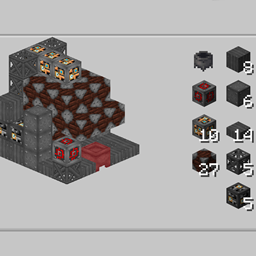
మల్టీబ్లాక్స్ JEI శోధనలో కనిపిస్తాయి, దీని వల్ల మల్టీబ్లాక్స్ను సులభంగా వెతకవచ్చు. ఇవి ప్రతి మల్టీబ్లాక్ రెసిపీల కోసం "కెటలిస్ట్" పదార్థాలకు కూడా లింక్ చేయబడి ఉంటాయి మరియు నేరుగా వాటికి వెళ్లవచ్చు.
మల్టీబ్లాక్ రెసిపీలు ప్రాథమిక నిర్మాణాన్ని మరియు పదార్థాలను చూపిస్తాయి. ఇంజినీర్స్ మాన్యువల్కు పూర్తి ప్రత్యామ్నాయంగా ఉద్దేశించినది కాకపోయినా, ఇన్పుట్ బ్లాక్స్ కోసం రెసిపీలను ఒకే క్లిక్తో సులభంగా వెతకడానికి ఇది సహాయపడుతుంది.
EMIని కూడా ప్రథమ శ్రేణి ప్లగిన్గా (Minecraft 1.20.1+) మద్దతిస్తుంది, ఎటువంటి కంపాటిబిలిటీ లోడర్లు అవసరం లేదు.
నిర్దిష్ట వెర్షన్ గమనికలు
1.20.1
- కొన్ని క్లిష్టమైన లైఫ్సైకిల్ సమస్యలను అధిగమించి, ఈ మాడ్ Minecraft 1.20+ వరకు కొనసాగడానికి అనుమతించినందుకు FLORIAN4600కు ఎంతో కృతజ్ఞతలు
- EMI మద్దతు కోసం Pengyకు ధన్యవాదాలు
1.16
- ఈ మాడ్లో 1.16లో తెలిసిన సమస్యలు ఉన్నాయి మరియు ఇది సింగిల్-ప్లేయర్-మాత్రమే అని పరిగణించాలి
1.16 కంటే పాతవి ఏవైనా
- పాత వెర్షన్లకు బ్యాక్పోర్ట్లు జరగవు. మీరు స్వయంగా పోర్ట్ చేయడానికి మరియు నిర్వహించడానికి సిద్ధంగా లేకపోతే దయచేసి అడగవద్దు.
- 1.12.2కు స్వతంత్ర బ్యాక్పోర్ట్ Rather Enough Immersive Multiblocksగా ఉంది
Just Enough Immersive Multiblocks ఎలా ఇన్స్టాల్ చేయాలి
With Millida Launcher
Install Millida Launcher
The launcher is free: download it at millida.net/launcher and sign in with any nickname.
Click “Install” on this page
The launcher opens and installs the mod for Minecraft 1.18.2–1.20.4 on Forge or NeoForge automatically.
Launch the game
A profile with it appears in the launcher: click “Play”.
Manually
Install Forge or NeoForge
The loader must match the game version of the mod file, for example Minecraft 1.20.4. After installing it, a separate profile appears in your launcher.
Download the file for your version
In the version list above, pick the file jeimultiblocks-1.20.4-1.0.6.jar (17 KB) for your game version and loader.
Put it in the mods folder
The folder is inside .minecraft (Windows: %appdata%\.minecraft\mods). If it does not exist, create it.
Launch the loader profile
Open “Mods” in the main menu: Just Enough Immersive Multiblocks should be in the list.
Minecraft 1.20.4 runs on Java 17: with a different Java version the game may close right after launch.
వెర్షన్లు
డిపెండెన్సీలతో
| Minecraft | లోడర్ | ఫైల్ | తేదీ | చర్యలు |
|---|---|---|---|---|
| 1.20.1 | NeoForge, Forge | jeimultiblocks-1.20.1-1.0.6.jar15.4 KB 6 | ||
| 1.20.4 | NeoForge | jeimultiblocks-1.20.4-1.0.6.jar16.6 KB | ||
| 1.19.2 | Forge | jeimultiblocks-1.19.2-0.0.3.jar11.5 KB 1 | ||
| 1.18.2 | Forge | jeimultiblocks-1.18.2-0.0.1.jar11 KB |
FAQ
Which Minecraft versions does Just Enough Immersive Multiblocks work on?
There are files for 1.20.4, 1.20.1, 1.19.2, 1.18.2. The newest is 1.20.4.
Is Just Enough Immersive Multiblocks for Forge or Fabric?
There are files for Forge: 1.18.2–1.20.1 and for NeoForge: 1.20.1–1.20.4. There are no files for Fabric: a mod for another loader will not start.
Does Just Enough Immersive Multiblocks need other mods?
The author lists no required dependencies: the Forge or NeoForge loader is enough.
Which Java does Just Enough Immersive Multiblocks need?
Minecraft 1.20.4 runs on Java 17. If the game closes right after launch, the usual cause is the wrong Java version in the profile settings.
How do I download Just Enough Immersive Multiblocks?
With Millida Launcher: it installs Just Enough Immersive Multiblocks into a modpack by itself, for the right game version and loader. The launcher is free.
సమీక్షలు
Just Enough Immersive Multiblocksకు మొదటి రేటింగ్ ఇవ్వండి


