

Minecraft 1.20.1, 1.16.5 కోసం Japan Props మోడ్
మైన్క్రాఫ్ట్ కోసం జపాన్ ప్రాప్స్ మోడ్ మీ మైన్క్రాఫ్ట్ ప్రపంచం యొక్క వాస్తవికతను పెంచడానికి అనేక జపనీస్ వీధి ప్రాప్లను పరిచయం చేస్తుంది. ట్రాఫిక్ కోన్లు, సైకిల్ బారియర్లు, ట్రాఫిక్ లైట్లు మొదలైన వస్తువులతో, ఈ మోడ్ పట్టణ ప్రాంతాలకు వివరాలు మరియు ప్రామాణికతను జోడిస్తుంది
 Fabric
 Quilt
Quilt Forge
Forge NeoForge
🚦 Japan Props ⛩️
Description
The Japan Props mod brings a collection of Japanese street props to your Minecraft world, adding realism and detail to your urban landscapes. From traffic cones and bicycle barriers to traffic lights and zebra crossings, this mod introduces a variety of props commonly found on Japanese streets. Whether you're building a bustling city or a quiet suburban neighborhood, these props will enhance the authenticity of your environment.
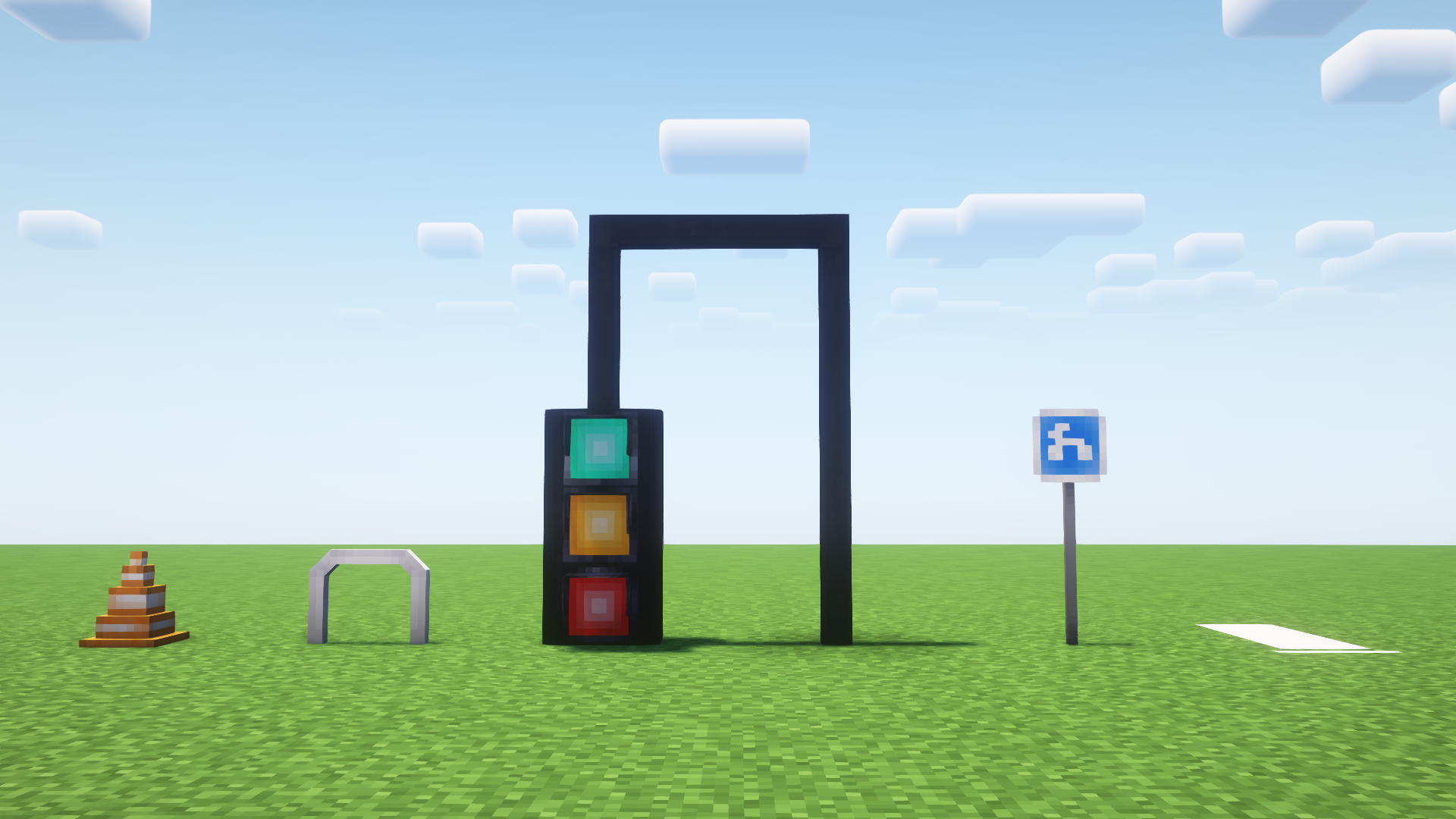
Items
- Traffic Cone
- Bicycle Barrier
- Traffic Light
- Zebra Crossing
- Vertical Pole
- Horizontal Pole
- Curved Pole
- Sign "for Bicycles"
- Speed Bump
- Vending Machine
- Bonsai Pot
- Car Barrier
- Seat Cushion
- Kotatsu Table
- Square Plate
- Tea Cup
- Chopstick

Version Info
<center>
File Game Version Loader Type Date
JapanProps_1.20.1_0.0.3.3.jar 1.20.1 Forge Release Aug 22, 2024
JapanProps_1.20.6_0.0.3_NeoForge.jar 1.20.6 NeoForge Release Jul 19, 2024
JapanProps_1.20.1_0.0.2.1_Fabric.jar 1.20.1 Fabric Release -
JapanProps_1.12.2_0.0.3.jar 1.12.2 Forge Release -
</center>
0.0.3.3 - Fabric/Quilt Update
Caution: There may be issues when running on Minecraft versions 1.20, 1.20.2, 1.20.3, 1.20.4. Some mods or loaders may not work correctly. If you want to avoid problems, please use Minecraft 1.20.1.
Development of version 1.12.2 is currently delayed. Please be patient.
Upcoming Update: 1.0.0
This version is coming soon. It may cause issues with worlds created in version 0.0.3.3. Please make a backup of your world before installing.
Credits
- Images used for props are from Complementary Shaders and RedHat Shaders
- License: Creative Commons Attribution-NonCommercial-NoDerivatives 4.0 International
Mod ID: jpp
Japan Props ఎలా ఇన్స్టాల్ చేయాలి
With Millida Launcher
Install Millida Launcher
The launcher is free: download it at millida.net/launcher and sign in with any nickname.
Click “Install” on this page
The launcher opens and installs the mod for Minecraft 1.14.4–1.20.4 on Fabric, Forge, NeoForge or Quilt automatically.
Launch the game
A profile with it appears in the launcher: click “Play”.
Manually
Install Fabric, Forge, NeoForge or Quilt
The loader must match the game version of the mod file, for example Minecraft 1.20.4. After installing it, a separate profile appears in your launcher.
Download the file for your version
In the version list above, pick the file JapanProps_1.20.1_0.0.3.3_Fabric.jar (6.4 MB) for your game version and loader.
Put it in the mods folder
The folder is inside .minecraft (Windows: %appdata%\.minecraft\mods). If it does not exist, create it.
Launch the loader profile
Open “Mods” in the main menu: Japan Props should be in the list.
Minecraft 1.20.4 runs on Java 17: with a different Java version the game may close right after launch.
వెర్షన్లు
డిపెండెన్సీలతో
| Minecraft | లోడర్ | ఫైల్ | తేదీ | చర్యలు |
|---|---|---|---|---|
| 1.20.1 | Forge | JapanProps_1.20.1_0.0.3.3.jar6.4 MB | ||
| 1.20.2 | Fabric, Quilt | JapanProps_1.20.1_0.0.3.3_Fabric.jar6.4 MB | ||
| 1.20.1 | NeoForge | JapanProps_1.20.1_0.0.3.2_NeoForge.jar4.3 MB | ||
| 1.14.4 | Forge | JapanProps_1.14.4_0.0.3.jar1.2 MB | ||
| 1.20.2 | Fabric, Quilt | JapanProps_1.20.1_0.0.2.1_Fabric.jar1.8 MB 1 | ||
| 1.19.2 | Forge | JapanProps_1.19.2_0.0.1-alpha.jar1.8 MB | ||
| 1.16.5 | Fabric, Quilt | JapanProps_1.16.5-fabric_0.0.1-alpha.jar1.8 MB |
సమీక్షలు
Japan Propsకు మొదటి రేటింగ్ ఇవ్వండి


