

Minecraft 1.12.2, 1.16.5 కోసం InventoryHUD+ మోడ్
మీ ప్రధాన ఇన్వెంటరీ, పోషన్ ప్రభావాలు మరియు మీ పరికరాలను మీ HUDకి జోడిస్తుంది. మరియు కొన్ని ఇతర ఫీచర్లు.
 Forge
 Fabric
 NeoForge
InventoryHUD+ మోడ్ గురించి
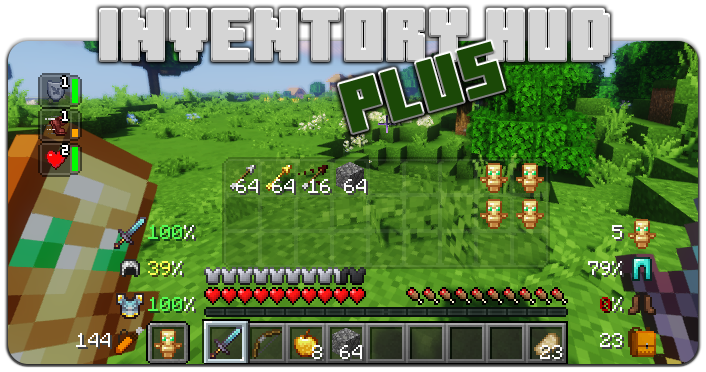
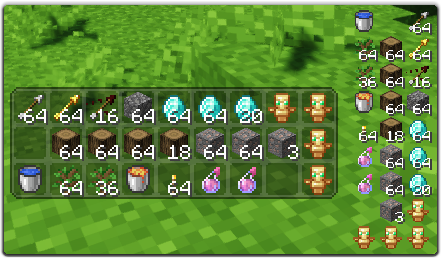
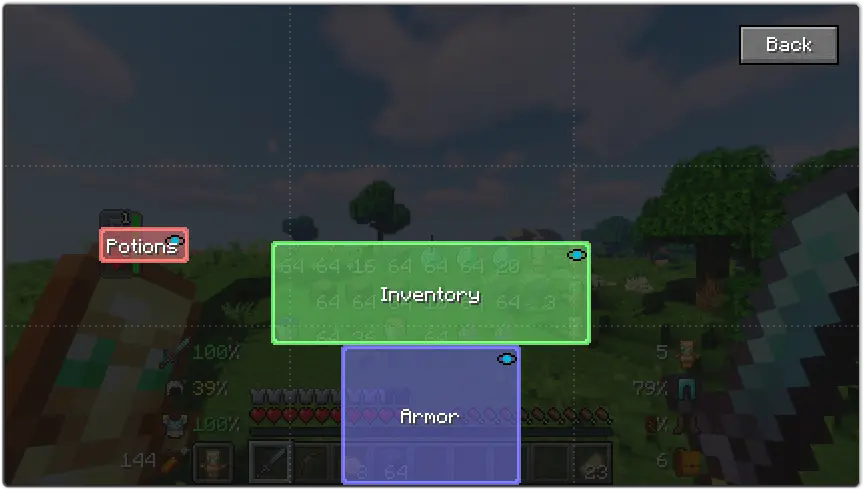
ఈ మోడ్లో కొన్ని ఫీచర్లు ఉన్నాయి, మొదటిది - ఇన్వెంటరీ HUD, మీరు ఆడుతున్నప్పుడు మీ ఇన్వెంటరీని చూపిస్తుంది, మీరు మోడ్ల మధ్య మారవచ్చు (మినీ/సాధారణ మరియు అడ్డం/నిలువు), అలాగే మీరు బ్యాక్గ్రౌండ్ పారదర్శకతను మార్చవచ్చు మరియు యానిమేషన్ను ఆన్/ఆఫ్ చేయవచ్చు
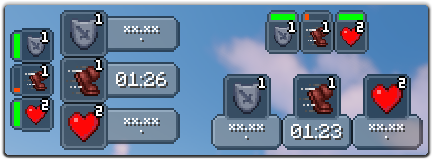
తదుపరి ఫీచర్ పోషన్HUD, ఇది మీ పోషన్ ఎఫెక్ట్లను టైమర్ లేదా వ్యవధి బార్తో చూపిస్తుంది, మీరు మినీ మోడ్ను ఉపయోగిస్తుంటే, మీరు కాన్ఫిగ్లో ఎఫెక్ట్ల మధ్య గ్యాప్ మరియు బ్యాక్గ్రౌండ్ పారదర్శకతను మార్చవచ్చు, అలాగే మీరు అడ్డం మోడ్ను కూడా ప్రారంభించవచ్చు
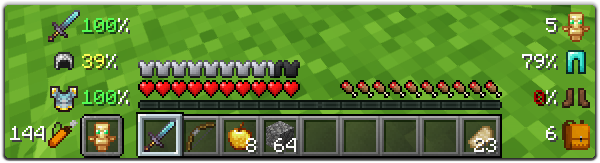
మరియు చివరిది కానీ తక్కువ కాదు, ఆర్మర్HUD, ఇది మీ ఆర్మర్ మరియు పరికరాల మన్నికను చూపిస్తుంది, అలాగే మీ ఇన్వెంటరీలో ఎన్ని ఖాళీ స్లాట్లు ఉన్నాయి మరియు మీకు ఎన్ని బాణాలు ఉన్నాయి అని చూపిస్తుంది. ఈ HUD పూర్తిగా అనుకూలీకరించదగినది, మీరు స్కేల్, డ్యామేజ్ ఇండికేటర్ రకాన్ని మార్చవచ్చు లేదా మీ పరికరాల ప్రతి భాగాన్ని ఆన్/ఆఫ్ చేయవచ్చు
మీరు కాన్ఫిగ్లో చాలా ఎంపికలను మార్చవచ్చు ("Mod" బటన్ మెయిన్ మెనూలో, తర్వాత "Config"), అలాగే మీరు ప్రతి HUD స్థానాన్ని వాటిని లాగి వదలడం ద్వారా మార్చవచ్చు. ఇన్గేమ్ కాన్ఫిగ్ స్క్రీన్ను తెరవడానికి మీరు కీబైండ్ను ఉపయోగించవచ్చు (డిఫాల్ట్గా "O")
మీరు ఈ మోడ్ను మెరుగుపరచడంలో నాకు సహాయం చేయాలనుకుంటే, మీరు దీన్ని మీ భాషలోకి అనువదించి json ఫైల్ను నాకు పంపవచ్చు.
అసలు లాంగ్ ఫైల్ను ఇక్కడ కనుగొనవచ్చు: enus.json
మద్దతు ఉన్న భాషలు
- చైనీస్ సింప్లిఫైడ్ (మెయిన్ల్యాండ్ చైనా) (zhcn) (Satxm కు ధన్యవాదాలు)
- చైనీస్ ట్రెడిషనల్ (తైవాన్) (zhtw) (yichifauzi కు ధన్యవాదాలు)
- చెక్ (cscz) (Janys159 కు ధన్యవాదాలు)
- ఇంగ్లీష్ (enus)
- ఫ్రెంచ్ (frfr) (Peperehobbits01 కు ధన్యవాదాలు)
- జర్మన్ (dede) (arrowlevel కు ధన్యవాదాలు)
- హంగేరియన్ (huhu) (Kalmix88 కు ధన్యవాదాలు)
- ఇటాలియన్ (itit) (cranos96 కు ధన్యవాదాలు)
- జపనీస్ (jajp) (co91 కు ధన్యవాదాలు)
- కొరియన్ (kokr) (gueso-gato1355 కు ధన్యవాదాలు)
- పోర్చుగీస్ - బ్రెజిల్ (ptbr) (VitorLeonardo కు ధన్యవాదాలు)
- రష్యన్ (ruru)
- స్పానిష్ (eses) (Zeedif కు ధన్యవాదాలు)
- టర్కిష్ (trtr) (MefeBey కు ధన్యవాదాలు)
- ఉక్రేనియన్ (ukua) (ElvisDanger కు ధన్యవాదాలు)
InventoryHUD+ ఎలా ఇన్స్టాల్ చేయాలి
With Millida Launcher
Install Millida Launcher
The launcher is free: download it at millida.net/launcher and sign in with any nickname.
Click “Install” on this page
The launcher opens and installs the mod for Minecraft 1.8–26.3 on Fabric, Forge or NeoForge automatically.
Launch the game
A profile with it appears in the launcher: click “Play”.
Manually
Install Fabric, Forge or NeoForge
The loader must match the game version of the mod file, for example Minecraft 26.3. After installing it, a separate profile appears in your launcher.
Download the file for your version
In the version list above, pick the file inventoryhud.forge.26.3-3.4.37.jar (231 KB) for your game version and loader.
Put it in the mods folder
The folder is inside .minecraft (Windows: %appdata%\.minecraft\mods). If it does not exist, create it.
Launch the loader profile
Open “Mods” in the main menu: InventoryHUD+ should be in the list.
InventoryHUD+ works on the player’s side only: there is no need to install it on a server.
వెర్షన్లు
డిపెండెన్సీలతో
| Minecraft | లోడర్ | ఫైల్ | తేదీ | చర్యలు |
|---|---|---|---|---|
| 26.3 | Forge | 26.3231 KB 11 | ||
| 26.3 | Fabric | 26.3235 KB 36 | ||
| 26.3 | NeoForge | 26.3231 KB | ||
| 26.3 | Forge | 26.3231 KB 13 | ||
| 26.3 | Fabric | 26.3235 KB 74 | ||
| 26.3 | NeoForge | 26.3231 KB 10 | ||
| 26.2 | Forge | 26.2231 KB 7 | — | |
| 26.1 | Forge | 26.1227 KB | — |
FAQ
Which Minecraft versions does InventoryHUD+ work on?
There are files for 1.8–26.3, 14 versions in total. The newest is 26.3.
Is InventoryHUD+ for Forge or Fabric?
There are files for Fabric: 1.16.2–26.3, for Forge: 1.8–26.3 and for NeoForge: 26.3.
Does InventoryHUD+ need other mods?
The author lists no required dependencies: the Fabric, Forge or NeoForge loader is enough.
Do I need to install InventoryHUD+ on a server?
No. InventoryHUD+ works on the player’s side only: there is no need to install it on a server.
How do I download InventoryHUD+?
With Millida Launcher: it installs InventoryHUD+ into a modpack by itself, for the right game version and loader. The launcher is free.
సమీక్షలు
InventoryHUD+కు మొదటి రేటింగ్ ఇవ్వండి


