
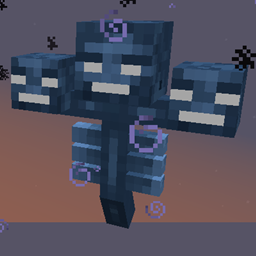
Minecraft 1.10.2 కోసం Hardcore Wither మోడ్
వితర్ యొక్క కఠినత ఆటగాళ్లకు అనుగుణంగా మారుతుంది
Hardcore Wither మోడ్ గురించి
మీరు ఎన్ని విథర్లతో పోరాడితే, పోరాటం అంత కఠినంగా మారుతుంది, మరియు బహుమతులు అంత మధురంగా ఉంటాయి.
మీ చుట్టూ పుట్టిన విథర్లకు క్రమంగా కఠినమైన ప్రత్యేక సామర్థ్యాలు వస్తాయి. ఒక విథర్ మీ చుట్టూ బహుళ ఆటగాళ్లతో పుట్టినట్లయితే, వారందరి విథర్ అనుభవం పరిగణనలోకి తీసుకోబడుతుంది.
అనేక ప్రత్యేక సామర్థ్యాలు (పెంచిన ఆరోగ్యం) ఉన్నాయి, వాటిలో చాలా వరకు కష్టమైన మార్గంలో కనుగొనడానికి ఉద్దేశించబడ్డాయి. అన్ని సామర్థ్యాలను కాన్ఫిగ్లలో నిలిపివేయవచ్చు/సర్దుబాటు చేయవచ్చు. ప్రతి సామర్థ్యాన్ని ఒక్కో డైమెన్షన్ ఆధారంగా అక్కడ బాగా పనిచేయకపోతే ఉపయోగం నుండి బ్లాక్లిస్ట్ చేయడానికి కూడా కాన్ఫిగర్ చేయవచ్చు.
మీరు Runic Dungeons తో ఆడితే సిఫార్సు చేయబడింది:
runic dungeons డైమెన్షన్లో టెలిపోర్ట్ సామర్థ్యాన్ని నిలిపివేయండి ఉదా. S:blacklistDims="34"
భవిష్యత్తులో మరిన్ని ప్రత్యేక సామర్థ్యాలకు ప్రణాళికలు ఉన్నాయి, సూచనలు స్వాగతం (రిపోజిటరీకి సమర్పించిన ఇష్యూలు ఉత్తమం).
ఆ మోడ్ ఉన్నట్లయితే Tinkers' Construct Green Heart Canisters పొందడానికి కూడా ఒక మార్గం ఉంది (కాన్ఫిగ్లలో నిలిపివేయగలిగేది).
Nether Stars ను Looting ఎన్చాంట్ ప్రభావితం చేయడానికి అనుమతిస్తుంది. (కాన్ఫిగర్ చేయగలిగే రేటులో).
మోడ్ప్యాక్లలో ఉపయోగించడానికి సంకోచించకండి; తెలియజేస్తే మెచ్చుకుంటాము, కానీ అవసరం లేదు.
Minecraft Forum Thread
Hardcore Wither ఎలా ఇన్స్టాల్ చేయాలి
With Millida Launcher
Install Millida Launcher
The launcher is free: download it at millida.net/launcher and sign in with any nickname.
Click “Install” on this page
The launcher opens and installs the mod for Minecraft 1.7.10–1.10.2 automatically.
Launch the game
A profile with it appears in the launcher: click “Play”.
Manually
Download the file for your version
In the version list above, pick the file hardcoreWither-1.10.2-2.2.3-beta-4bd2a01-universal.jar (138 KB) for your game version.
Put it in the mods folder
The folder is inside .minecraft (Windows: %appdata%\.minecraft\mods). If it does not exist, create it.
Launch the loader profile
Open “Mods” in the main menu: Hardcore Wither should be in the list.
Minecraft 1.10.2 runs on Java 8: with a different Java version the game may close right after launch.
వెర్షన్లు
డిపెండెన్సీలతో
| Minecraft | లోడర్ | ఫైల్ | తేదీ | చర్యలు |
|---|---|---|---|---|
| 1.10.2 | — | 1.10.2-2.2.3-beta138 KB | ||
| 1.10.2 | — | 1.10.2-2.1.2-alpha136 KB | ||
| 1.7.10 | — | 1.7.10-1.1.383.1 KB |
FAQ
Which Minecraft versions does Hardcore Wither work on?
There are files for 1.10.2, 1.7.10. The newest is 1.10.2.
Which Java does Hardcore Wither need?
Minecraft 1.10.2 runs on Java 8. If the game closes right after launch, the usual cause is the wrong Java version in the profile settings.
Where can I download Hardcore Wither safely?
On this page: the file hardcoreWither-1.10.2-2.2.3-beta-4bd2a01-universal.jar (138 KB) is stored on Millida’s server, with no link shorteners. SHA-1 checksum: 483ce92e96cfa57e0a0882668a05697d7a725202.
సమీక్షలు
Hardcore Witherకు మొదటి రేటింగ్ ఇవ్వండి


