
Minecraft 1.20.1, 26.2 కోసం Good Recipes మోడ్
ఎక్కువగా మరియు మెరుగ్గా క్రాఫ్ట్ చేయండి. మరిన్ని ఆసక్తికరమైన క్రాఫ్టింగ్ రెసిపీలను జోడించే మోడ్!
 NeoForge
 Fabric
 Quilt
Quilt Forge
ForgeAn important update about supported versions
We're discontinuing updates for older versions and will only maintain 1.20.1, 1.21.1, 1.21.11, and future 26.1.x (hotfixes only for unsupported versions).
Minecraft by default doesn't include some basic recipes, like a simple Name Tag, certain heads/skulls, or Shroomlight. This mod adds those recipes, and many other interesting ones such as:
- Totem of Undying - craft this lifesaver without hunting wandering traders.
- Trident - obtain the powerful weapon directly from materials.
- Expanded Dye Options - more ways to create every colour, including mixed‑dye recipes.
- Obsidian Production - combine a lava bucket and a water bucket to craft obsidian instantly.
- Reversible Recipes - undo changes you’ve made, such as:
- Removing slime from pistons.
- Converting special rails back to standard rails.
- Emptying minecarts.
And many more! Check out the gallery.
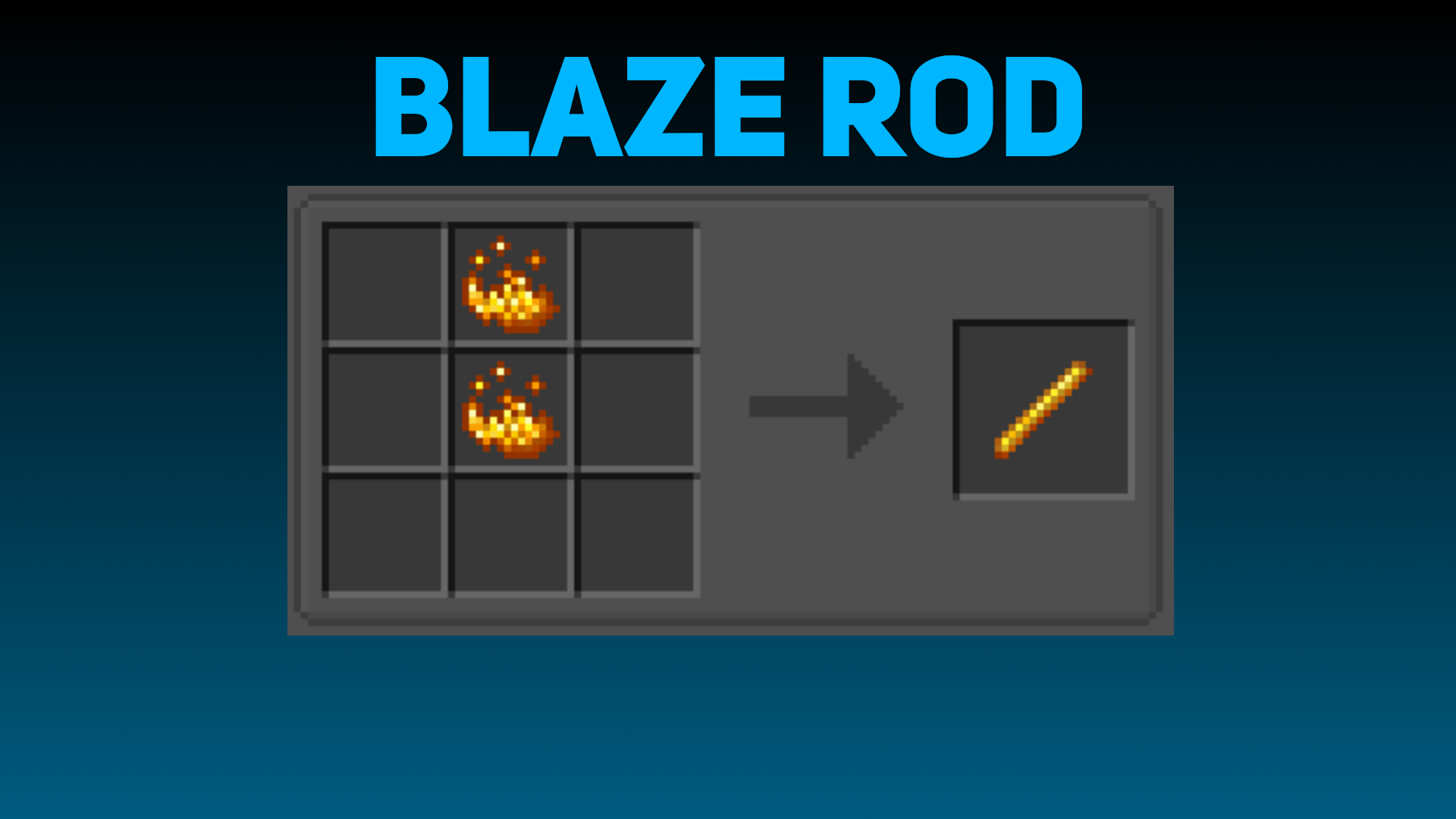
Additional Furnace Recipes
- Rotten Flesh → Leather - recycle unwanted food into a valuable crafting material.
- Slabs & Raw Ore Blocks - smelt directly into usable items, saving inventory space.
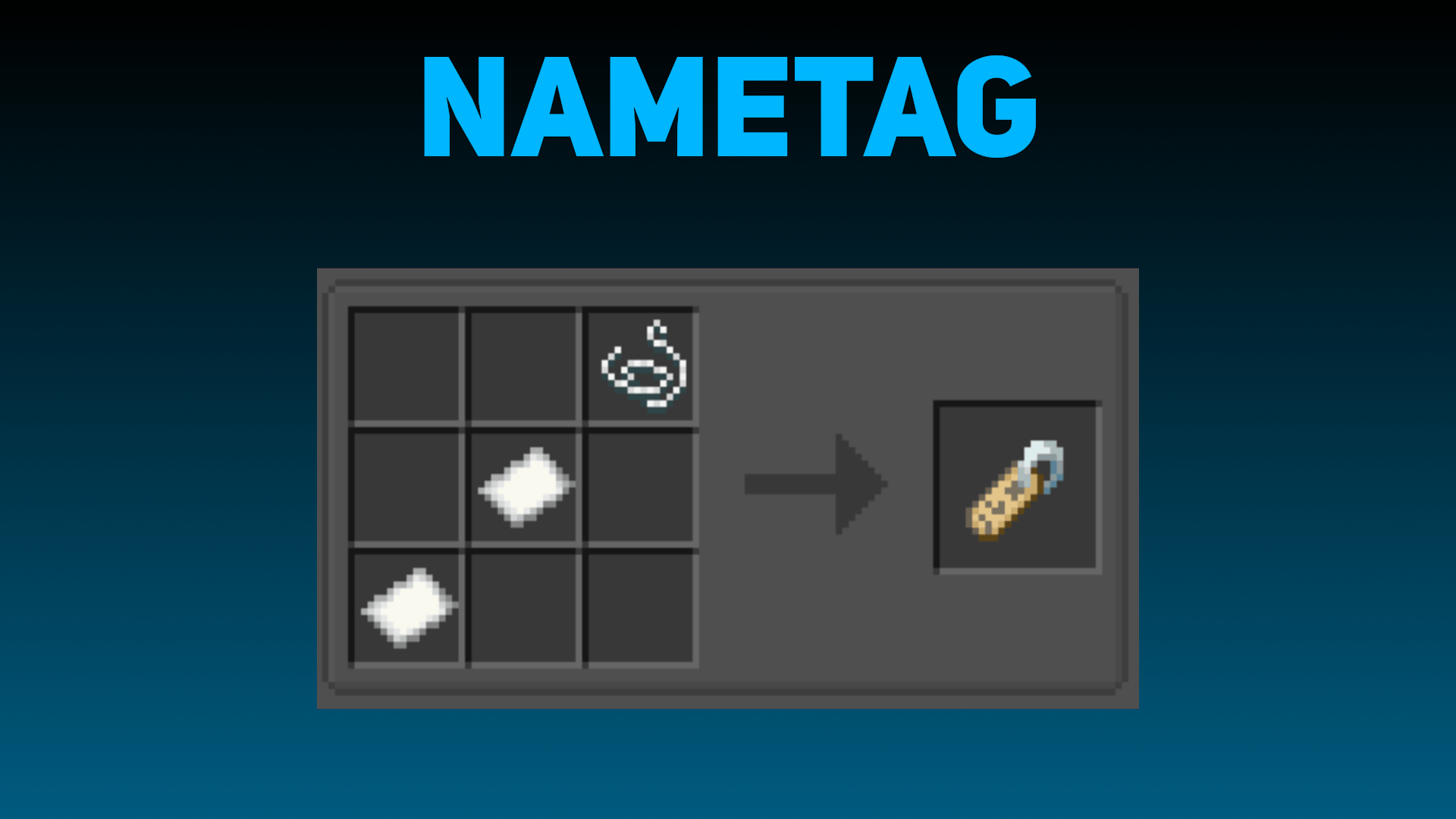
Ongoing Development
The mod is actively updated, with more recipes and quality‑of‑life tweaks on the way. Check the gallery for visual examples of the new crafting options.
You can make any suggestion in the Panden Projects Discord server!
All this and more with Good Recipes - Ready to improve your gameplay experience?
Made by JotaPanden
Good Recipes ఎలా ఇన్స్టాల్ చేయాలి
With Millida Launcher
Install Millida Launcher
The launcher is free: download it at millida.net/launcher and sign in with any nickname.
Click “Install” on this page
The launcher opens and installs the mod for Minecraft 1.20.1–26.2 on Fabric, Forge, NeoForge or Quilt automatically.
Launch the game
A profile with it appears in the launcher: click “Play”.
Manually
Install Fabric, Forge, NeoForge or Quilt
The loader must match the game version of the mod file, for example Minecraft 26.2. After installing it, a separate profile appears in your launcher.
Download the file for your version
In the version list above, pick the file goodrecipes-5.0.0-neoforge-26.1.x.jar (243 KB) for your game version and loader.
Put it in the mods folder
The folder is inside .minecraft (Windows: %appdata%\.minecraft\mods). If it does not exist, create it.
Launch the loader profile
Open “Mods” in the main menu: Good Recipes should be in the list.
వెర్షన్లు
డిపెండెన్సీలతో
| Minecraft | లోడర్ | ఫైల్ | తేదీ | చర్యలు |
|---|---|---|---|---|
| 26.1 | NeoForge | 5.0.0 - NeoForge 26.1.x and 26.2243 KB | ||
| 26.1 | Fabric, Quilt | 5.0.0 - Fabric 26.1.x and 26.21 MB | ||
| 1.20.1 | Forge, NeoForge | 5.0.0 - Forge/NeoForge 1.20.1243 KB |
FAQ
Which Minecraft versions does Good Recipes work on?
There are files for 26.2, 26.1.2, 26.1.1, 26.1, 1.20.1. The newest is 26.2.
Is Good Recipes for Forge or Fabric?
There are files for Fabric: 26.1–26.2, for Forge: 1.20.1, for NeoForge: 1.20.1–26.2 and for Quilt: 26.1–26.2.
Does Good Recipes need other mods?
The author lists no required dependencies: the Fabric, Forge, NeoForge or Quilt loader is enough.
Where can I download Good Recipes safely?
On this page: the file goodrecipes-5.0.0-neoforge-26.1.x.jar (243 KB) is stored on Millida’s server, with no link shorteners. SHA-1 checksum: 5f671967b0fdd456f3b153ca91a2062adcbaf7a7.
సమీక్షలు
Good Recipesకు మొదటి రేటింగ్ ఇవ్వండి


