
 Fabric
 Quilt
 NeoForge
 Forge
పనితీరు
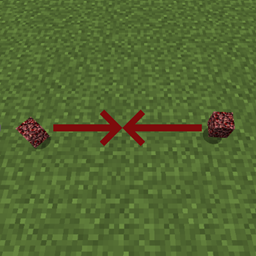
ఈ మాడ్ నేలపై పడిన వస్తువులు ఎలా కలిసిపోతాయో నియంత్రించడానికి రెండు కాన్ఫిగరేషన్ ఎంపికలను జోడిస్తుంది. ఇది పడిన వస్తువులు ఎక్కువగా ఉన్న ప్రాంతాలలో, ఉదాహరణకు పేలుడు గుంతలు లేదా ఫార్మ్లలో, పనితీరును గణనీయంగా మెరుగుపరుస్తుంది. ఆటగాళ్లు ఈ మాడ్ను ఇన్స్టాల్ చేయాల్సిన అవసరం లేకుండా సర్వర్లో ఇన్స్టాల్ చేయవచ్చు. దీన్ని సింగిల్ప్లేయర్లో కూడా ఉపయోగించవచ్చు.
కాన్ఫిగ్
ఈ మాడ్లో ఈ క్రింది కాన్ఫిగ్ ఎంపికలు ఉన్నాయి: (Forge కోసం: 1.15+ లో, ఈ కాన్ఫిగ్ సెట్టింగ్లను మీ ప్రపంచ ఫోల్డర్లోని serverconfig ఫోల్డర్లో కనుగొనవచ్చు)
radius - ఇది 0.5 నుండి 500 వరకు ఉండే విలువ, మరియు పడిన వస్తువు కలిసిపోవడానికి ఇతర పడిన వస్తువుల కోసం వెతికే ప్రాంతం పరిమాణాన్ని నిర్వచిస్తుంది. ఉదాహరణ: దీన్ని 5.0కి సెట్ చేస్తే, పడిన వస్తువు చుట్టూ (అన్ని దిశలలో) 5 బ్లాక్ల ప్రాంతంలో వెతుకుతుంది. "0.5" అనేది వనిల్లా ప్రవర్తన. గమనించండి, ఈ ప్రవర్తన గోడలను పరిగణనలోకి తీసుకోదు. checkY - పడిన వస్తువులు తమ పైన మరియు క్రింద కూడా తనిఖీ చేయాలనుకుంటే దీన్ని trueకి సెట్ చేయండి, లేకపోతే falseకి సెట్ చేయండి. "false" అనేది వనిల్లా ప్రవర్తన.
ట్యాగ్లు
నిర్దిష్ట వస్తువుల ప్రవర్తనను మరింత నియంత్రించగల రెండు ఐటమ్ ట్యాగ్లు కూడా ఉన్నాయి:
- getittogetherdrops:donotcombine - ట్యాగ్కు జోడించిన వస్తువులు అస్సలు కలిసిపోవు
- getittogetherdrops:ignored - ఈ ట్యాగ్లోని వస్తువులను మాడ్ విస్మరిస్తుంది, తద్వారా అవి వనిల్లా ప్రవర్తనకు తిరిగి వెళ్తాయి. ఈ ట్యాగ్ getittogetherdrops:donotcombine కంటే ప్రాధాన్యత కలిగి ఉంటుంది
ప్రదర్శన
ఈ మాడ్ను ఏ మాడ్ప్యాక్లోనైనా ఉపయోగించడానికి మీకు అనుమతి ఉంది.
Discordలో నాతో చేరండి! https://discord.gg/kgZUAxK
మాడ్ అప్డేట్లు మరియు ఇతర విషయాల కోసం Twitterలో నన్ను ఫాలో అవ్వండి! https://twitter.com/bl4ckscor3
Get It Together, Drops! ఎలా ఇన్స్టాల్ చేయాలి
With Millida Launcher
Install Millida Launcher
The launcher is free: download it at millida.net/launcher and sign in with any nickname.
Click “Install” on this page
The launcher opens and installs the mod for Minecraft 1.18.1–26.3 on Fabric, Forge, NeoForge or Quilt automatically.
Launch the game
A profile with it appears in the launcher: click “Play”.
Manually
Install Fabric, Forge, NeoForge or Quilt
The loader must match the game version of the mod file, for example Minecraft 26.3. After installing it, a separate profile appears in your launcher.
Download the file for your version
In the version list above, pick the file getittogetherdrops-fabric-26.1.1-1.5.1.jar (81 KB) for your game version and loader.
Put it in the mods folder
The folder is inside .minecraft (Windows: %appdata%\.minecraft\mods). If it does not exist, create it.
Launch the loader profile
Open “Mods” in the main menu: Get It Together, Drops! should be in the list.
వెర్షన్లు
డిపెండెన్సీలతో
| Minecraft | లోడర్ | ఫైల్ | తేదీ | చర్యలు |
|---|---|---|---|---|
| 26.1.1 | Fabric, Quilt | getittogetherdrops-fabric-26.x-1.5.1.jar81.1 KB 28 | ||
| 26.1.1 | NeoForge | getittogetherdrops-neoforge-26.x-1.5.jar79.7 KB 3 | ||
| 1.20.1 | Forge | getittogetherdrops-forge-1.20.1-1.3.jar7.7 KB 1 | ||
| 1.18.1 | — | getittogetherdrops-1.18-1.1.jar7.2 KB |
FAQ
Which Minecraft versions does Get It Together, Drops! work on?
There are files for 1.18.1–26.3, 7 versions in total. The newest is 26.3.
Is Get It Together, Drops! for Forge or Fabric?
There are files for Fabric: 26.1.1–26.3, for Forge: 1.20–1.20.1, for NeoForge: 26.1.1–26.3 and for Quilt: 26.1.1–26.3.
Does Get It Together, Drops! need other mods?
The author lists no required dependencies: the Fabric, Forge, NeoForge or Quilt loader is enough.
Where can I download Get It Together, Drops! safely?
On this page: the file getittogetherdrops-fabric-26.1.1-1.5.1.jar (81 KB) is stored on Millida’s server, with no link shorteners. SHA-1 checksum: 585b823a54bab112cdc905689513a2f31500c80e.
సమీక్షలు
Get It Together, Drops!కు మొదటి రేటింగ్ ఇవ్వండి


