

Minecraft 1.20.4 కోసం Game Menu Mod Option [Forge]
1.12.2 కంటే ముందు లాగా గేమ్ మెనూకు MOD సెట్టింగ్లు
 NeoForge
 Forge
Game Menu Mod Option [Forge] మోడ్ గురించి
గేమ్ మెనూ మోడ్ ఆప్షన్
1.12.2 ముందు లాగానే గేమ్ మెనూకి MOD సెట్టింగ్లు జోడించబడ్డాయి
ఇది Forge MOD
1.12.2 ముందు ఉన్న MOD బటన్ నుండి మార్పుగా Forge అప్డేట్ నోటిఫికేషన్ ఫంక్షన్ జోడించబడింది
ఈ ఫంక్షన్ను కాన్ఫిగ్ నుండి మార్చుకోవచ్చు.
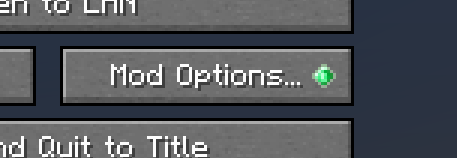
v2.0.0 నుండి ModMenu స్టైల్ జోడించబడింది
దీన్ని కాన్ఫిగ్లో ఎనేబుల్ చేయవచ్చు
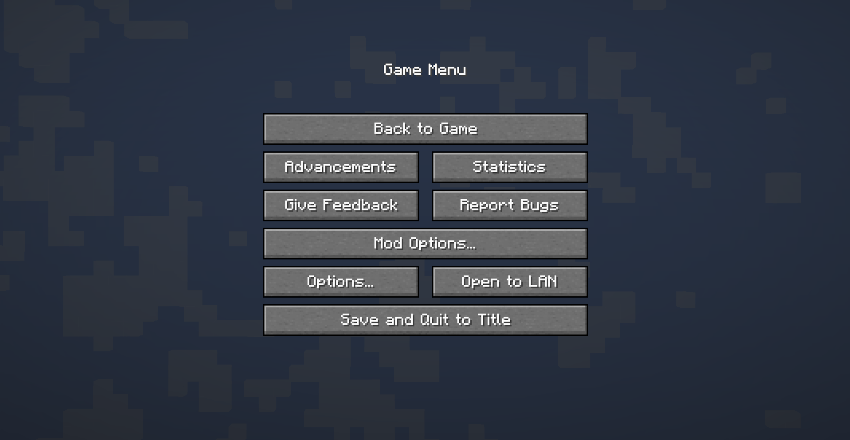
కింది వెర్షన్ల తర్వాత ఈ మోడ్ను ఇన్స్టాల్ చేయకుండానే Forge మోడ్ బటన్ను జోడిస్తుంది.
MC1.20.1 - 47.1.25
MC1.19.4 - 45.1.15
MC1.19.2 - 43.2.20
ఈ మోడ్ యొక్క ప్రధాన ఫంక్షనాలిటీ ఇకపై అవసరం లేదు, కానీ మోడ్ అప్డేట్ నోటిఫికేషన్ డిస్ప్లే మరియు మోడ్ బటన్ను మునుపటి లాగానే అదే స్థానానికి తిరిగి తీసుకురాగల సామర్థ్యం ఉన్నందున, మేము దీన్ని అప్డేట్ చేయడం కొనసాగిస్తాము.
ModPack
దయచేసి దీన్ని స్వేచ్ఛగా ఉపయోగించండి.
Game Menu Mod Option [Forge] ఎలా ఇన్స్టాల్ చేయాలి
With Millida Launcher
Install Millida Launcher
The launcher is free: download it at millida.net/launcher and sign in with any nickname.
Click “Install” on this page
The launcher opens and installs the mod for Minecraft 1.17.1–1.20.4 on Forge or NeoForge automatically.
Launch the game
A profile with it appears in the launcher: click “Play”.
Manually
Install Forge or NeoForge
The loader must match the game version of the mod file, for example Minecraft 1.20.4. After installing it, a separate profile appears in your launcher.
Download the file for your version
In the version list above, pick the file gamemenumodoption-neoforge-mc1.20.2-2.3.0.jar (242 KB) for your game version and loader.
Put it in the mods folder
The folder is inside .minecraft (Windows: %appdata%\.minecraft\mods). If it does not exist, create it.
Launch the loader profile
Open “Mods” in the main menu: Game Menu Mod Option [Forge] should be in the list.
Minecraft 1.20.4 runs on Java 17: with a different Java version the game may close right after launch.
వెర్షన్లు
డిపెండెన్సీలతో
| Minecraft | లోడర్ | ఫైల్ | తేదీ | చర్యలు |
|---|---|---|---|---|
| 1.20.2 | NeoForge | GameMenuModOption-1.20.2-2.3.0-NeoForge242 KB 1 | ||
| 1.20.2 | Forge | GameMenuModOption-1.20.2-2.3.0-Forge242 KB | ||
| 1.17.1 | Forge | GameMenuModOption-1.17.1-1.986.5 KB 1 |
FAQ
Which Minecraft versions does Game Menu Mod Option [Forge] work on?
There are files for 1.20.4, 1.20.2, 1.17.1. The newest is 1.20.4.
Is Game Menu Mod Option [Forge] for Forge or Fabric?
There are files for Forge: 1.17.1–1.20.4 and for NeoForge: 1.20.2–1.20.4. There are no files for Fabric: a mod for another loader will not start.
Does Game Menu Mod Option [Forge] need other mods?
The author lists no required dependencies: the Forge or NeoForge loader is enough.
Which Java does Game Menu Mod Option [Forge] need?
Minecraft 1.20.4 runs on Java 17. If the game closes right after launch, the usual cause is the wrong Java version in the profile settings.
Where can I download Game Menu Mod Option [Forge] safely?
On this page: the file gamemenumodoption-neoforge-mc1.20.2-2.3.0.jar (242 KB) is stored on Millida’s server, with no link shorteners. SHA-1 checksum: 2aa0c107a050464a4a6412f068c552b058e5aafe.
సమీక్షలు
Game Menu Mod Option [Forge]కు మొదటి రేటింగ్ ఇవ్వండి


