

Minecraft 1.20.1, 1.21.1 కోసం ExtendedAE మోడ్
AE2 కోసం కొన్ని QoL విషయాలను జోడిస్తుంది
 NeoForge
 Forge
Forge Fabric
🚀 Extended AE అంటే ఏమిటి?
Extended AE అనేది Applied Energistics 2 కోసం ఒక యాడ్-ఆన్, ఇది నిల్వ మరియు క్రాఫ్టింగ్ వర్క్ఫ్లోలను సులభతరం చేస్తుంది.
1.21+ కోసం KubeJS మద్దతు
Discord సర్వర్
🔑 ముఖ్యాంశాలు
- 🧩 36-స్లాట్ Pattern Provider & Interface – ఒకే బ్లాక్లో భారీ రెసిపీ సెట్లను క్రాఫ్ట్ చేయండి లేదా ఎగుమతి చేయండి.
- 🌊 Infinity Cells (Water / Cobblestone) – అనంతమైన ప్రాథమిక వనరులు అందుబాటులో.
- ⚡ x8 వేగవంతమైన Import / Export Buses – అధిక-నిర్గమన ఐటమ్ I/O.
- 🔎 Extended Pattern Access Terminal (వైర్డ్ + వైర్లెస్) – భారీ ఆటోక్రాఫ్టింగ్ UI.
- 🛠️ Pattern Modifier – క్రాఫ్టింగ్ ప్యాటర్న్లను బ్యాచ్-ఎడిట్ & క్లోన్ చేయండి.
- 🏷️ Tag Export & Storage Buses – ఏదైనా ఐటమ్ ట్యాగ్ ద్వారా ఫిల్టర్/అవుట్పుట్.
- 🎯 Precise Export Bus – ప్రతి-స్లాట్ ఖచ్చితమైన ఎగుమతి.
- 📦 Mod Export & Storage Buses – మోడ్ ID ద్వారా ఇన్వెంటరీ ఫిల్టర్లు.
- 🔄 Active Formation Plane – రెడ్స్టోన్పై మాత్రమే బ్లాక్లను ఉంచుతుంది.
- ⚙️ Extended Inscriber & Extended Charger – సమాంతర చిప్ తయారీ & ఛార్జింగ్.
- 🔬 Crystal Assembler & Restorer – తక్షణ స్వచ్ఛమైన-క్రిస్టల్ పెరుగుదల & మరమ్మత్తు.
- 🏗️ Extended Molecular Assembler – x8 సమాంతర క్రాఫ్టింగ్.
- 🧬 Assembler Matrix - అత్యంత వేగం కోసం స్కేలబుల్ మల్టీబ్లాక్ క్రాఫ్టర్ 🔥
- 🧴 ME Canner – క్యాన్లు & కంటైనర్లను నింపుతుంది (లేదా ఇప్పుడు ఖాళీ చేస్తుంది).
- 📡 ME Wireless Connector – సుదూర-శ్రేణి నెట్వర్క్ వంతెన.
🖥️ వెర్షన్లు & లోడర్లు
MC Fabric Forge NeoForge
1.19.2 ✅ ✅ ❌
1.20.1 ✅ ✅ ❌
1.21.1 ⚠️ ⚠️ ✅
⚠️ - Applied Energistics 2 ద్వారా విడిచిపెట్టబడింది
🔗 లింక్లు
GitHub 🛠️
🙌 క్రెడిట్లు
🎨 టెక్స్చర్లు & మోడల్లు SeaKerman ద్వారా
📸 ప్రదర్శన
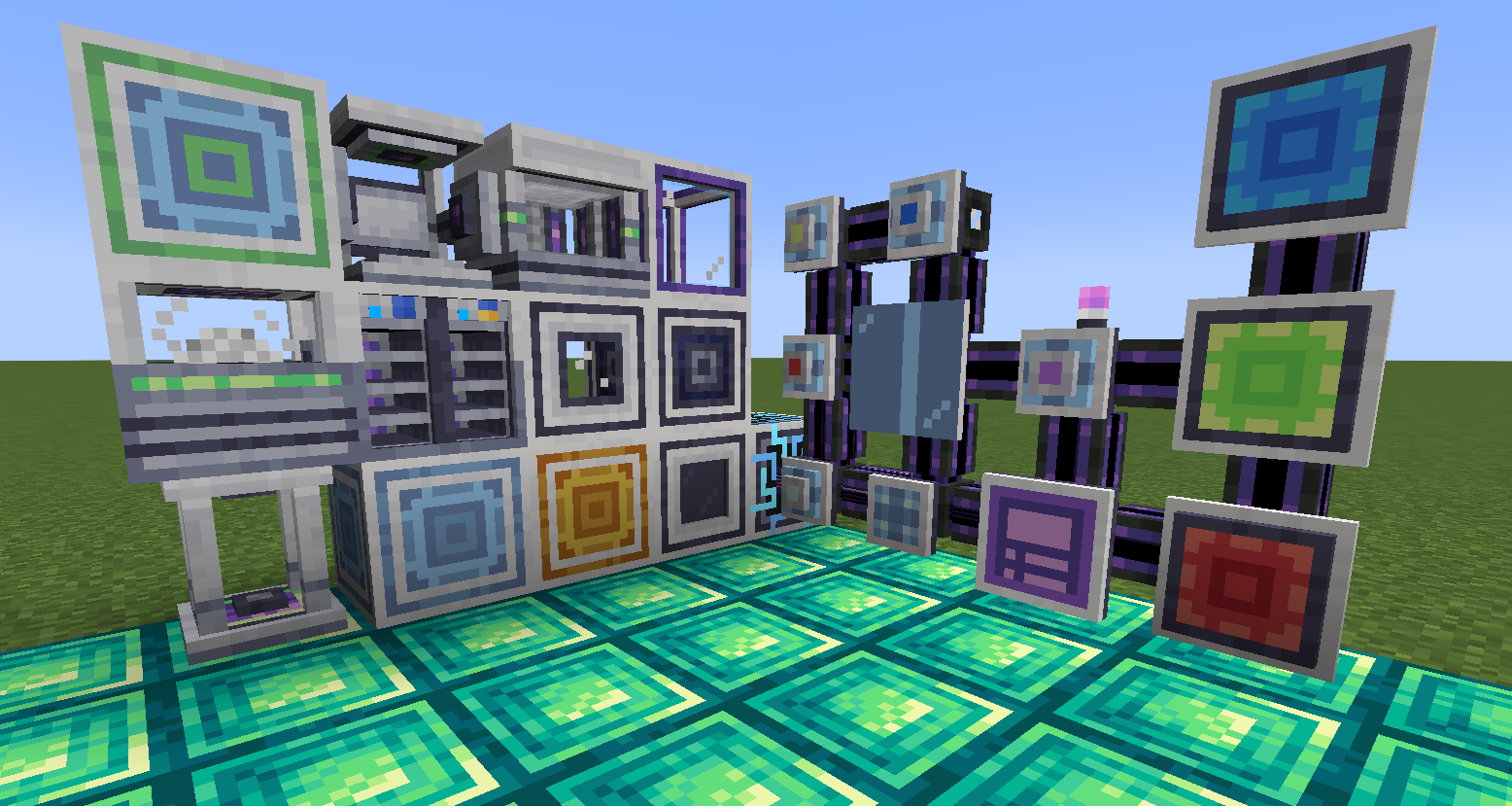
ExtendedAE ఎలా ఇన్స్టాల్ చేయాలి
With Millida Launcher
Install Millida Launcher
The launcher is free: download it at millida.net/launcher and sign in with any nickname.
Click “Install” on this page
The launcher opens and installs the mod for Minecraft 1.12.2–26.1.2 on Fabric, Forge or NeoForge automatically.
Launch the game
A profile with it appears in the launcher: click “Play”.
Manually
Install Fabric, Forge or NeoForge
The loader must match the game version of the mod file, for example Minecraft 26.1.2. After installing it, a separate profile appears in your launcher.
Download the file for your version
In the version list above, pick the file ExtendedAE-26.1-1.0.4-neoforge.jar (5.2 MB) for your game version and loader.
Put it in the mods folder
The folder is inside .minecraft (Windows: %appdata%\.minecraft\mods). If it does not exist, create it.
Launch the loader profile
Open “Mods” in the main menu: ExtendedAE should be in the list.
వెర్షన్లు
డిపెండెన్సీలతో
| Minecraft | లోడర్ | ఫైల్ | తేదీ | చర్యలు |
|---|---|---|---|---|
| 1.21.1 | NeoForge | ExtendedAE-1.21-2.2.38-neoforge.jar5.6 MB 2 | ||
| 1.20.1 | Forge, NeoForge | ExtendedAE-1.20-1.4.21-forge.jar2.8 MB 5 | ||
| 26.1.2 | NeoForge | ExtendedAE-26.1-1.0.4-neoforge.jar5.2 MB | ||
| 1.12.2 | Forge | ExtendedAE-1.12-0.0.2.jar30.5 KB 7 | ||
| 1.21.1 | NeoForge | ExtendedAE-1.21-2.1.4-neoforge.jar1.5 MB | ||
| 1.20.1 | Fabric | ExtendedAE-1.20-1.0.2-fabric.jar1.4 MB 2 | ||
| 1.20.1 | Fabric | ExtendedAE-1.20-0.1.0-fabric.jar1.1 MB |
సమీక్షలు
ExtendedAEకు మొదటి రేటింగ్ ఇవ్వండి


