
 Forge
Epic Fight - Impactful మోడ్ గురించి
- మీరు 18.5.3/19.5.3/20.6.2 ఇన్స్టాల్ చేసి, గేమ్ లోడ్ అయ్యేటప్పుడు క్రాష్ అవుతుంటే, దయచేసి మీ /config/impactful-common.toml ను మరియు అసలు మాడ్ను తొలగించి, తాజా హాట్ఫిక్స్ వెర్షన్ను ఇన్స్టాల్ చేయండి, లేదా impactful-common.toml లోని "weaponcategoriessetting" ఆప్షన్లో uchigatana ను tachi తో మరియు katana ను uchigatana తో మాన్యువల్గా మార్చండి
ఆధునిక యాక్షన్ గేమ్లు ప్రతి పంచ్లో ఆటగాడికి శక్తిని అనుభవించేలా చేయడానికి చాలా ప్రయత్నాలు చేశాయి. Impactful అలాంటి ప్రయత్నాలలో ఒకటి, ఇది Epic Fight కు హిట్ స్టాప్ మరియు స్క్రీన్ షేక్ను తీసుకువస్తుంది.
<ఫీచర్లు>
- ఆయుధ వర్గాల ఆధారంగా లేదా అటాక్ యానిమేషన్తో పేర్కొనడం ద్వారా అనుకూలీకరించగల హిట్ స్టాప్
- ఆయుధ వర్గాల ఆధారంగా లేదా అటాక్ యానిమేషన్తో పేర్కొనడం ద్వారా అనుకూలీకరించగల స్క్రీన్ షేక్
- ఆటగాడు గార్డ్ చేస్తున్నప్పుడు బ్లాక్ రకం ఆధారంగా అనుకూలీకరించగల స్క్రీన్ షేక్
- మీటియర్ స్లామ్ మొదలైన ప్రతి గ్రౌండ్ స్లామ్కు స్క్రీన్ షేక్ జోడించడం
- ఆయుధ వర్గాల ఆధారంగా లేదా అటాక్ యానిమేషన్తో పేర్కొనడం ద్వారా అనుకూలీకరించగల రేడియల్ బ్లర్
- ఆటగాడికి మాత్రమే
మీ స్వంత సెట్టింగ్ను ఎలా అనుకూలీకరించాలి:
20.11 తర్వాతి వెర్షన్కు రిసోర్స్ప్యాక్ మరియు డేటాప్యాక్ సెటప్ చేయాలి. 20.11.1 కోసం ఉదాహరణ
స్క్రీన్ షేక్ మరియు రేడియల్ బ్లర్ యొక్క విజువల్ ఎఫెక్ట్ల కోసం క్లయింట్ సైడ్లో రిసోర్స్ప్యాక్ సెటప్ చేస్తే సరిపోతుంది.
మీరు రిసోర్స్ప్యాక్లోని ఐటమ్ల ఆధారంగా విజువల్ ఎఫెక్ట్ను అనుకూలీకరించవచ్చు. "modid/itemskin/itemregistryname.json". ట్రైల్స్ను ఎలా అనుకూలీకరించాలో అలాగే
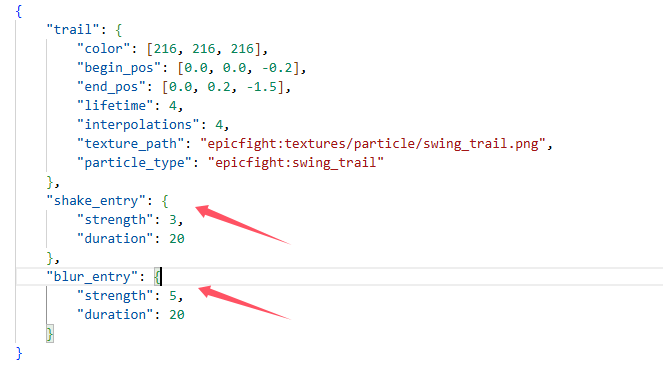
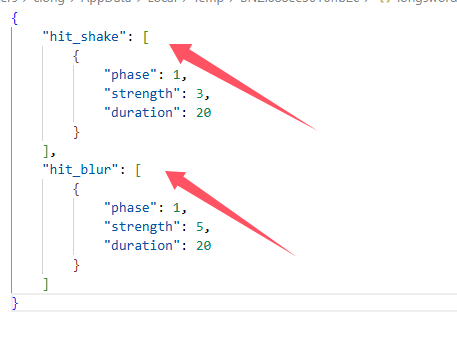
లేదా మీరు రిసోర్స్ప్యాక్లోని యానిమేషన్ ఆధారంగా విజువల్ ఎఫెక్ట్ను అనుకూలీకరించవచ్చు. "modid/animmodels/animations/biped/combat/visualeffct/animationregistryname.json"
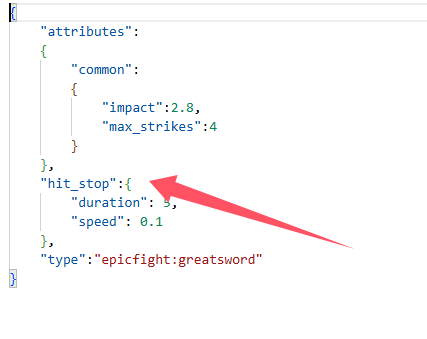
హిట్ స్టాప్ కోసం రెండు వైపులా రిసోర్స్ప్యాక్ మరియు డేటాప్యాక్ సెటప్ చేయాలి.
డేటాప్యాక్లోని ఐటమ్ కెపాబిలిటీల ఆధారంగా అనుకూల హిట్ స్టాప్ సెట్టింగ్ "modid/capabilities/weapons/itemregistryname.json". ఆయుధ కెపాబిలిటీని ఎలా అనుకూలీకరించాలో అలాగే
యానిమేషన్ ఆధారంగా అనుకూల హిట్ స్టాప్ సెట్టింగ్
"modid/animmodels/animations/biped/combat/hitstop/animationregistryname.json"
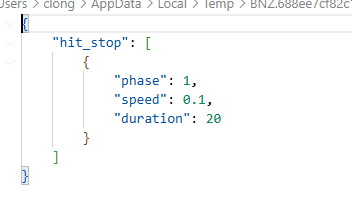
సర్వర్లో ఆడుతున్నప్పుడు, హిట్ స్టాప్ యొక్క యానిమేషన్ సెట్టింగ్ సర్వర్ సైడ్లో డేటాప్యాక్గా మరియు క్లయింట్ సైడ్లో రిసోర్స్ప్యాక్గా సెటప్ చేయాలి.
సింగిల్ప్లేయర్లో, రిసోర్స్ప్యాక్గా సెటప్ చేస్తే సరిపోతుంది
20.11 కంటే ముందు వెర్షన్కు, impactful-common.toml మరియు impactful-client.toml కాన్ఫిగరేషన్ ఫైల్ను సెట్ చేస్తే సరిపోతుంది
Epic Fight - Impactful ఎలా ఇన్స్టాల్ చేయాలి
With Millida Launcher
Install Millida Launcher
The launcher is free: download it at millida.net/launcher and sign in with any nickname.
Click “Install” on this page
The launcher opens and installs the mod for Minecraft 1.20.1 on Forge automatically.
Launch the game
A profile with it appears in the launcher: click “Play”.
Manually
Install Forge
The loader must match the game version of the mod file, for example Minecraft 1.20.1. After installing it, a separate profile appears in your launcher.
Download the file for your version
In the version list above, pick the file impactful-20.14.2.jar (71 KB) for your game version.
Put it in the mods folder
The folder is inside .minecraft (Windows: %appdata%\.minecraft\mods). If it does not exist, create it.
Launch the loader profile
Open “Mods” in the main menu: Epic Fight - Impactful should be in the list.
Minecraft 1.20.1 runs on Java 17: with a different Java version the game may close right after launch.
వెర్షన్లు
డిపెండెన్సీలతో
| Minecraft | లోడర్ | ఫైల్ | తేదీ | చర్యలు |
|---|---|---|---|---|
| 1.20.1 | Forge | impactful-20.14.2.jar71 KB 11 | ||
| 1.20.1 | Forge | impactful-20.8.2.jar37.1 KB |
FAQ
Which Minecraft versions does Epic Fight - Impactful work on?
Only Minecraft 1.20.1: there are no files for other versions.
Is Epic Fight - Impactful for Forge or Fabric?
Only for Forge: 1.20.1. There are no files for Fabric or NeoForge: a mod for another loader will not start.
Does Epic Fight - Impactful need other mods?
The author lists no required dependencies: the Forge loader is enough.
Which Java does Epic Fight - Impactful need?
Minecraft 1.20.1 runs on Java 17. If the game closes right after launch, the usual cause is the wrong Java version in the profile settings.
Where can I download Epic Fight - Impactful safely?
On this page: the file impactful-20.14.2.jar (71 KB) is stored on Millida’s server, with no link shorteners. SHA-1 checksum: c539bb8172a1a961c5108fb8c84d29921801060f.
సమీక్షలు
Epic Fight - Impactfulకు మొదటి రేటింగ్ ఇవ్వండి


