

 Fabric
 NeoForge
 Forge
Distant Horizons మోడ్ గురించి
Distant Horizons తక్కువ పనితీరు ఖర్చుతో అత్యధిక (256+) చంక్ రెండర్ దూరాలను సాధించడానికి మిమ్మల్ని అనుమతిస్తుంది.
ఇప్పుడు మీరు చివరకు ఆ పర్వత శిఖర వీక్షణ టవర్ను ఆస్వాదించవచ్చు.
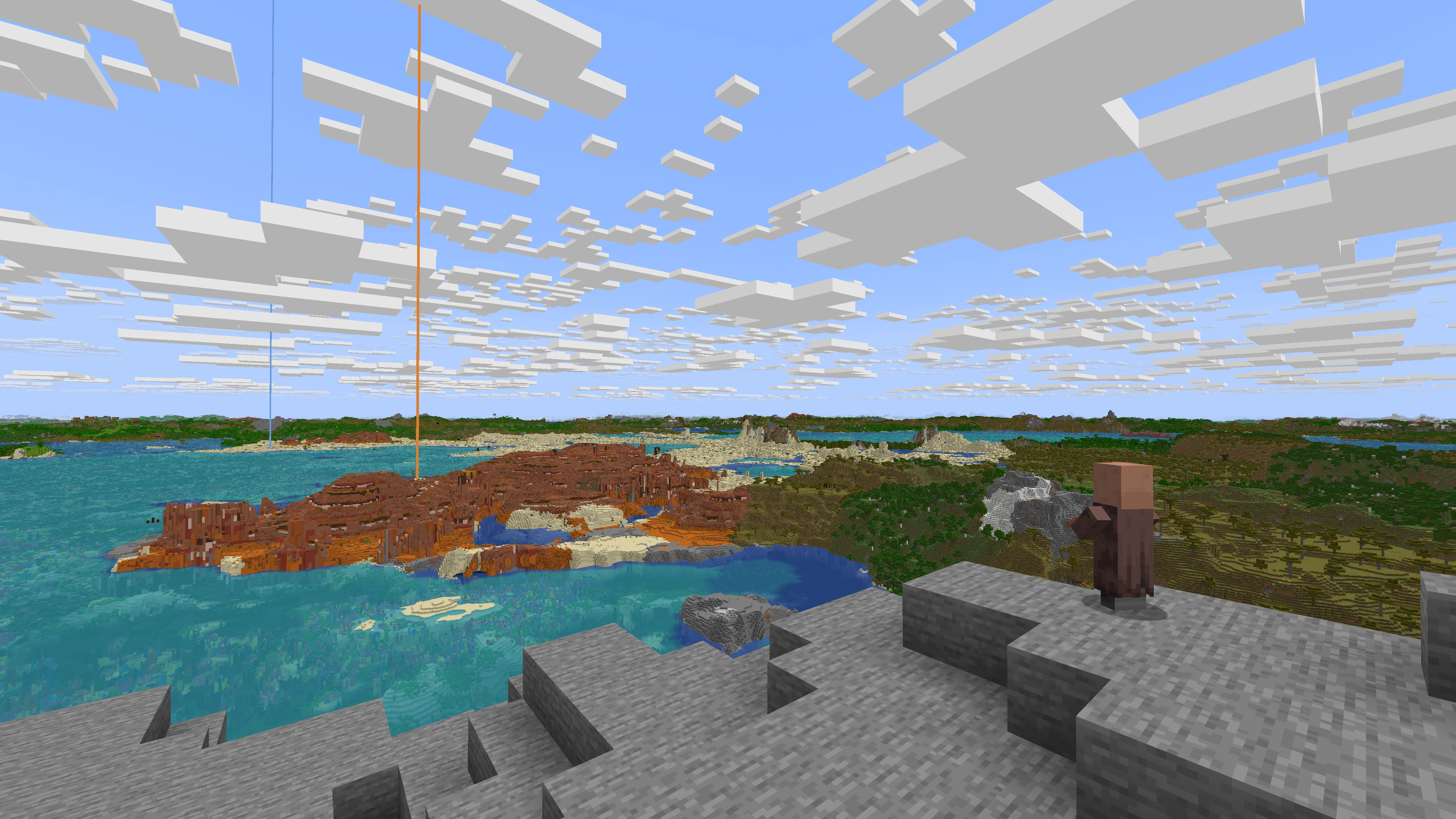
ఈ ఫోటో Minecraft రెండర్ దూరం 8 మరియు మాడ్ దూరం 512 తో తీసుకోబడింది.

తరచుగా అడిగే ప్రశ్నలు:
ప్ర: Forge లేదా Fabric?
జ: MC 1.20.6 మరియు కొత్తవి - NeoForge మరియు Fabric రెండూ ఒకే jar లో ఉన్నాయి.
MC 1.20.4 మరియు పాతవి - Forge మరియు Fabric రెండూ ఒకే jar లో ఉన్నాయి.

ప్ర: Shaders?
జ: అవును, కానీ కొన్ని shaders తో మాత్రమే.
- Optifine: DH ఫార్వర్డ్ రెండర్ చేసిన shaders తో పాక్షికంగా పనిచేస్తుంది.
- Iris (మరియు సమానమైన పోర్ట్లు): DH 2.1.0+ Iris 1.7+ తో మాత్రమే పనిచేస్తుంది మరియు DH మద్దతును దృష్టిలో ఉంచి నిర్మించిన shaders తో మాత్రమే.
- DH 2.0 మరియు పాతవి Iris తో పనిచేయవు.
ప్ర: ఇది ఆటగాడు సృష్టించిన నిర్మాణాలతో పనిచేస్తుందా?
జ: అవును.
ప్ర: ఇది నా GPU ఉపయోగించి రెండర్ చేస్తుందా?
జ: అవును.
Distant Horizons గ్రాఫిక్స్ రెండరింగ్ కోసం OpenGL లేదా Vulkan ఉపయోగిస్తుంది.
ప్ర: మల్టీప్లేయర్ మద్దతు ఉందా?
జ: అవును
క్లయింట్ వైపు మాత్రమే:
మీ క్లయింట్లో DH మాత్రమే ఇన్స్టాల్ చేయబడి ఉంటే, LODs సెషన్ల మధ్య సేవ్ చేయబడతాయి, అయితే వాటిని లోడ్ చేయడానికి మీరు ప్రపంచాన్ని అన్వేషించాలి.
సర్వర్ మరియు క్లయింట్:
DH సర్వర్ మరియు క్లయింట్ రెండింటిలోనూ ఇన్స్టాల్ చేయబడి ఉంటే, DH ఇన్స్టాల్ చేయబడి మరియు Distant Generation Enabled ను true గా సెట్ చేసిన ప్రతి కనెక్ట్ అయిన వినియోగదారుకు LODs స్వయంచాలకంగా పంపబడతాయి, సర్వర్లో distant generation ను నిలిపివేయడం వినియోగదారులకు LODs పంపబడకుండా నిరోధిస్తుంది.
ప్ర: నా గేమ్ స్టట్టర్ అవుతోంది, సహాయం!
జ: ఈ క్రింది దశలను ప్రతిదాన్ని ప్రయత్నించండి:
- Java 21+ కోసం ZGC లేదా Java 8-17 కోసం Shenandoah వంటి కన్కరెంట్ గార్బేజ్ కలెక్టర్ను ఉపయోగించండి
- ఇది మీ JVM ఆర్గ్యుమెంట్ల (args) ద్వారా చేయవచ్చు
- Minecraft కేటాయించిన RAM ను పెంచండి
- 4-8 కోర్లు ఉన్న CPUs కోసం: 6-8 GB కేటాయించడానికి ప్రయత్నించండి
- 10+ కోర్లు ఉన్న CPUs కోసం: 12-16 GB కేటాయించడానికి ప్రయత్నించండి
- DH కాన్ఫిగ్ మెనూలో DH యొక్క CPU లోడ్ను తగ్గించండి
- DH కాన్ఫిగ్ మెనూలో DH యొక్క "Distant Generation" ను నిలిపివేయండి
- DH కాన్ఫిగ్ మెనూలో DH యొక్క "Graphics Preset" ను తగ్గించండి
ప్ర: Bukkit ప్లగిన్ను ఎక్కడ డౌన్లోడ్ చేయగలను?
జ: bukkit ప్లగిన్కు దాని స్వంత ప్రత్యేక డౌన్లోడ్ పేజీ ఉంది:
https://modrinth.com/plugin/distant-horizons-support
విస్తరించిన తరచుగా అడిగే ప్రశ్నలు:
Discord:
వార్తలు, అప్డేట్లు మరియు సహాయం కోసం మా Discord లో చేరండి:
discord.com/invite/xAB8G4cENx
మాకు మద్దతు ఇవ్వండి:
మీరు అభివృద్ధిలో సహాయం చేయాలనుకుంటే, మా discord లో చేరి మాకు తెలియజేయండి!
లేకపోతే, మీరు అభివృద్ధిలో సహాయం చేయలేకపోయినా Distant Horizons కు మద్దతు ఇవ్వాలనుకుంటే, మా విరాళాల పేజీని చూడండి:
ko-fi.com/distanthorizons
Distant Horizons ఎలా ఇన్స్టాల్ చేయాలి
With Millida Launcher
Install Millida Launcher
The launcher is free: download it at millida.net/launcher and sign in with any nickname.
Click “Install” on this page
The launcher opens and installs the mod for Minecraft 1.12–26.3 on Fabric, Forge or NeoForge automatically.
Launch the game
A profile with it appears in the launcher: click “Play”.
Manually
Install Fabric, Forge or NeoForge
The loader must match the game version of the mod file, for example Minecraft 26.3. After installing it, a separate profile appears in your launcher.
Download the file for your version
In the version list above, pick the file DistantHorizons-3.3.4-26.3-fabric-neoforge.jar (27 MB) for your game version and loader.
Put it in the mods folder
The folder is inside .minecraft (Windows: %appdata%\.minecraft\mods). If it does not exist, create it.
Launch the loader profile
Open “Mods” in the main menu: Distant Horizons should be in the list.
On a server
A server on Fabric, Forge or NeoForge
The mod only works on a server with the same loader and game version, for example 26.3.
File goes into the server’s mods folder
Stop the server, put the mod file into the mods folder and start the server again.
Use the “To server” button
On Millida Hosting, the button at the top of the page uploads the file to your server and restarts it for you.
వెర్షన్లు
డిపెండెన్సీలతో
| Minecraft | లోడర్ | ఫైల్ | తేదీ | చర్యలు |
|---|---|---|---|---|
| 26.3 | Fabric, NeoForge | 26.327.2 MB 800 | ||
| 26.3 | Fabric, NeoForge | 26.327.2 MB 1 | ||
| 26.2 | Fabric, NeoForge | 26.226.5 MB 400 | ||
| 26.1.2 | Fabric, NeoForge | 26.1.227 MB 115 | ||
| 1.21.11 | Fabric, NeoForge | 1.21.1127 MB 1,126 | ||
| 1.21.10 | Fabric, NeoForge | 1.21.1027.3 MB 30 | ||
| 1.21.9 | Fabric, NeoForge | 1.21.927.2 MB 2 | ||
| 1.21.8 | Fabric, NeoForge | 1.21.827.1 MB 25 |
FAQ
Which Minecraft versions does Distant Horizons work on?
There are files for 1.12–26.3, 21 versions in total. The newest is 26.3.
Does Distant Horizons need other mods?
The author lists no required dependencies: the Fabric, Forge or NeoForge loader is enough.
Does Distant Horizons work on a server?
Yes. Distant Horizons works both in singleplayer and on a server.
Where can I download Distant Horizons safely?
On this page: the file DistantHorizons-3.3.4-26.3-fabric-neoforge.jar (27 MB) is stored on Millida’s server, with no link shorteners. SHA-1 checksum: 310c0363068dfae18e91f799ed671a591b6ad49a.
సమీక్షలు
Distant Horizonsకు మొదటి రేటింగ్ ఇవ్వండి


