

Minecraft 1.20.1, 1.21.1 కోసం Display Delight మోడ్
Farmer's Delightలోని ప్రతి ఆహార వస్తువును 3Dలో ఉంచడానికి అనుమతిస్తుంది
 NeoForge
 Forge
ForgePlaceable 3D Foods!
This addon lets you place EVERY food item in Farmer's Delight(and other addons) in 3D!
>>Fabric port
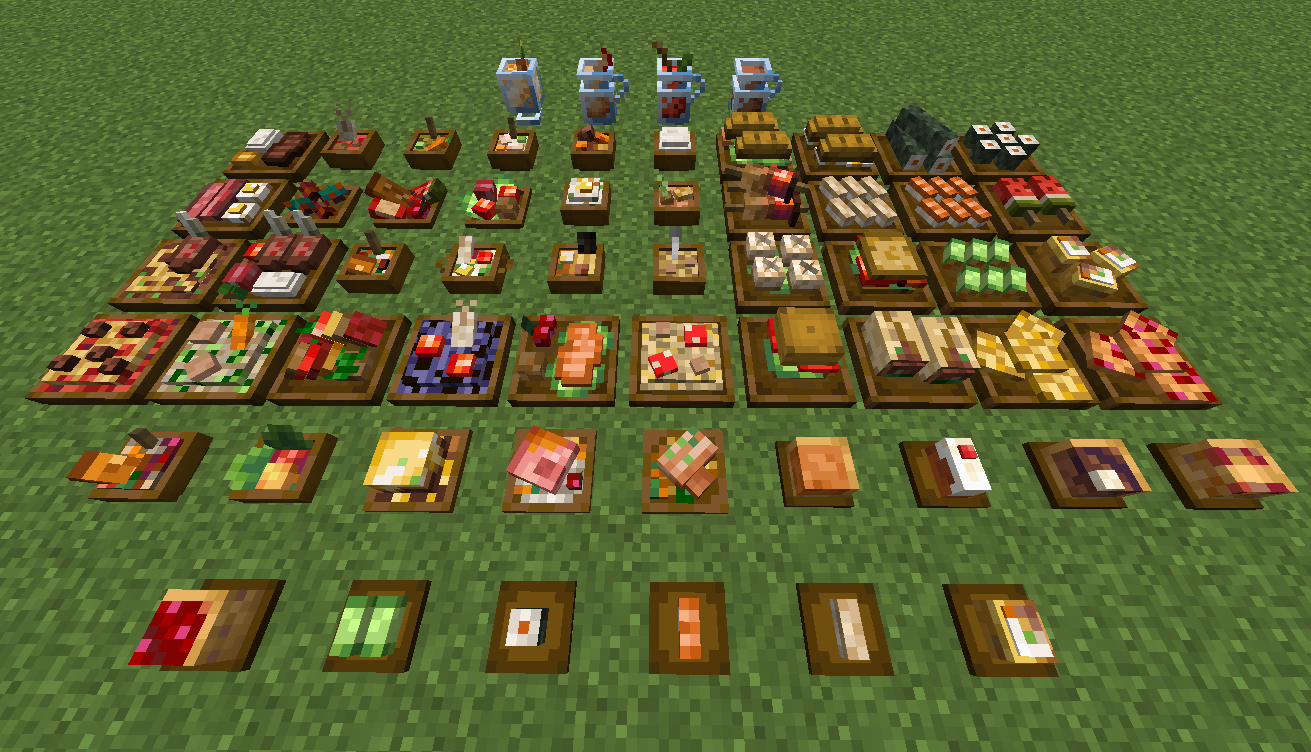
For foods already in containers (bowls, glass bottles, etc.), simply Sneak + Right-click to place them directly on the ground.
All placed food blocks are neither block entities nor entities, which makes them lag-friendly when placed in large amounts.

New Items: Food Plates
Crafted using any wooden slab, plates allow you to display smaller finger foods that don't come in a container. Some finger foods in the larger plates are stackable. (maximum stack size varies)
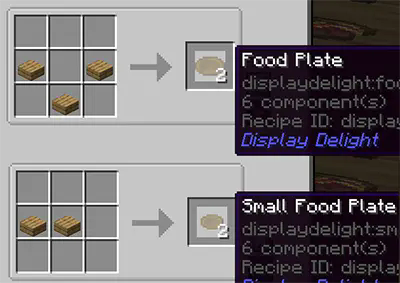
Plate Interactions
- Place All Items: Sneak + Right-click with the food.
- Take One Item: Right-click with an empty hand.
- Take All Items: Sneak + Right-click with an empty hand.

Hiding/showing plates
- Hide the plate: Right-click it with any Axe.
- Show the plate again: Right-click it with a right Food Plate item.
Obtaining Food Block Items in Survival
- Silk Touch: Mine placed foods to drop them as items. (Note: Plated foods must be at maximum stack capacity to drop).
- Wandering Traders: They sell food block items, prioritizing items from add-ons you don't have installed. This is the only way to obtain those specific food blocks in survival
Compatible Addons
- Corn delight - 8 foods
- Expanded Delight - 37 foods
- Delightful - 22 foods
- Pineapple Delight - 6 foods
- Ocean's Delight - 9 foods
- Alex's Delight - 8 foods
- Cultural Delights - 25 foods
- Large Meals - 13 foods
- Festive Delight - 3 foods
- 8 foods from Brewin' and Chewin'
- 15 foods from End's Delight
- 17 foods from Ender's Delight
- 15 foods from Crabber's Delight
- 18 foods from Aquaculture Delight
- 37 foods from My Nether's Delight
- 8 foods from Nether's Delight
- Abnormals Delight - 22 foods
- Miner's Delight+ - 12 foods
- Farmer's Respite - 14 foods
Credits
Farmer's 3D Resource pack by Pder
- Some 3D model designs are originally derived from this resource pack
MB-3D Items Resource pack
Display Delight ఎలా ఇన్స్టాల్ చేయాలి
With Millida Launcher
Install Millida Launcher
The launcher is free: download it at millida.net/launcher and sign in with any nickname.
Click “Install” on this page
The launcher opens and installs the mod for Minecraft 1.20.1–1.21.1 on Forge or NeoForge automatically.
Launch the game
A profile with it appears in the launcher: click “Play”.
Manually
Install Forge or NeoForge
The loader must match the game version of the mod file, for example Minecraft 1.21.1. After installing it, a separate profile appears in your launcher.
Download the file for your version
In the version list above, pick the file displaydelight-1.6.0.jar (1.0 MB) for your game version and loader.
Put it in the mods folder
The folder is inside .minecraft (Windows: %appdata%\.minecraft\mods). If it does not exist, create it.
Launch the loader profile
Open “Mods” in the main menu: Display Delight should be in the list.
On a server
A server on Forge or NeoForge
The mod only works on a server with the same loader and game version, for example 1.21.1.
File goes into the server’s mods folder
Stop the server, put the mod file into the mods folder and start the server again.
Use the “To server” button
On Millida Hosting, the button at the top of the page uploads the file to your server and restarts it for you.
Minecraft 1.21.1 runs on Java 21: with a different Java version the game may close right after launch.
వెర్షన్లు
డిపెండెన్సీలతో
| Minecraft | లోడర్ | ఫైల్ | తేదీ | చర్యలు |
|---|---|---|---|---|
| 1.20.1 | Forge, NeoForge | 1.20.11.1 MB 1 | ||
| 1.21 | NeoForge | 1.211.1 MB | ||
| 1.20.1 | Forge, NeoForge | 1.20.11 MB | ||
| 1.21.1 | NeoForge | 1.21.11 MB | ||
| 1.21.1 | NeoForge | 1.21.11020 KB | ||
| 1.20.1 | Forge, NeoForge | 1.20.1995 KB | ||
| 1.21.1 | NeoForge | 1.21.1985 KB | ||
| 1.20.1 | Forge, NeoForge | 1.20.1734 KB |
FAQ
Which Minecraft versions does Display Delight work on?
There are files for 1.21.1, 1.21, 1.20.1. The newest is 1.21.1.
Is Display Delight for Forge or Fabric?
There are files for Forge: 1.20.1 and for NeoForge: 1.20.1–1.21.1. There are no files for Fabric: a mod for another loader will not start.
Does Display Delight need other mods?
The author lists no required dependencies: the Forge or NeoForge loader is enough.
Does Display Delight work on a server?
Yes. Display Delight works both in singleplayer and on a server.
Which Java does Display Delight need?
Minecraft 1.21.1 runs on Java 21. If the game closes right after launch, the usual cause is the wrong Java version in the profile settings.
Where can I download Display Delight safely?
On this page: the file displaydelight-1.6.0.jar (1.0 MB) is stored on Millida’s server, with no link shorteners. SHA-1 checksum: a53384fc7e66b1ed25f34fe8b168ba8174b69b2f.
సమీక్షలు
Display Delightకు మొదటి రేటింగ్ ఇవ్వండి


