

Minecraft 1.21.10 కోసం Disenchanter మోడ్
లూట్ వృథా కాకూడదు కాబట్టి సౌకర్యవంతమైన Disenchanter
 Fabric
 Quilt
QuiltDisenchanter మోడ్ గురించి
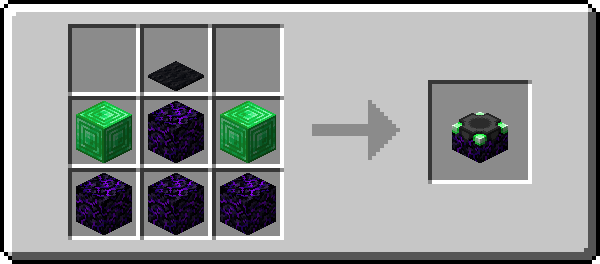
The Disenchanter is a deceptively simple device for recovering enchantments from items. Use it by itself, and the first enchantment will be returned and the item destroyed. Use one of the Catalysts however and you will get a different set of enchantments back. Some of them will even preserve the item in the process!
To use the Disenchanter, craft one, place it down and right-click to open its interface. In the leftmost slot you can put the item you want to be disenchanted. The rightmost slot takes books onto which the enchantments are transferred. The center slot is for the Catalysts, which are outlined in the following section. As mentioned above, you can also use the Disenchanter without having anything in that slot.
Amethyst Shard: Recovers the first enchantment and preserves the item Diamond: Recovers two random enchantments and the first one Emerald: Recovers two random enchantments Ender Pearl: Recovers one random enchantment. Here, the item is also preserved but will take 500 durability damage Experience Bottle: Recovers all enchantments that are at the same level as the highest one present Heart Of The Sea: Recovers all enchantments but reduces them by one level Nether Star: Recovers all enchantments and preserves the item
Join the Wisp Forest Discord if you have any questions, issues or other remarks - we'll be happy to help
Disenchanter ఎలా ఇన్స్టాల్ చేయాలి
With Millida Launcher
Install Millida Launcher
The launcher is free: download it at millida.net/launcher and sign in with any nickname.
Click “Install” on this page
The launcher opens and installs the mod for Minecraft 1.21.9–1.21.10 on Fabric or Quilt automatically.
Launch the game
A profile with it appears in the launcher: click “Play”.
Manually
Install Fabric or Quilt
The loader must match the game version of the mod file, for example Minecraft 1.21.10. After installing it, a separate profile appears in your launcher.
Download the file for your version
In the version list above, pick the file disenchanter-0.1.11+1.21.9.jar (100 KB) for your game version and loader.
Put it in the mods folder
The folder is inside .minecraft (Windows: %appdata%\.minecraft\mods). If it does not exist, create it.
Launch the loader profile
Open “Mods” in the main menu: Disenchanter should be in the list.
Minecraft 1.21.10 runs on Java 21: with a different Java version the game may close right after launch.
వెర్షన్లు
డిపెండెన్సీలతో
| Minecraft | లోడర్ | ఫైల్ | తేదీ | చర్యలు |
|---|---|---|---|---|
| 1.21.9 | Fabric, Quilt | [1.21.9+] Disenchanter - 0.1.11100 KB | ||
| — | Fabric | [1.18-pre7] Disenchanter - 0.1.274.5 KB |
FAQ
Which Minecraft versions does Disenchanter work on?
There are files for 1.21.10, 1.21.9. The newest is 1.21.10.
Is Disenchanter for Forge or Fabric?
There are files for Fabric: 1.21.9–1.21.10 and for Quilt: 1.21.9–1.21.10. There are no files for Forge or NeoForge: a mod for another loader will not start.
Does Disenchanter need other mods?
The author lists no required dependencies: the Fabric or Quilt loader is enough.
Which Java does Disenchanter need?
Minecraft 1.21.10 runs on Java 21. If the game closes right after launch, the usual cause is the wrong Java version in the profile settings.
Where can I download Disenchanter safely?
On this page: the file disenchanter-0.1.11+1.21.9.jar (100 KB) is stored on Millida’s server, with no link shorteners. SHA-1 checksum: 7cf9c46587f30dc472b7a33c234747501df74284.
సమీక్షలు
Disenchanterకు మొదటి రేటింగ్ ఇవ్వండి


