

Minecraft 1.21.1, 1.21 కోసం Concentration మోడ్
Minecraft 1.20.6+ కోసం బార్డర్లెస్ ఫుల్స్క్రీన్ మద్దతు
 Forge
Forge NeoForge
 Fabric
 Quilt
QuiltIntroduction
Added borderless support for Minecraft 1.20.6+.
For Windows user: Exclusive mode is the best choice. For Linux (with X11) user: Borderless and Exclusive mode should all be fine. For Linux (with wayland) user: Exclusive may works better than Borderless mode. For macOS user: I'm not sure but Borderless maybe better than Exclusive mode.
Compatiblility
Sodium
Only supports sodium 0.6+.
Embeddium
Totally fine, no conflicts.
Vulkan Mod
As a user reported in issue#7, the borderless fullscreen provided by Vulkan Mod not works. So I add compatibility with Vulkan Mod so that you can use Concentration as an alternative borderless fullscreen with Vulkan Mod.
For Modpackers
You can use my mod in your modpack, however please don't provide the mod file directly, use mrpack or any other modpack format instead.
Screenshots
Vanilla
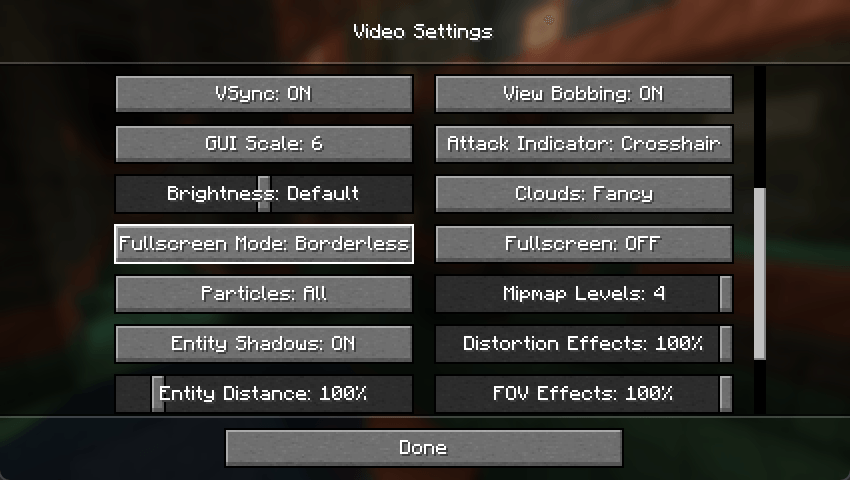
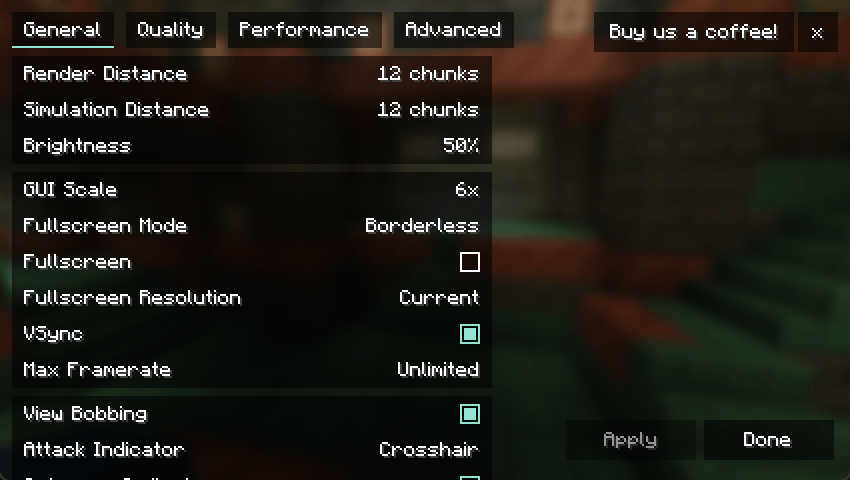
with Sodium
with VulkanMod
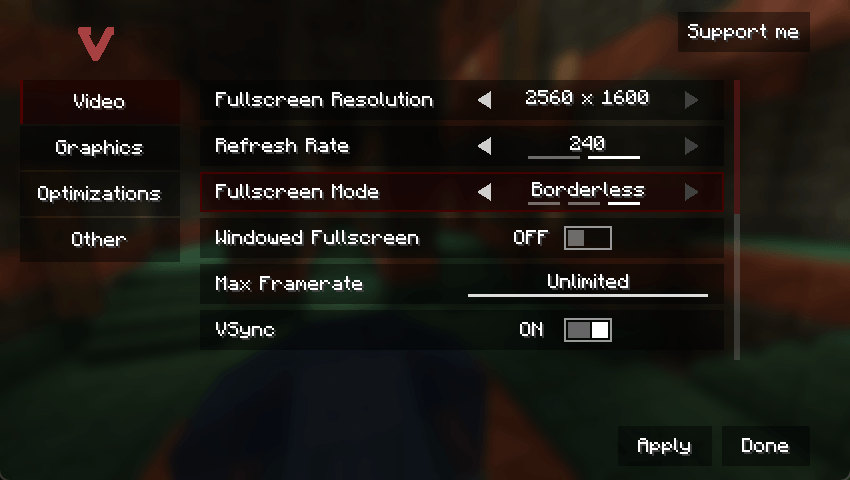
Concentration ఎలా ఇన్స్టాల్ చేయాలి
With Millida Launcher
Install Millida Launcher
The launcher is free: download it at millida.net/launcher and sign in with any nickname.
Click “Install” on this page
The launcher opens and installs the mod for Minecraft 1.21–1.21.3 on Fabric, Forge, NeoForge or Quilt automatically.
Launch the game
A profile with it appears in the launcher: click “Play”.
Manually
Install Fabric, Forge, NeoForge or Quilt
The loader must match the game version of the mod file, for example Minecraft 1.21.3. After installing it, a separate profile appears in your launcher.
Download the file for your version
In the version list above, pick the file Concentration-forge-1.21-2.3.0.jar (40 KB) for your game version and loader.
Put it in the mods folder
The folder is inside .minecraft (Windows: %appdata%\.minecraft\mods). If it does not exist, create it.
Launch the loader profile
Open “Mods” in the main menu: Concentration should be in the list.
Minecraft 1.21.3 runs on Java 21: with a different Java version the game may close right after launch.
వెర్షన్లు
డిపెండెన్సీలతో
| Minecraft | లోడర్ | ఫైల్ | తేదీ | చర్యలు |
|---|---|---|---|---|
| 1.21 | Forge | concentration-forge-1.21-2.3.0.jar40.4 KB | ||
| 1.21 | NeoForge | concentration-neoforge-1.21-2.3.0.jar47.9 KB | ||
| 1.21 | Fabric, Quilt | concentration-fabric-1.21-2.3.0.jar55.5 KB |
FAQ
Which Minecraft versions does Concentration work on?
There are files for 1.21.3, 1.21.2, 1.21.1, 1.21. The newest is 1.21.3.
Is Concentration for Forge or Fabric?
There are files for Fabric: 1.21–1.21.3, for Forge: 1.21–1.21.3, for NeoForge: 1.21–1.21.3 and for Quilt: 1.21–1.21.3.
Does Concentration need other mods?
The author lists no required dependencies: the Fabric, Forge, NeoForge or Quilt loader is enough.
Which Java does Concentration need?
Minecraft 1.21.3 runs on Java 21. If the game closes right after launch, the usual cause is the wrong Java version in the profile settings.
Where can I download Concentration safely?
On this page: the file Concentration-forge-1.21-2.3.0.jar (40 KB) is stored on Millida’s server, with no link shorteners. SHA-1 checksum: 3ae2c4830f0733f226fa5cd9148c6cee1215ca28.
సమీక్షలు
Concentrationకు మొదటి రేటింగ్ ఇవ్వండి


