

 NeoForge
 Fabric
 Quilt
 Forge
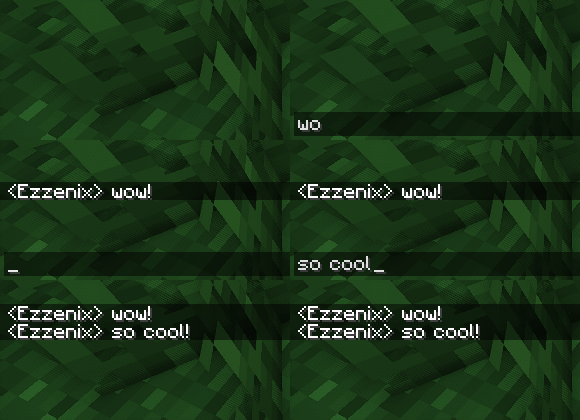
✨ చాట్ యానిమేషన్
- సున్నితమైన యానిమేషన్లను జోడించడం ద్వారా చాట్ దృశ్యాలను మెరుగుపరుస్తుంది.
- సందేశాలకు ఎడమవైపున ఉన్న సందేశ సూచిక రేఖను ఐచ్ఛికంగా తొలగిస్తుంది.
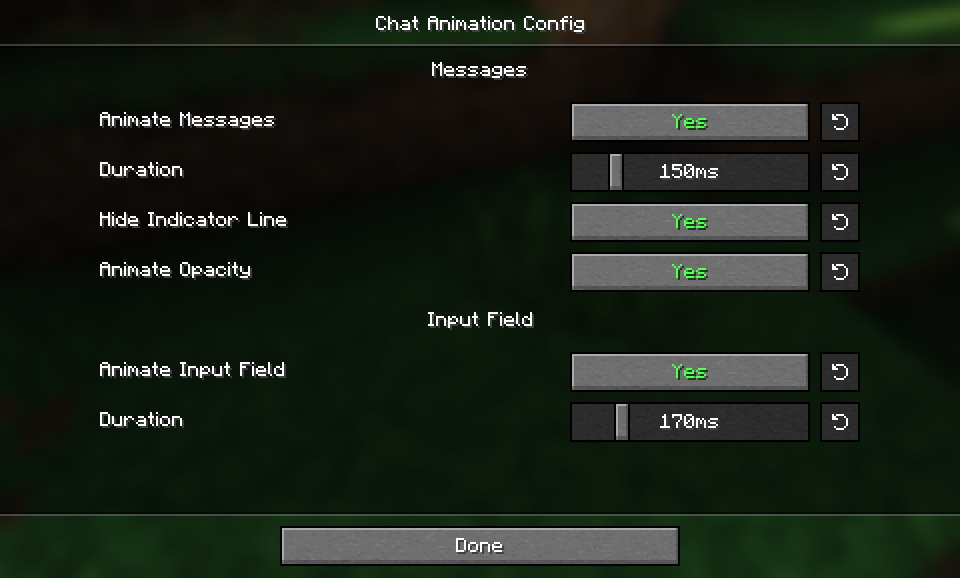
- Fabricలో Mod Menu ఉపయోగించి మోడ్ను కాన్ఫిగర్ చేయవచ్చు.
నా మరో మోడ్ను కూడా చూడండి: Smooth Gui

Chat Animation [Smooth Chat] ఎలా ఇన్స్టాల్ చేయాలి
With Millida Launcher
Install Millida Launcher
The launcher is free: download it at millida.net/launcher and sign in with any nickname.
Click “Install” on this page
The launcher opens and installs the mod for Minecraft 1.20.1–26.3 on Fabric, Forge, NeoForge or Quilt automatically.
Launch the game
A profile with it appears in the launcher: click “Play”.
Manually
Install Fabric, Forge, NeoForge or Quilt
The loader must match the game version of the mod file, for example Minecraft 26.3. After installing it, a separate profile appears in your launcher.
Download the file for your version
In the version list above, pick the file chatanimation-neoforge-1.3.5+mc26.3.jar (1.0 MB) for your game version and loader.
Put it in the mods folder
The folder is inside .minecraft (Windows: %appdata%\.minecraft\mods). If it does not exist, create it.
Launch the loader profile
Open “Mods” in the main menu: Chat Animation [Smooth Chat] should be in the list.
Chat Animation [Smooth Chat] works on the player’s side only: there is no need to install it on a server.
వెర్షన్లు
డిపెండెన్సీలతో
| Minecraft | లోడర్ | ఫైల్ | తేదీ | చర్యలు |
|---|---|---|---|---|
| 26.3 | NeoForge | 26.31 MB 8 | ||
| 26.3 | Fabric, Quilt | 26.3423 KB 125 | ||
| 26.2 | NeoForge | 26.21 MB 1 | ||
| 26.2 | Fabric, Quilt | 26.2423 KB 64 | ||
| 1.21.11 | NeoForge | 1.21.111 MB 7 | ||
| 26.1.2 | NeoForge | 26.1.21 MB | ||
| 1.21.5 | Forge | 1.21.51 MB 1 | ||
| 1.21.10 | NeoForge | 1.21.101 MB |
ఇది రన్ అవ్వడానికి కావాల్సినవి
- Mod Menuఐచ్ఛికం
FAQ
Which Minecraft versions does Chat Animation [Smooth Chat] work on?
There are files for 1.20.1–26.3, 18 versions in total. The newest is 26.3.
Is Chat Animation [Smooth Chat] for Forge or Fabric?
There are files for Fabric: 1.21–26.3, for Forge: 1.20.1–1.21.5, for NeoForge: 1.21.5–26.3 and for Quilt: 1.21–26.3.
Does Chat Animation [Smooth Chat] need other mods?
The author lists no required dependencies: the Fabric, Forge, NeoForge or Quilt loader is enough.
Do I need to install Chat Animation [Smooth Chat] on a server?
No. Chat Animation [Smooth Chat] works on the player’s side only: there is no need to install it on a server.
Where can I download Chat Animation [Smooth Chat] safely?
On this page: the file chatanimation-neoforge-1.3.5+mc26.3.jar (1.0 MB) is stored on Millida’s server, with no link shorteners. SHA-1 checksum: b9d5ba6032808af3a3616eb21586d88ae82c9cfe.
సమీక్షలు
Chat Animation [Smooth Chat]కు మొదటి రేటింగ్ ఇవ్వండి


