
Minecraft 26.2 కోసం Catalogue మోడ్
అన్ని మోడ్లోడర్ల కోసం ఒక సార్వత్రిక మోడ్ జాబితా మెనూ!
 NeoForge
 Fabric
 Forge
ForgeCatalogue మోడ్ గురించి





📖 గురించి:
Catalogue అనేది అన్ని మాడ్లోడర్లపై పనిచేయడానికి రూపొందించిన సార్వత్రిక మాడ్ జాబితా మెనూ. Catalogue ఆటగాళ్లకు ఈ విధంగా గొప్ప అనుభవాన్ని అందిస్తుంది:
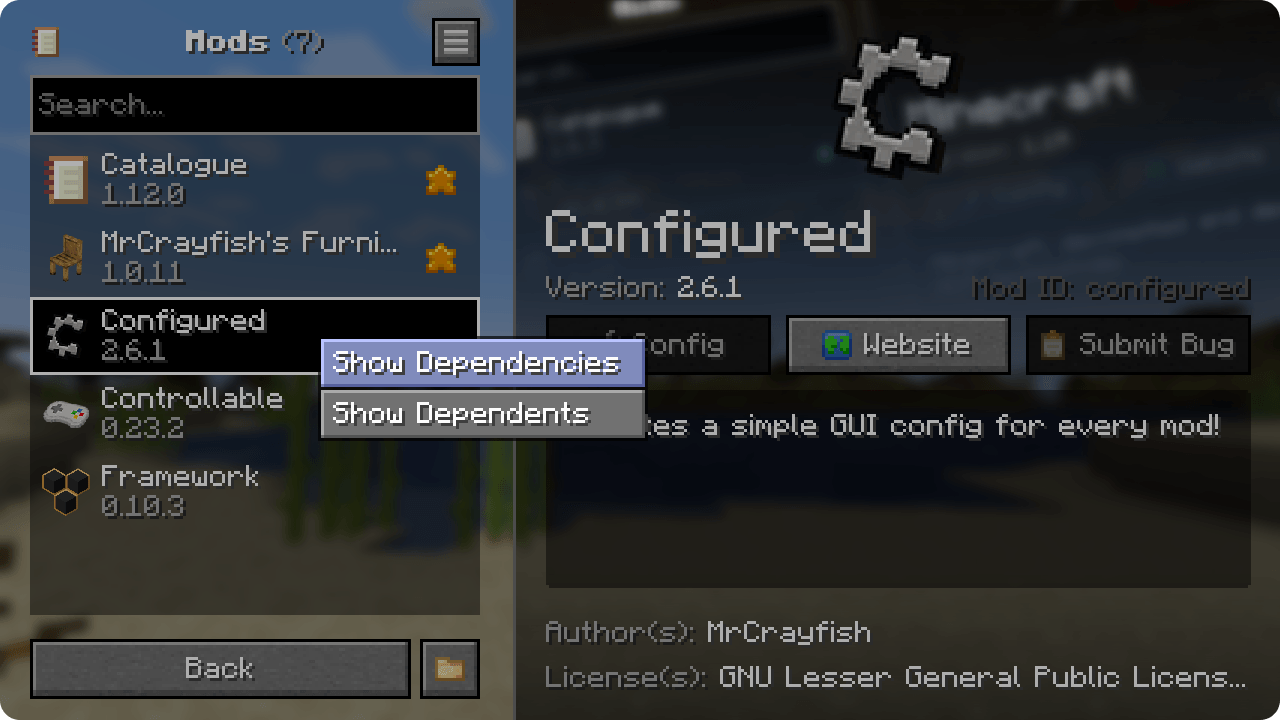
- ఆధునిక మరియు సహజమైన UI డిజైన్ కలిగి ఉండటం
- మాడ్ జాబితాను వెతకడానికి మీకు అవకాశం ఇవ్వడం.
- అప్డేట్, కాన్ఫిగ్ మరియు మరిన్ని ఉన్నాయా అనే ఆధారంగా మాడ్లను ఫిల్టర్ చేయడం.
- ఒక మాడ్ను ఫేవరెట్ చేయడానికి అనుమతించడం, ఇది ఫేవరెట్ ఫస్ట్ ద్వారా క్రమబద్ధీకరించినప్పుడు వేగవంతమైన యాక్సెస్ను అనుమతిస్తుంది.
- జాబితాలోని మాడ్పై రైట్ క్లిక్ > షో డిపెండెన్సీస్ ద్వారా మాడ్ యొక్క డిపెండెన్సీలను చూపడం.
- మాడ్లోడర్లు మరియు మాడ్లు జోడించిన లైబ్రరీలను దాచడం.
- మాడ్ యొక్క కాన్ఫిగ్లు, వెబ్సైట్ హోమ్పేజీని యాక్సెస్ చేయడానికి మరియు వారి ట్రాకర్కు సమస్యలను సమర్పించడానికి షార్ట్కట్లను అందించడం.
Catalogue ఆటోమేటిక్గా Forge/NeoForge మాడ్ల లోగో చిత్రాలను మరియు Fabric మాడ్ల నుండి ఐకాన్లను మద్దతు ఇస్తుంది. ఐకాన్ లేకపోతే ఇది మాడ్ నుండి ఐటమ్లను కూడా ఉపయోగిస్తుంది. మీరు Fabric ఉపయోగిస్తుంటే, Mod Menu యొక్క కాన్ఫిగ్ ఎంట్రీపాయింట్ను Catalogueతో పనిచేయించడానికి అనుమతించవచ్చు

Menulogue
📦 డెవలపర్లు:

డిఫాల్ట్గా, Catalogue ఇప్పటికే ఉన్న అసెట్లను ఉపయోగించడానికి ప్రయత్నిస్తుంది, ఉదాహరణకు Fabric యొక్క లోగో మరియు NeoForge/Forge యొక్క logoFile. అయితే మీ మాడ్ యొక్క రూపం మరియు అనుభూతిపై పూర్తి నియంత్రణ ఇచ్చే అదనపు బ్రాండింగ్ ఎంపికలు Catalogueలో ఉన్నాయి. ఈ ఫీచర్ గురించి మరింత తెలుసుకోవడానికి, బ్రాండింగ్ గైడ్ చూడండి.
📷 స్క్రీన్షాట్లు:
🙋♀️ మద్దతు కావాలా? అధికారిక Discord సర్వర్లో చేరండి:
మద్దతు కోసం కామెంట్ విభాగం అంత బాగుండదు, అధికారిక discord సర్వర్లో చేరండి. మాడ్లను ఇన్స్టాల్ చేయడం మరియు కాన్ఫిగర్ చేయడం, క్రాష్లను పరిష్కరించడం మరియు మరిన్నింటిలో మీరు సహాయం పొందవచ్చు! అదనంగా మాడ్ అప్డేట్లు మరియు డెవలప్మెంట్ గురించిన వార్తలను కూడా (మరెక్కడా కంటే ముందుగా) పొందుతారు.

Catalogue ఎలా ఇన్స్టాల్ చేయాలి
With Millida Launcher
Install Millida Launcher
The launcher is free: download it at millida.net/launcher and sign in with any nickname.
Click “Install” on this page
The launcher opens and installs the mod for Minecraft 1.21.11–26.2 on Fabric, Forge or NeoForge automatically.
Launch the game
A profile with it appears in the launcher: click “Play”.
Manually
Install Fabric, Forge or NeoForge
The loader must match the game version of the mod file, for example Minecraft 26.2. After installing it, a separate profile appears in your launcher.
Download the file for your version
In the version list above, pick the file catalogue-neoforge-26.2-1.12.3.jar (302 KB) for your game version and loader.
Put it in the mods folder
The folder is inside .minecraft (Windows: %appdata%\.minecraft\mods). If it does not exist, create it.
Launch the loader profile
Open “Mods” in the main menu: Catalogue should be in the list.
వెర్షన్లు
డిపెండెన్సీలతో
| Minecraft | లోడర్ | ఫైల్ | తేదీ | చర్యలు |
|---|---|---|---|---|
| 26.2 | NeoForge | Catalogue 1.12.3302 KB 2 | ||
| 26.2 | Fabric | Catalogue 1.12.3309 KB 21 | ||
| 1.21.11 | Forge | Catalogue 1.12.3301 KB 22 |
FAQ
Which Minecraft versions does Catalogue work on?
There are files for 26.2, 1.21.11. The newest is 26.2.
Is Catalogue for Forge or Fabric?
There are files for Fabric: 26.2, for Forge: 1.21.11 and for NeoForge: 26.2.
Does Catalogue need other mods?
The author lists no required dependencies: the Fabric, Forge or NeoForge loader is enough.
Where can I download Catalogue safely?
On this page: the file catalogue-neoforge-26.2-1.12.3.jar (302 KB) is stored on Millida’s server, with no link shorteners. SHA-1 checksum: de28c4c89be87f5e2815da82a5e877231eaddca0.
సమీక్షలు
Catalogueకు మొదటి రేటింగ్ ఇవ్వండి


