

Minecraft 26.3 కోసం A Good Place మోడ్
బ్లాక్లకు ప్లేస్మెంట్ యానిమేషన్లను జోడించే మోడ్
 Fabric
 NeoForge
A Good Place
📖 About 📖
This mod adds fancy new animations for block placement.
The process is entirely customizable through the use of Resource Packs. With this sytem you'll be able to customize every aspect of the animation starting from which block it affects to how the animation itself plays out, tweakable via various control points.
To edit the existing animation simply hop into your resource pack folder.
There you'll find a Sample Pack in which you can simply edit the only json file there. Be sure to read the Readme.md file for an in depth explaiantion or check out the WIKI here.
You Might have to enable the default texture pack in your resource pack folder when you first install this mod
Also be sure to share your custom animations with us!
🖼️ Media🖼️
🔧 Customization🔧
As explained previously every aspect of the mod is fully customizable, starting from which blocks are affected to how they are animated.
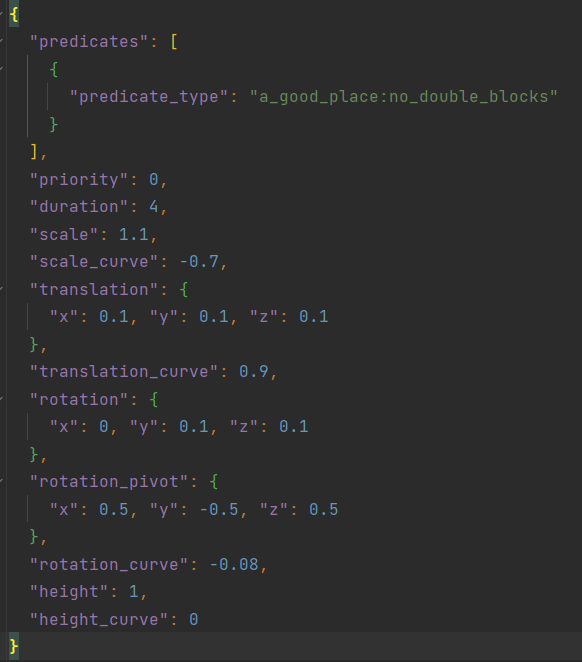
To start simply go into your Resource Pack folder, there you'll find a sample pack already made for you. You can edit its jsons files or add new ones to create one or more animations. Here's an example of how the default animation json file looks like.
A Good Place ఎలా ఇన్స్టాల్ చేయాలి
With Millida Launcher
Install Millida Launcher
The launcher is free: download it at millida.net/launcher and sign in with any nickname.
Click “Install” on this page
The launcher opens and installs the mod for Minecraft 26.1–26.3 on Fabric or NeoForge automatically.
Launch the game
A profile with it appears in the launcher: click “Play”.
Manually
Install Fabric or NeoForge
The loader must match the game version of the mod file, for example Minecraft 26.3. After installing it, a separate profile appears in your launcher.
Download the file for your version
In the version list above, pick the file a_good_place-26.3-1.3.9-fabric.jar (90 KB) for your game version and loader.
Put it in the mods folder
The folder is inside .minecraft (Windows: %appdata%\.minecraft\mods). If it does not exist, create it.
Launch the loader profile
Open “Mods” in the main menu: A Good Place should be in the list.
A Good Place works on the player’s side only: there is no need to install it on a server.
వెర్షన్లు
డిపెండెన్సీలతో
| Minecraft | లోడర్ | ఫైల్ | తేదీ | చర్యలు |
|---|---|---|---|---|
| 26.3 | Fabric | 26.389.7 KB 117 | ||
| 26.2 | NeoForge | 26.291.4 KB 3 | ||
| 26.2 | Fabric | 26.289.8 KB 56 | ||
| 26.1.2 | NeoForge | 26.1.291.4 KB | ||
| 26.1.2 | Fabric | 26.1.289.9 KB 13 | ||
| 26.3 | Fabric | 26.389.8 KB 1 | ||
| 26.2 | Fabric | 26.289.5 KB | ||
| 26.2 | NeoForge | 26.292.7 KB |
సమీక్షలు
A Good Placeకు మొదటి రేటింగ్ ఇవ్వండి


