

Minecraft 1.19.2 కోసం Modrinth Tech Rat Build
స్నేహితులు మరియు కుటుంబం కోసం Immersive Tech మోడ్ప్యాక్, ఇక్కడ మీరు ఇతరులను మీ సింగిల్ ప్లేయర్ ప్రపంచానికి ఆహ్వానించవచ్చు. ఆటోమేషన్, అంతరిక్ష ప్రయాణం, తుపాకులు, కార్లు, విమానాలు, అనేక మాబ్లు మరియు తక్షణమే ఏర్పాటు చేయగల భవనాలు కూడా ఉన్నాయి :).
- వ్యూలు
- 53 వ్యూలు
- అప్డేట్ చేయబడింది
- అప్డేట్ చేయబడింది 03.09.2026
- 1.19.2
 Fabric
- క్లయింట్ మరియు సర్వర్
Modrinth Tech Rat మోడ్ప్యాక్ గురించి
This modpack focusses on tech, exploration and quality of life mods to enjoy in a social setting with friends and family.
The pack started in 1.19.2 and almost all features carried over into 1.20.1.

Warnings when upgrading your 1.19.2 world to 1.20.1:
- Bookshelves will loose their inventory. First go move out all items from your bookshelves if you're not ok with loosing it.
- Scout pouches and their contents will be lost, so first remove their contents before updating to the 1.20.1 version.
- Campanion items will be lost (the mod is not for Minecraft 1.20.1 yet.). Grappling hooks, sleeping bags and rope bridges, etc., all now have replacement mods for similar functionality.
- Defensive Measures mod not 1.20.1 compatible yet, so you'll loose those traps, turrets and cannons.
- Many mob mods (e.g: Goodall, Mega Parrots, etc.) were not 1.20.1 compatible yet, so those mobs will be gone.
- ItemSwapper removed - not so ideal with modded, so I stopped using it.
- Your keybindings will be reset to modpack defaults for 1.20.1 (which differs from the 1.19.2 version)
- Some Prefab materials might be missing, so some prefab structures might have their walls gone, for example.
(My main focus is the Colonies and Technologies pack, but I'll try keep this one up to date for 1.20.1.)
Highlights to mention:
- A dad joke on world load (Daily Dad)
- GUI and interface improvements (AutoHUD, Slot Cycler, Switcheroo, and more.)
- Beautiful World Generation and fun exploration. (Terralith, Yung's mods, Better Nether & End and When Dungeons Arise)
- Many new mobs (Hybrid Aquatic, Beetlebox, Ender Zoology, Naturalist, Skeletal Remains, Tiny Skeletons)
- Origins and Origins Skills
- Vein Mining
- Single Player world hosting (Essential: Invite friends into your single player world, emotes, cosmetics.)
- Revive downed allies (Hardcore Revival)
- Instant Building Deployments (Prefabicated)
- Space Travel (Ad Astra)
- Automation (Modern Industrialisation & Create)
- Storage solutions (backpacks, larger chests and Tom's simple storage)
- Cars (Automobility)
- Immersive Aircraft
- Guns (MCHalo)
- Custom tools (Forging & Smelting with Forgero & Alloy Forgery, or use Piercing Paxels)
- Combat & Weapons (Better Combat, Simply Swords)
- Advanced Key Mapping support (Amecs - allows more combinations with Ctr/Shift/etc.)
- In-Game Boombox/DJ'ing (Iam Music Player)
- Huge amounts of build customisation with furniture mods like Paladin's Furnitue and other mods like Chipped and Wunderreich
- A completionist index to track all items in the pack that you've collected.
- Remember to always first do a backup of your world.
Getting Started:
- Check Key Mappings Images for default important/recommended keys.
- Be aware of these features (familiarise yourself with the keys you want for it):
- Sneak + r-click any chest or mob to move them (while having both hands empty).
- Hold the vein mining key for vein mining. (default ^ or ~)
- Hold the Crawl key to crawl whenever you want. (default caps lock)
- Origin ability buttons (Where relevant, default g & h.)
- Combat Roll (Default Mouse 4)
- Multiplayer Ping (Default Mouse 5)
- Go deploy your first Prefab starter base (It has basic stone tools, leather armor and food in a chest somewhere)
- Explore a bit for loot
- Build an Alloy Forge for smelting ores
- Use Compact Storage, Extended Drawers and Tom's Simple Storage for easier storage management
- Build a steam powered drill for 3x3 silk touch branch mining
- Build a Weapon Crafter for some guns
- Eventually, go to space with your rockets :)
Some Default Keybindings:
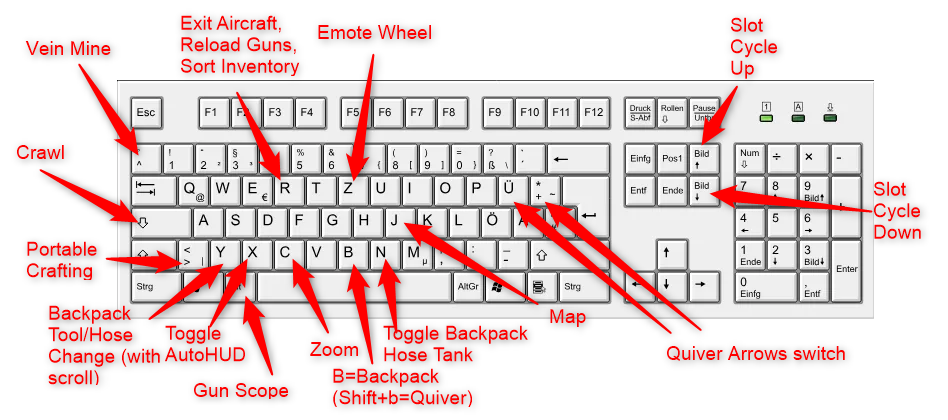
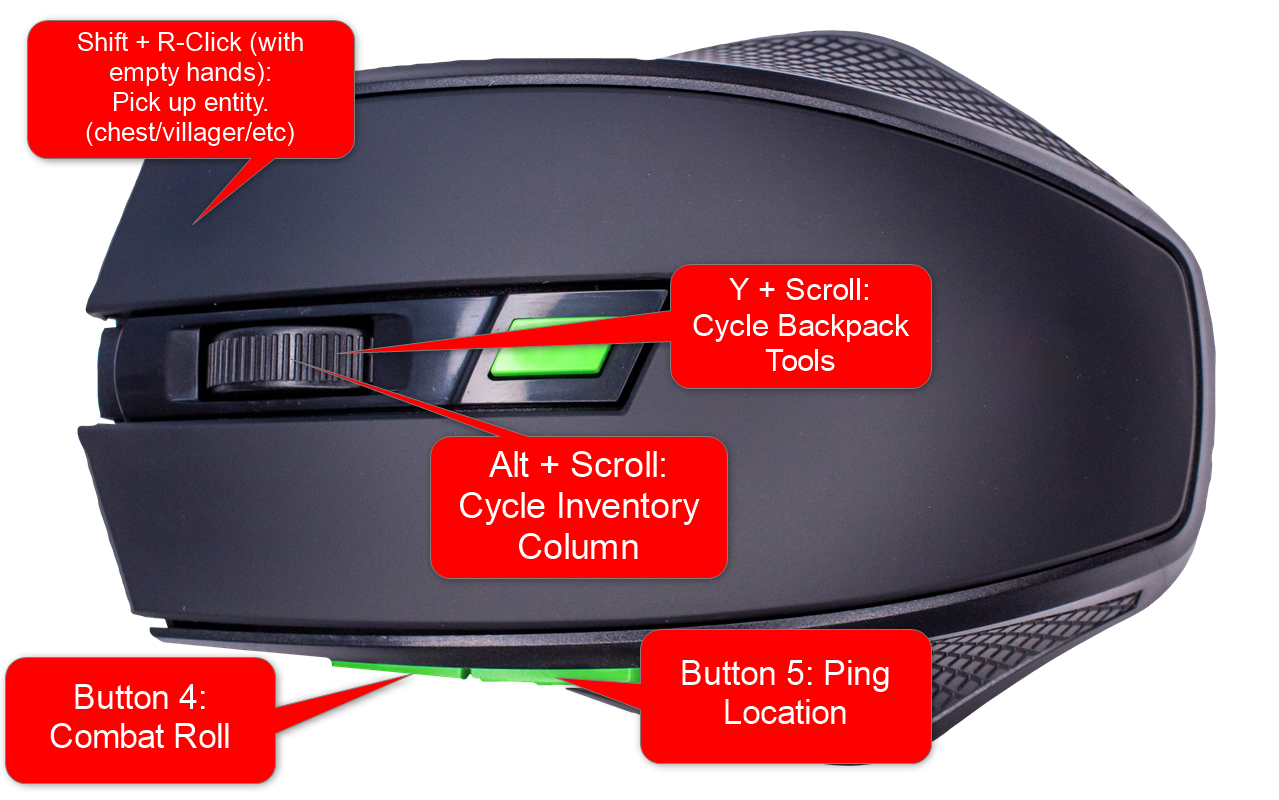
Focussing on Modrinth mods only (hence the name), where possible. (Had to use Compact Storage from Curseforge for the 1.20.1 version, due to the Modrinth version not being up to date.) Also intentionally avoiding magic mods, to keep the pack more family friendly, where feasible.
Known issues and workarounds:
- If picking up a map from a chest causes a client crash: Delete the map from user inventory via NBTExplorer.
- Loading End crashes server (Description: Watching Server): Try changing your Max Tick Time from 60000 to -1 in your server properties to allow longer load times.
(Logo design by Freepik.)

Modrinth Tech Rat ఎలా ఇన్స్టాల్ చేయాలి
With Millida Launcher
Install Millida Launcher
The launcher is free: download it at millida.net/launcher and sign in with any nickname.
Click “Install” on this page
The launcher opens and installs the modpack for Minecraft 1.19.2 on Fabric automatically.
Launch the game
A profile with it appears in the launcher: click “Play”.
Manually
Download the modpack archive
In the version list above, pick the file Modrinth Tech Rat v19 19.mrpack (2.1 MB).
Import it into a launcher
A launcher that supports modpacks (Millida Launcher, Prism) takes the archive via “Add modpack”, then “From file”. No need to unpack it yourself.
Allocate memory
Modpacks need more memory than the plain game: set 4–6 GB in the profile settings.
On a server
Use the “To server” button
On Millida Hosting, the button at the top of the page uploads the file to your server and restarts it for you.
Invite friends: they install the same modpack
To join the server, every player needs the same modpack version.
Minecraft 1.19.2 runs on Java 17: with a different Java version the game may close right after launch.
వెర్షన్లు
డిపెండెన్సీలతో
| Minecraft | లోడర్ | ఫైల్ | చర్యలు |
|---|---|---|---|
| 1.19.2 | Fabric | 1.19.22.1 MB |
ఇది రన్ అవ్వడానికి కావాల్సినవి
- Dependencyఇప్పటికే చేర్చబడింది
- Dependencyఇప్పటికే చేర్చబడింది
- Advancement Plaquesఇప్పటికే చేర్చబడింది
- Dependencyఇప్పటికే చేర్చబడింది
- Dependencyఇప్పటికే చేర్చబడింది
- Dependencyఇప్పటికే చేర్చబడింది
- Essential Modఇప్పటికే చేర్చబడింది
- libIPNఇప్పటికే చేర్చబడింది
- Dependencyఇప్పటికే చేర్చబడింది
- Dependencyఇప్పటికే చేర్చబడింది
- Dependencyఇప్పటికే చేర్చబడింది
- Dependencyఇప్పటికే చేర్చబడింది
FAQ
Which Minecraft versions does Modrinth Tech Rat work on?
Only Minecraft 1.19.2: there are no files for other versions.
Is Modrinth Tech Rat for Forge or Fabric?
Only for Fabric: 1.19.2.
Which mods are in the Modrinth Tech Rat modpack?
Mods in the modpack include Dependency, Advancement Plaques, Essential Mod, libIPN.
Which Java does Modrinth Tech Rat need?
Minecraft 1.19.2 runs on Java 17. If the game closes right after launch, the usual cause is the wrong Java version in the profile settings.
Where can I download Modrinth Tech Rat safely?
On this page: the file Modrinth Tech Rat v19 19.mrpack (2.1 MB) is stored on Millida’s server, with no link shorteners. SHA-1 checksum: ad12d642fc87864c7e2abc79dfb9ad79704d7c5e.
సమీక్షలు
Modrinth Tech Ratకు మొదటి రేటింగ్ ఇవ్వండి


