
Vertoak City మ్యాప్ గురించి
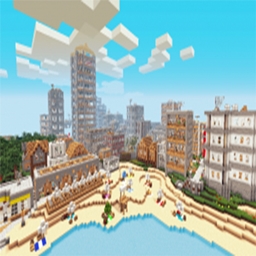
Map Info: Vertoak City is a massive city themed creation/adventure map for minecraft. Unlike other maps, there are no goals or rules in Vertoak City, you can explore and do anything you want. You choose your own adventure!
Every building in the city has fully furnished rooms to explore, and there are tons of hidden chests and secret rooms to find as well. Can you find them all? There are also two ruins located near the city, exploring them will reveal their secrets.
Vertoak City ఎలా ఇన్స్టాల్ చేయాలి
With Millida Launcher
Install Millida Launcher
The launcher is free: download it at millida.net/launcher and sign in with any nickname.
Click “Install” on this page
The launcher opens and installs the map for Minecraft 1.7.2–1.7.10 automatically.
Launch the game
A profile with it appears in the launcher: click “Play”.
Manually
Download the map archive
Pick the file Vertoak V12 Stuff Inside.zip (62 MB).
Unpack it into the saves folder
The world folder (with level.dat inside) must sit directly in .minecraft/saves.
Open the world
“Singleplayer”: the map will be in your world list.
On a server
Replace the world folder
Stop the server and put the map folder in place of world (or set its name in level-name).
Use the “To server” button
On Millida Hosting, the button at the top of the page uploads the file to your server and restarts it for you.
వెర్షన్లు
డిపెండెన్సీలతో
| Minecraft | లోడర్ | ఫైల్ | తేదీ | చర్యలు |
|---|---|---|---|---|
| 1.7.6 | — | Vertoak V12 Stuff Inside.zip62.2 MB 16 |
FAQ
Which Minecraft versions does Vertoak City work on?
There are files for 1.7.2–1.7.10, 8 versions in total. The newest is 1.7.10.
Where can I download Vertoak City safely?
On this page: the file Vertoak V12 Stuff Inside.zip (62 MB) is stored on Millida’s server, with no link shorteners. SHA-1 checksum: 491c472800c7d8900ca55b00268fe1614a73f857.
సమీక్షలు
Vertoak Cityకు మొదటి రేటింగ్ ఇవ్వండి



