
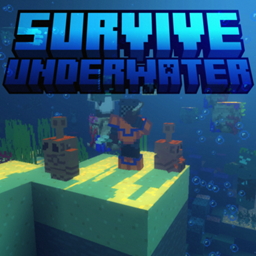
Minecraft 26.0.02 కోసం SURVIVE UNDERWATER మ్యాప్
పగడాల మధ్య బతికి, సముద్రం 5005 రహస్యాలను కనుగొనండి.
Click and follow me on Instagram to see all of my content updates!
Join the Discord Server, for more content, bug report and feedback!
Listen to "OCEAN 5005" From survive underwater's official music pack
Welcome to Survive Underwater
Yeah, pretty straightforward title, it's pretty much a survival, but underwater. It does however include a lot of content to explore, enter this first part of the map which consists of 7 dungeons, 4 of which are facilities with really good rewards! Now for the important stuff:
I.YOUR SPAWN
See this little thingy here? That's the IRON LUNG, the (0,0) coordinate of the world and your spawn. Containing the trophy room, some loot and some food, everything vital for your survival.
Trophy Room [You'll find compasses for the quests here, the difficulty of each quest defined by the sign's color goes Easy>Medium>Hard>Extreme and Uncompleted (Quests that aren't ready available on the next update)
The Freezer
Control Room
Well this is still pretty boring, it's called UNDERWATER for a reason, so...
II.THE OUTSIDE, THE FACILITIES AND THE RUINS
Now let's see some places with ACTUAL water on the map:
MAGMA? UNDERWATER?
A sunken cargo ship
UNDERWATER CAVE??
Haha kelp funny
Iron Lung V2
One of the many Research Facilities
III. THE MUSIC
Yeah, this world has its very own custom music! As of now, you can enjoy C418's water songs + 2 new songs created by me! I hope you like them!
Is this all of the content?
OF COURSE NOT! Here is the full list of content, YOU will need to discover by playing!
- 5 Custom Dungeons/Quests + 2 more quests in update 1.1!
- More than 10 Armor Collectibles
- A hidden story behind all of these locations
- Enemies not native to the oceans you'll need to fight
- Trophies for each quest completed
So what are you waiting for?
Download SURVIVE UNDERWATER and go crazy in your brand new eternal ocean biome!
SURVIVE UNDERWATER ఎలా ఇన్స్టాల్ చేయాలి
With Millida Launcher
Install Millida Launcher
The launcher is free: download it at millida.net/launcher and sign in with any nickname.
Click “Install” on this page
The launcher opens and installs the map for Minecraft 26.0.02 automatically.
Launch the game
A profile with it appears in the launcher: click “Play”.
Manually
Download the map archive
Pick the file [Hardcore]_Survive_Underwater_1.3.0.mcworld (22 MB).
Unpack it into the saves folder
The world folder (with level.dat inside) must sit directly in .minecraft/saves.
Open the world
“Singleplayer”: the map will be in your world list.
On a server
Replace the world folder
Stop the server and put the map folder in place of world (or set its name in level-name).
Use the “To server” button
On Millida Hosting, the button at the top of the page uploads the file to your server and restarts it for you.
వెర్షన్లు
డిపెండెన్సీలతో
| Minecraft | లోడర్ | ఫైల్ | తేదీ | చర్యలు |
|---|---|---|---|---|
| 26.0.02 | — | [Hardcore]_Survive_Underwater_1.3.0.mcworld22.5 MB |
సమీక్షలు
SURVIVE UNDERWATERకు మొదటి రేటింగ్ ఇవ్వండి



