
Star Trek Puzzle మ్యాప్ గురించి
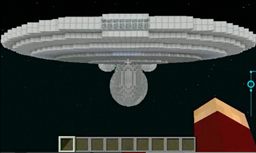
After the Enterprise is badly damaged, your task is to beam down to an unknown planet and retrieve some Fuse Elements from a crash site. The 9 Fuse Elements are needed to obtain a Fuse Block to stabilize the Enterprise's Warp Core. Most parts of the Enterprise REALLY work :D
Report Bugs and issues on my YouTube Channel: www.youtube.com/user/MayrCraft
Star Trek Puzzle ఎలా ఇన్స్టాల్ చేయాలి
With Millida Launcher
Install Millida Launcher
The launcher is free: download it at millida.net/launcher and sign in with any nickname.
Click “Install” on this page
The launcher opens and installs the map for Minecraft 1.5.2 automatically.
Launch the game
A profile with it appears in the launcher: click “Play”.
Manually
Download the map archive
Pick the file Minecraft_Star_Trek_Adventure_Map.zip (516 KB).
Unpack it into the saves folder
The world folder (with level.dat inside) must sit directly in .minecraft/saves.
Open the world
“Singleplayer”: the map will be in your world list.
On a server
Replace the world folder
Stop the server and put the map folder in place of world (or set its name in level-name).
Use the “To server” button
On Millida Hosting, the button at the top of the page uploads the file to your server and restarts it for you.
వెర్షన్లు
డిపెండెన్సీలతో
| Minecraft | లోడర్ | ఫైల్ | తేదీ | చర్యలు |
|---|---|---|---|---|
| 1.5.2 | — | Minecraft_Star_Trek_Adventure_Map.zip516 KB |
FAQ
Which Minecraft versions does Star Trek Puzzle work on?
Only Minecraft 1.5.2: there are no files for other versions.
Where can I download Star Trek Puzzle safely?
On this page: the file Minecraft_Star_Trek_Adventure_Map.zip (516 KB) is stored on Millida’s server, with no link shorteners. SHA-1 checksum: 92b1def512a9c83224bff849e9e1b7473d0dcb79.
సమీక్షలు
Star Trek Puzzleకు మొదటి రేటింగ్ ఇవ్వండి



