
Minecraft 1.21.1, 1.21 కోసం Herobrine Original Map
అసలు మ్యాప్ను ఆధునిక వెర్షన్లకు తీసుకువెళుతుంది
Herobrine Original Map మ్యాప్ గురించి
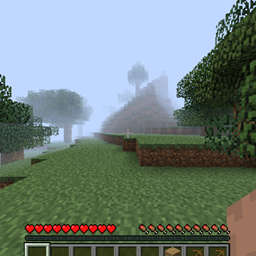
This Project Brings Original Herobrine's Sighting World Into Modern Minecraft Versions.
Download The World From The Download List For The Required Version, Extract The Files To A Folder And Move It To Location %appdata% > .minecraft > saves
Launch Minecraft, Join The World, The Player Is Default Positioned To The Coordinates, Where The Original ScreenShot Was Taken. If The Player's Position Has Reset To Spawn You Can Go Back To These Coordinates
Coordinates: X=5.16 Y=71 Z=-298.53
Camera Angle: RX=93.75 RY=-1.2
Note:
- World Is Ported With Least Of Corruption But It Will Still Be There, Any New Chunks Above Version Beta 1.7.3 or Release 1.0.0 Will Tranform To Newer Chunks As Of Modern Terrain Generation Of Game.
- Some Third Party Rendering Mods Might Break Some Things When Loading Chunks Into Modern Versions, Or Straight Up Crash The World. Use It With Caution Or Any Other Helper Mod
- I Personally Don't Recommend Shaders Especially On Some Release Versions
- You Can Use Environmental Mods To Get Alpha Fog And Aesthetic Into Your Game
- If You Want To Generate Old Chunks, Download Release 1.0.0 Version Of The Game And Generate Chunks There Then Load It Into Newer Versions
Load Order:
Release 1.0 ➡ Release 1.2 ➡ Release 1.8.9 ➡ Release 1.12.2
Enjoy The World With Your Friends Without Any Hassle Of Converting Old World To Specific Versions With Chunk Corruption.
Herobrine Original Map ఎలా ఇన్స్టాల్ చేయాలి
With Millida Launcher
Install Millida Launcher
The launcher is free: download it at millida.net/launcher and sign in with any nickname.
Click “Install” on this page
The launcher opens and installs the map for Minecraft 1.21–1.21.3 automatically.
Launch the game
A profile with it appears in the launcher: click “Play”.
Manually
Download the map archive
Pick the file Herobrine1.21.zip (11 MB).
Unpack it into the saves folder
The world folder (with level.dat inside) must sit directly in .minecraft/saves.
Open the world
“Singleplayer”: the map will be in your world list.
On a server
Replace the world folder
Stop the server and put the map folder in place of world (or set its name in level-name).
Use the “To server” button
On Millida Hosting, the button at the top of the page uploads the file to your server and restarts it for you.
వెర్షన్లు
డిపెండెన్సీలతో
| Minecraft | లోడర్ | ఫైల్ | తేదీ | చర్యలు |
|---|---|---|---|---|
| 1.21 | — | Herobrine 1.2110.6 MB 1 |
FAQ
Which Minecraft versions does Herobrine Original Map work on?
There are files for 1.21.3, 1.21.2, 1.21.1, 1.21. The newest is 1.21.3.
Where can I download Herobrine Original Map safely?
On this page: the file Herobrine1.21.zip (11 MB) is stored on Millida’s server, with no link shorteners. SHA-1 checksum: 2e068e8cb96063b40634ef93acfe39d56ad2abc8.
సమీక్షలు
Herobrine Original Mapకు మొదటి రేటింగ్ ఇవ్వండి



