

Minecraft 1.21.1, 1.21 కోసం Minecraft Bingo డేటా ప్యాక్
Bingo అనేది ఆటగాళ్లు యాదృచ్ఛిక జాబితా నుండి ఐటమ్లను సేకరించడానికి పోటీపడే సరదా మినీ-గేమ్.
- డౌన్లోడ్లు
- 2 డౌన్లోడ్లు
- వ్యూలు
- 41 వ్యూలు
- అప్డేట్ చేయబడింది
- అప్డేట్ చేయబడింది 29.03.2026
- 1.21 — 26.1
 డేటా ప్యాక్
- క్లయింట్ మరియు సర్వర్
Bingo Game Data Pack [1.20.3-26.1]
Your goal is to collect certain items as quickly as possible and complete the Bingo card. The team that completes the task first will win.
- - -
Different versions of Bingo are designed for specific versions of Vanilla Minecraft Java Edition. Make sure you are using the correct version of the game for compatibility.
⚠️ Important: This data pack requires an accompanying resource pack to function properly. Please make sure it is installed! -
Installation Guide for Data Pack & Resource Pack

Select and Download
Decide which version of the game you want to play, and then download the Data Pack (DP) and Resource Pack (RP) corresponding to your chosen version.

Download
- Find the Minecraft Bingo page on Modrinth (you are on it).
- Select the “Versions” tab.
- Click on the name of the version you want to download.
- At the bottom of the page, you will find the data package file and resource package file you need.
- Download both files
Downloading Guide for the Data Pack & Resource Pack
Data Pack Installation:
- To install the Data Pack in a new world:
- Open Minecraft, go to Singleplayer > Create New World.
- Click on the More button, then Data Packs.
- Select Open Pack Folder and move the downloaded Data Pack file into this folder.
- To add the Data Pack to an existing world:
- Open Minecraft, go to Singleplayer, select the world you want, and click on Edit.
- Open the World Folder, then go to the datapacks folder.
- Move the downloaded Data Pack file here.
- ⚠️ Warning: Adding the Data Pack to an existing world may impact your current gameplay. This includes potential changes such as the deletion of achievements and modifications to your inventory. Ensure you understand how the Data Pack works to avoid any unintended consequences or loss of progress.
- Reload if Necessary
Use the /reload command in-game if needed to activate the Data Pack.
Resource Pack Installation:
- Open Minecraft and go to Options > Resource Packs > Open Pack Folder.
- Move the downloaded Resource Pack file here.
- Go back to Minecraft, select the Resource Pack, and activate it.
How to Play
Once you've installed everything you need, you can play alone or gather players for a group game - it's all up to you! To start the game, enter the command /trigger .bingo.start. Once initiated, each player will have the opportunity to select their team.
Team Selection: You can join any team, and there are no limits to the number of players in each team. You can play solo, team up with friends, or create multiple teams—it's all your choice.
Discuss Configuration: It's advisable to discuss the game setup with other participants before starting. The rules are flexible, allowing you to customize the game to your liking, as long as all players agree.
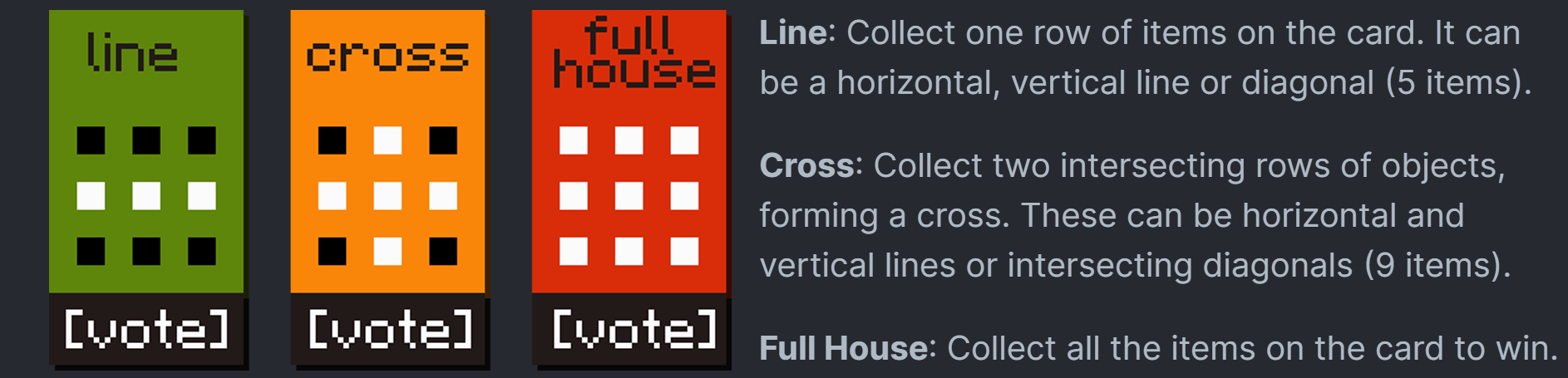
Game Modes:
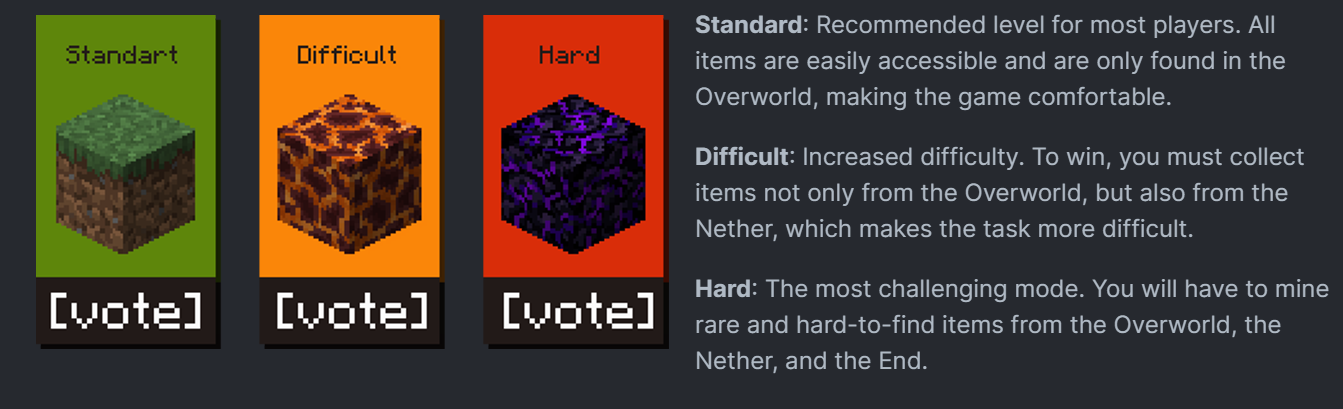
Difficulty levels:
Command - Description
/trigger .bingo.start - After entering it, the game will start immediately and you will be able to start completing the goals. /trigger .bingo.leave.game - Use this command if you need to leave the current Bingo game. /trigger .bingo.settings - It is recommended to use this command to customize the interface according to your preferences. /trigger .bingo.rules - This command will show you the rules of the game. Use it if you want to quickly familiarize yourself with the rules.
Translation
Chinese (Simplified) English (UK) English (USA) French German Italian Japanese Polish Portuguese (Brazil) Russian Spanish (Mexico) Spanish (Spain) Turkish Ukrainian
Credits and Resources
- Original Idea by lorgon111
- Negative Space Font - GitHub Repository
- No Shadow - GitHub Repository
Enjoy the game!
Minecraft Bingo ఎలా ఇన్స్టాల్ చేయాలి
With Millida Launcher
Install Millida Launcher
The launcher is free: download it at millida.net/launcher and sign in with any nickname.
Click “Install” on this page
The launcher opens and installs the data pack for Minecraft 1.21–26.1 automatically.
Launch the game
A profile with it appears in the launcher: click “Play”.
Manually
Download the archive
Pick the file Bingo datapack 26.1.zip (3.6 MB) for your game version.
New world: “Data Packs”
When creating a world, click “Data Packs”, drag the archive into the window, then move it to “Selected”.
Existing world: the datapacks folder
Put the archive into saves/<world>/datapacks and type /reload in game.
On a server
Archive goes into the server world’s datapacks
The world/datapacks folder on the server; players do not need to install anything.
Reload the data
Type /reload in the server console or restart the server.
Use the “To server” button
On Millida Hosting, the button at the top of the page uploads the file to your server and restarts it for you.
వెర్షన్లు
డిపెండెన్సీలతో
| Minecraft | లోడర్ | ఫైల్ | తేదీ | చర్యలు |
|---|---|---|---|---|
| 26.1 | డేటా ప్యాక్ | 26.13.6 MB 1 | ||
| 1.21.11 | డేటా ప్యాక్ | 1.21.113.6 MB | ||
| 1.21 | డేటా ప్యాక్ | 1.213.8 MB |
FAQ
Which Minecraft versions does Minecraft Bingo work on?
There are files for 26.1, 1.21.11, 1.21.1, 1.21. The newest is 26.1.
Does Minecraft Bingo work on a server?
Yes: the data pack goes into the datapacks folder of the server world, and players do not need to install anything.
సమీక్షలు
Minecraft Bingoకు మొదటి రేటింగ్ ఇవ్వండి


