

Minecraft 1.20.1, 1.19.2 కోసం Hardcore Revive+ Classic డేటా ప్యాక్
Hardcore Modeలో మీ స్నేహితులను పునరుజ్జీవింపజేయడానికి మిమ్మల్ని అనుమతించే మీ ప్రపంచానికి ఒక యాడ్-ఆన్.
- వ్యూలు
- 49 వ్యూలు
- అప్డేట్ చేయబడింది
- అప్డేట్ చేయబడింది 26.09.2026
- 1.18 — 1.21.4
 డేటా ప్యాక్
- క్లయింట్ మరియు సర్వర్
Overview
You need Hardcore mode enabled for this to work!
Have you ever played Hardcore mode with your friends and one of you died unfairly or in a silly way? Instead of restarting your world, Hardcore Revive+ aims to keep the thrill of Hardcore mode while making death less punishing.
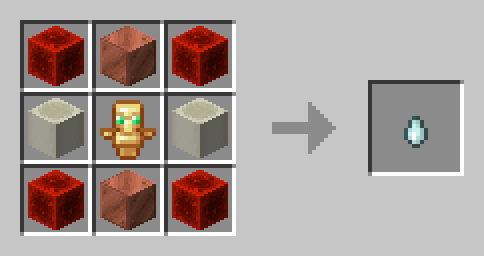
Instead of permanently being in spectator mode after dying, you become a ghost -- a spectator that is still able to interact with the world and other players. To be revived, another player (if they like you) must craft a Soul Charm and throw it at your ghost.
Soul Charm Recipe
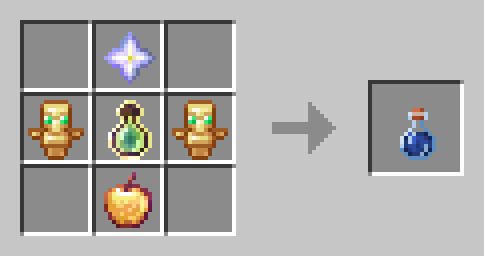
Players can also craft a Life Jelly, a potion that grants the player two extra hearts until death. Upon consumption, the potion also grants Absorption 4 and Regeneration 5. (The recipe includes an enchanted golden apple)
Life Jelly Recipe
Configuration
You can configure settings in-game via the command /function hcrplus:_settings.

Features
- You can can revive other players who have died in Hardcore mode
- Ghosts can possess other players or mobs to grant either buffs or debuffs
- Health is reduced after being revived or crafting a Soul Charm
- Friends not included

Incompatibilities
- Hardcore Revive Reloaded
- Any "Unlock all recipes" data pack or mod
Hardcore Revive+ Classic ఎలా ఇన్స్టాల్ చేయాలి
With Millida Launcher
Install Millida Launcher
The launcher is free: download it at millida.net/launcher and sign in with any nickname.
Click “Install” on this page
The launcher opens and installs the data pack for Minecraft 1.18–1.21.4 automatically.
Launch the game
A profile with it appears in the launcher: click “Play”.
Manually
Download the archive
Pick the file Hardcore Revive+ v1.7.4.zip (29 KB) for your game version.
New world: “Data Packs”
When creating a world, click “Data Packs”, drag the archive into the window, then move it to “Selected”.
Existing world: the datapacks folder
Put the archive into saves/<world>/datapacks and type /reload in game.
On a server
Archive goes into the server world’s datapacks
The world/datapacks folder on the server; players do not need to install anything.
Reload the data
Type /reload in the server console or restart the server.
Use the “To server” button
On Millida Hosting, the button at the top of the page uploads the file to your server and restarts it for you.
వెర్షన్లు
డిపెండెన్సీలతో
| Minecraft | లోడర్ | ఫైల్ | తేదీ | చర్యలు |
|---|---|---|---|---|
| 1.21.4 | డేటా ప్యాక్ | 1.21.428.9 KB | ||
| 1.21.4 | డేటా ప్యాక్ | 1.21.429 KB | ||
| 1.21.4 | డేటా ప్యాక్ | 1.21.427.5 KB | ||
| 1.21.3 | డేటా ప్యాక్ | 1.21.326.7 KB | ||
| 1.19.2 | డేటా ప్యాక్ | 1.19.226.2 KB | ||
| 1.18.2 | డేటా ప్యాక్ | 1.18.226.2 KB | — |
FAQ
Which Minecraft versions does Hardcore Revive+ Classic work on?
There are files for 1.18–1.21.4, 16 versions in total. The newest is 1.21.4.
Does Hardcore Revive+ Classic work on a server?
Yes: the data pack goes into the datapacks folder of the server world, and players do not need to install anything.
Where can I download Hardcore Revive+ Classic safely?
On this page: the file Hardcore Revive+ v1.7.4.zip (29 KB) is stored on Millida’s server, with no link shorteners. SHA-1 checksum: ce06ae1c6f361c1717dc35760df5f4e40323782e.
సమీక్షలు
Hardcore Revive+ Classicకు మొదటి రేటింగ్ ఇవ్వండి


