

Minecraft 1.20.1, 1.16.5 కోసం Craftable Mushrooms డేటా ప్యాక్
పుట్టగొడుగులు మరియు పుట్టగొడుగు బ్లాక్ల కోసం రెసిపీలను జోడించే సింపుల్ మాడ్/డేటాప్యాక్.
- వ్యూలు
- 33 వ్యూలు
- అప్డేట్ చేయబడింది
- అప్డేట్ చేయబడింది 19.11.2025
- 1.13 — 1.20.6
 డేటా ప్యాక్
- క్లయింట్ మరియు సర్వర్
🍄About
Simple Mushroom Crafting is a lightweight Quality of Life (QoL) mod/datapack that makes mushroom building blocks fully craftable and reversible. Whether you need compact storage for your mushroom farms or easy access to mushroom blocks for building, this pack has you covered.

📋 Recipes
🟥-> Red Mushroom Block, 🟫-> Brown Mushroom Block Result - Ingredients - Recipe Pattern
| Red Mushroom Block | 4x Red Mushroom | 🍄🍄 🍄🍄 | | Brown Mushroom Block | 4x Brown Mushroom | 🍄🟫🍄🟫 🍄🟫🍄🟫 | 4x Red Mushroom - Red Mushroom Block - 🟥 4x Brown Mushroom - Brown Mushroom Block - 🟫 | 1x Mushroom Stem | 2x Red Mushroom 2x Brown Mushroom | 🍄🟫🍄 🍄🍄🟫 | | 4x Mushroom Stem | 2x Red Mushroom Block 2x Brown Mushroom Block | 🟥🟫 🟫🟥 |
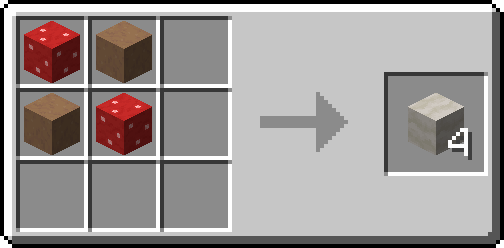
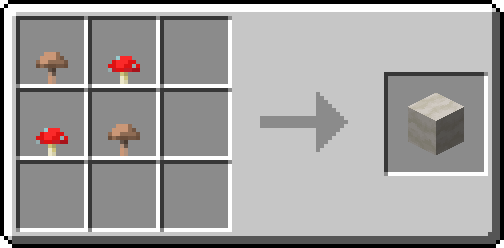
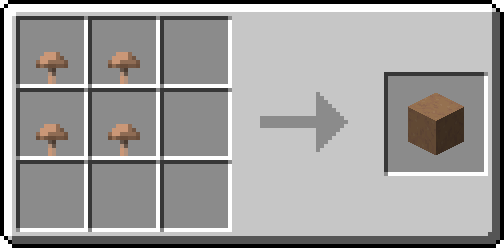
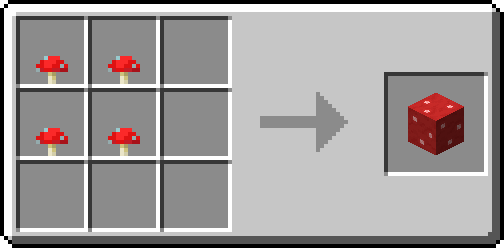

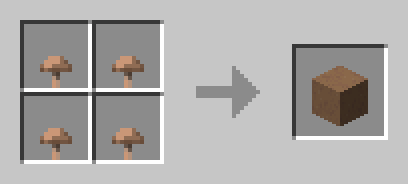
Tip: Use Just Enough Items(JEI) To View The Recipe In-Game

🧩 Installation Guide
How to Install the Mod (.jar)
- Download the Mod: Get the .jar file for Create: Veridium Recipe.
- Drop the File: Drag the downloaded .jar.
How to Install the Datapack (.zip)
- Download: Get the .zip file for the Datapack version.
- Open Your World Folder:
- Install: Open the datapacks folder and drag the downloaded .zip file inside.
⚙️ Supported Version
Version - Loader - Support
1.21.1+ - Forge/Neoforge/Fabric/Quilt - soon 1.21.1 -> 1.13 - Forge/Neoforge/Fabric/Quilt - ✅
📦 Other Recipes


👀 Play with friends
Want to run a flawless modded server? Check out Godlike Host! Setting up a server through them is the absolute best way to support us right now.
Don't just take our word for it—read the community reviews here: Best Minecraft Server Hosting.
👉 Click the image below or use this link: Godlike Host to get 50% off your first month!

Craftable Mushrooms ఎలా ఇన్స్టాల్ చేయాలి
With Millida Launcher
Install Millida Launcher
The launcher is free: download it at millida.net/launcher and sign in with any nickname.
Click “Install” on this page
The launcher opens and installs the data pack for Minecraft 1.13–1.20.6 automatically.
Launch the game
A profile with it appears in the launcher: click “Play”.
Manually
Download the archive
Pick the file craftable_mushroom_1.20-1.13.zip (3 KB) for your game version.
New world: “Data Packs”
When creating a world, click “Data Packs”, drag the archive into the window, then move it to “Selected”.
Existing world: the datapacks folder
Put the archive into saves/<world>/datapacks and type /reload in game.
On a server
Archive goes into the server world’s datapacks
The world/datapacks folder on the server; players do not need to install anything.
Reload the data
Type /reload in the server console or restart the server.
Use the “To server” button
On Millida Hosting, the button at the top of the page uploads the file to your server and restarts it for you.
వెర్షన్లు
డిపెండెన్సీలతో
| Minecraft | లోడర్ | ఫైల్ | తేదీ | చర్యలు |
|---|---|---|---|---|
| 1.17.1 | డేటా ప్యాక్ | 1.17.12.9 KB | ||
| 1.16.5 | డేటా ప్యాక్ | 1.16.52.9 KB | ||
| 1.15.2 | డేటా ప్యాక్ | 1.15.22.9 KB | ||
| 1.14.4 | డేటా ప్యాక్ | 1.14.42.9 KB |
FAQ
Which Minecraft versions does Craftable Mushrooms work on?
There are files for 1.13–1.20.6, 34 versions in total. The newest is 1.20.6.
Does Craftable Mushrooms work on a server?
Yes: the data pack goes into the datapacks folder of the server world, and players do not need to install anything.
Where can I download Craftable Mushrooms safely?
On this page: the file craftable_mushroom_1.20-1.13.zip (3 KB) is stored on Millida’s server, with no link shorteners. SHA-1 checksum: 2017693f4cd2afec8262fc69b0dc46b152917ec9.
సమీక్షలు
Craftable Mushroomsకు మొదటి రేటింగ్ ఇవ్వండి


