
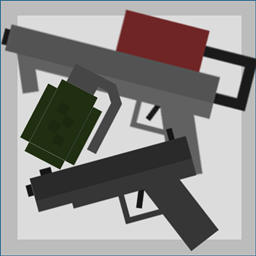
Minecraft 1.21.3 కోసం Bullets, Bombs, and Fires డేటా ప్యాక్
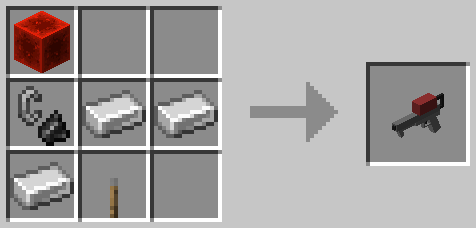
ఈ డేటా ప్యాక్ ఒక గన్, గ్రెనేడ్ మరియు ఒక ఫ్లేమ్త్రోయర్ను జోడిస్తుంది.
Bullets, Bombs, and Fires డేటా ప్యాక్ గురించి
THIS DATAPACK REQUIRES A RESOURCE PACK FOR TEXTURES!!! Resource Pack: https://www.curseforge.com/minecraft/texture-packs/bullets-bombs-and-fires-resource-pack The data pack "Bullets, Bombs, and Fires" adds four new items to the game!
- Gun
- Grenade
- Flamethrower
- Bullets
Gun
Damage: 10HP (5 Hearts) Range: 100 blocks Dependency Item: "Bullets" (needed in the off-hand) Stack Size: Unstackable
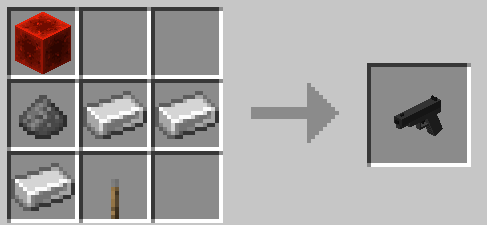
Bullets
Required for the Gun. Stack Size: 16
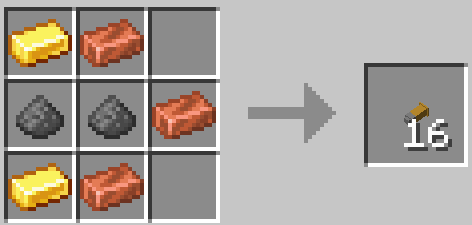
Grenades
Damage: Varies Range: 50 blocks No Dependency Item. Stack Size: 16
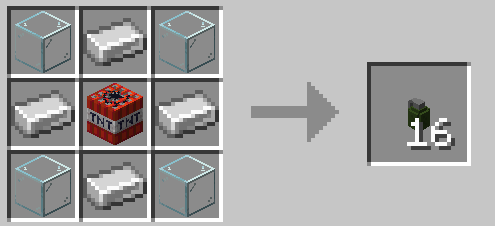
Flamethrower
Damage: None, apart from fire damage. Range: 50 blocks Dependency Item: Blaze Powder (needed in the odd-hand) Stack Size: Unstackable
Bullets, Bombs, and Fires ఎలా ఇన్స్టాల్ చేయాలి
With Millida Launcher
Install Millida Launcher
The launcher is free: download it at millida.net/launcher and sign in with any nickname.
Click “Install” on this page
The launcher opens and installs the data pack for Minecraft 1.21.2–1.21.3 automatically.
Launch the game
A profile with it appears in the launcher: click “Play”.
Manually
Download the archive
Pick the file Bullets-Bombs-Fires-1.1.zip (11 KB) for your game version.
New world: “Data Packs”
When creating a world, click “Data Packs”, drag the archive into the window, then move it to “Selected”.
Existing world: the datapacks folder
Put the archive into saves/<world>/datapacks and type /reload in game.
On a server
Archive goes into the server world’s datapacks
The world/datapacks folder on the server; players do not need to install anything.
Reload the data
Type /reload in the server console or restart the server.
Use the “To server” button
On Millida Hosting, the button at the top of the page uploads the file to your server and restarts it for you.
వెర్షన్లు
డిపెండెన్సీలతో
| Minecraft | లోడర్ | ఫైల్ | తేదీ | చర్యలు |
|---|---|---|---|---|
| 1.21.3 | — | Bullets-Bombs-Fires (1.21.2 - 1.21.3)10.9 KB |
సమీక్షలు
Bullets, Bombs, and Firesకు మొదటి రేటింగ్ ఇవ్వండి


