
O Nostalgia-Craft resurs paku
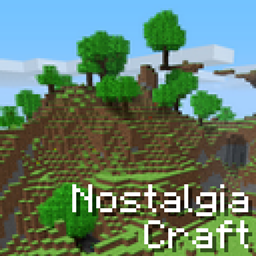
This texture pack aims to recreate the design which existed back in the alpha version of Minecraft. It’s a much brighter theme of colors and also sounds have been replaced with the old ones. Perhaps some of you want to experience how Minecraft looked like in the early days. This pack will take you on a nostalgic trip back to the year of 2010.
(The original creator of Nostlgia-Craft is made by 2XMM2 that made this possible.)
Nostagia-Craft: Java Edition Page: https://www.minecraftforum.net/forums/mapping-and-modding-java-edition/resource-packs/1229392-nostalgia-craft
The texture pack makes the world look much more brighter than what it looks like with the default Minecraft PE texture pack which exists for the latest Minecraft version. It's recommended to turn off Smooth Lighting for maximum effect.
Minecraft Alpha:
Minecraft Today (Outdated):
Credits;
- Nostalgia-Craft was originally made by 2XMM2 for Java Edition.
- Nostalgia-Craft Bedrock Port was oriinally made by MasterlazorX.
- This is a fork of MaterlazorX's Bedrock Port which is made possible for newer versions of Minecraft.
- I am very aware that the page for Nostalgia-Craft in MCPEDL got terminated, I wanted to bring this pack back and update it as best as i can.
Kako instalirati Nostalgia-Craft
With Millida Launcher
Install Millida Launcher
The launcher is free: download it at millida.net/launcher and sign in with any nickname.
Click “Install” on this page
The launcher opens and installs the resource pack for Minecraft 1.21.132–26.3 automatically.
Launch the game
A profile with it appears in the launcher: click “Play”.
Manually
Download the archive
Pick the file NostalgiaCraft-Beta-v1.1.x.mcpack (1.5 MB) for your game version. No need to unpack it.
Put it in the resourcepacks folder
The easiest way: “Options”, then “Resource Packs”, then “Open Pack Folder”, and drag the archive there.
Enable the pack
In the same window, move the pack to the right-hand “Selected” column and click “Done”.
Verzije
Sa zavisnostima
| Minecraft | Loader | Fajl | Datum | Akcije |
|---|---|---|---|---|
| 1.21.132 | — | Nostalgia-Craft - Beta (1.1.x) for 26+1.5 MB 4 |
Česta pitanja
Which Minecraft versions does Nostalgia-Craft work on?
There are files for 26.3, 26.0.02, 26.0, 1.21.132. The newest is 26.3.
Where can I download Nostalgia-Craft safely?
On this page: the file NostalgiaCraft-Beta-v1.1.x.mcpack (1.5 MB) is stored on Millida’s server, with no link shorteners. SHA-1 checksum: 1b79194ec97c0b3a8f0537aa24da0824bd82923b.
Recenzije
Budi prvi koji će oceniti Nostalgia-Craft


