

NyxaVora Šejderi za Minecraft 1.21.1, 1.21
Šareni shaderpack napravljen da Minecraft učini svetlijim, mekšim i atmosferičnijim bez uništavanja performansi. Zadržava prepoznatljiv vanilla stil uz dodavanje prijatnih boja, nežnog osvetljenja i čistog fantazijskog izgleda.
 Fabric
 OptiFine
O NyxaVora šejderima
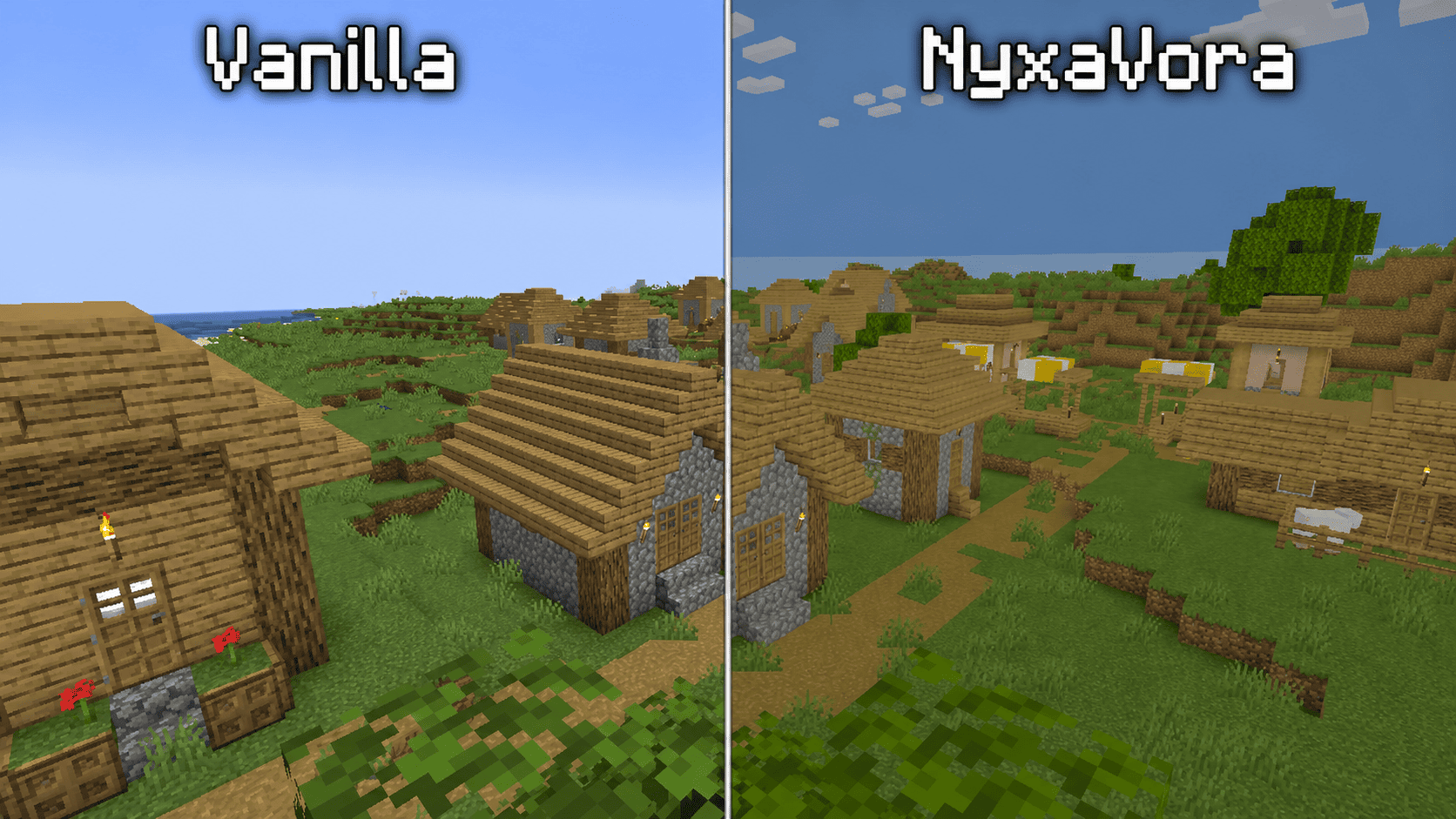
NyxaVora Shaders is a colorful Minecraft shaderpack designed to make the game feel brighter, softer, and more atmospheric while keeping the classic vanilla style recognizable.
It enhances Minecraft with pleasant colors, gentle lighting, and a clean fantasy-inspired look. NyxaVora Shaders is made for players who want their worlds to feel more vivid, cozy, and magical without making the game overly realistic or too demanding on performance.

Features Brighter and more colorful lighting Softer and more atmospheric visuals Vanilla-friendly style that still feels like Minecraft Clean fantasy-like look for survival, building, and exploration Pleasant colors that make biomes feel more lively Lightweight visual improvements without heavily hurting performance Better mood and ambience for screenshots and everyday gameplay Why use NyxaVora Shaders?
NyxaVora Shaders is perfect for players who enjoy Minecraft’s original style but want the world to look more vibrant and polished. It makes forests, villages, caves, landscapes, and builds feel warmer, softer, and more visually appealing while keeping gameplay clear and familiar.
Whether you are exploring, building, surviving, or taking screenshots, NyxaVora Shaders gives Minecraft a colorful fantasy atmosphere without destroying the vanilla feel.

Kako instalirati NyxaVora
With Millida Launcher
Install Millida Launcher
The launcher is free: download it at millida.net/launcher and sign in with any nickname.
Click “Install” on this page
The launcher opens and installs the shaders for Minecraft 1.21–26.1.2 automatically.
Launch the game
A profile with it appears in the launcher: click “Play”.
Manually
Install Iris or OptiFine
Without a shader mod the game cannot see shaders. Install it for the same Minecraft version.
Download the shader archive
Pick the file Nyxavora Low.zip (9 KB) and do not unpack it.
Put it in the shaderpacks folder
“Options”, then “Video Settings”, then “Shader Packs”, then “Open Shader Pack Folder”, and drag the archive there.
Select the shaders
In the same window, click the pack name and “Apply”.
Verzije
Sa zavisnostima
| Minecraft | Loader | Fajl | Datum | Akcije |
|---|---|---|---|---|
| 26.1 | Iris, OptiFine | 26.18.7 KB | ||
| 1.21.11 | Iris, OptiFine | 1.21.118.7 KB | ||
| 1.21 | Iris, OptiFine | 1.218.7 KB |
Česta pitanja
Which Minecraft versions does NyxaVora work on?
There are files for 1.21–26.1.2, 15 versions in total. The newest is 26.1.2.
What do I need to run NyxaVora?
Shaders are loaded through Iris or OptiFine: without one of them the game cannot see them.
Where can I download NyxaVora safely?
On this page: the file Nyxavora Low.zip (9 KB) is stored on Millida’s server, with no link shorteners. SHA-1 checksum: c3ed59dd4040521cb47759d91908a4e415d3121a.
Recenzije
Budi prvi koji će oceniti NyxaVora


