

Banana Shaders za Minecraft 1.20.1, 1.21.1
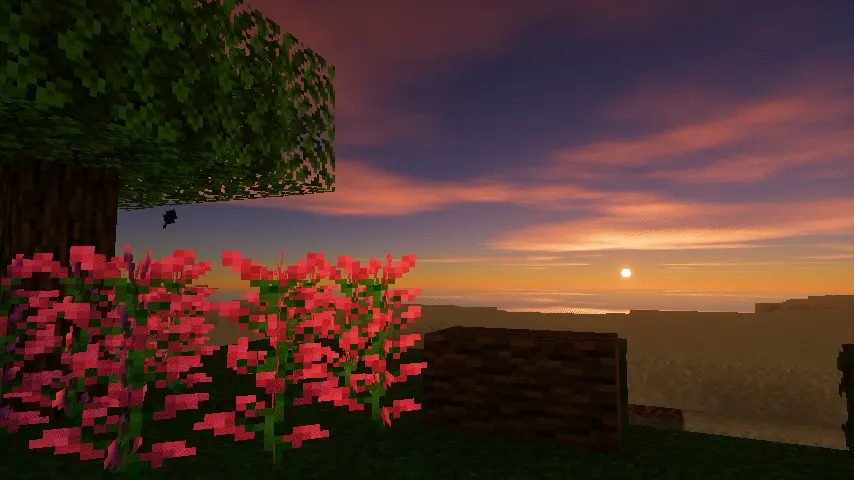
Topliji zalasci sunca, mirnija voda i mekši oblaci.
 Fabric
 OptiFine
Halcyon Shaders
Halcyon Shaders is a Minecraft shaderpack built on top of Glimmer's codebase, adjusted to push warmer sunset lighting and a calmer water style. It keeps Glimmer's lightweight, performance-friendly approach while changing the overall mood of the world toward something softer and more golden.

Features
- Sunset and sunrise colors: adjusted color grading during dawn and dusk to give richer amber and orange tones instead of the default palette
- Flat water toggle: an option to switch between the standard water look and a flatter, calmer surface style, useful for screenshots or a more stylized aesthetic
- Reworked clouds: new cloud rendering for a softer sky that fits the updated lighting
- Wet farmland: tilled soil and farmland blocks now show a damp, reflective surface, similar to how they'd look after rain or near water
Same shadow and reflection quality as Glimmer, with no added performance cost

License and Credits
Halcyon Shaders is a modification of Glimmer, originally created by jbritain and released under the MIT License. All credit for the base shader code and structure goes to jbritain and the Glimmer contributors. Halcyon Shaders is distributed under the same MIT License, and any further redistribution should keep this attribution intact.
Kako instalirati Banana Shaders
With Millida Launcher
Install Millida Launcher
The launcher is free: download it at millida.net/launcher and sign in with any nickname.
Click “Install” on this page
The launcher opens and installs the shaders for Minecraft 1.20–26.1.2 automatically.
Launch the game
A profile with it appears in the launcher: click “Play”.
Manually
Install Iris or OptiFine
Without a shader mod the game cannot see shaders. Install it for the same Minecraft version.
Download the shader archive
Pick the file HalcyonShaders.zip (5.5 MB) and do not unpack it.
Put it in the shaderpacks folder
“Options”, then “Video Settings”, then “Shader Packs”, then “Open Shader Pack Folder”, and drag the archive there.
Select the shaders
In the same window, click the pack name and “Apply”.
Verzije
Sa zavisnostima
| Minecraft | Loader | Fajl | Datum | Akcije |
|---|---|---|---|---|
| 26.1.2 | Iris, OptiFine | 26.1.25.5 MB |
Česta pitanja
Which Minecraft versions does Banana Shaders work on?
There are files for 1.20–26.1.2, 22 versions in total. The newest is 26.1.2.
What do I need to run Banana Shaders?
Shaders are loaded through Iris or OptiFine: without one of them the game cannot see them.
Where can I download Banana Shaders safely?
On this page: the file HalcyonShaders.zip (5.5 MB) is stored on Millida’s server, with no link shorteners. SHA-1 checksum: 34cf8e43ac01581ef0618637790520534809f2f2.
Recenzije
Budi prvi koji će oceniti Banana Shaders


