

Description
PrisonGems is an essential Plugin for all Prison Servers. it adds several new Utilities, which are mainly aimed to be useful for Prison Servers, but can of course be used for any other type of Server as well.
The first and most important thing it adds are: Gems Gems are a currency which runs independently from Vault. Those Gems can be obtained by mining Blocks in the world. The drop chance of those, is of course configurable. Gems can be used to buy things: mainly to upgrade your Items You can upgrade the Enchantments of your Items using Gems for example if you have Unbreaking I it can be upgraded to Unbreaking II etc...
Now, if you are using PrisonUtils, you can also sell Backpacks via Gems. Or if you are using CommandOverride, you can make certain commands cost Gems to be executed.
Another thing Gems can be used for is not only upgrading your Tools/Armor/Weapons but also repairing those.

Commands/Permissions
Command Description Permission
/upgrade Opens up the Inventory to upgrade your Items No Permission required.
/repair Repairs the Item in your Hand for a configurable cost gems.repair
/backpacks Opens up a Shop where you can buy Backpacks for Gems No Permission required.
/gems Shows how many Gems you have No Permission required.
/gems withdraw <Amount> Converts a specified Amount of Gems to its respective Item Form for Trades and Shops No Permission required.
/gems <Player> Shows how many Gems a Player has gems.others
/gems set <Player> <Amount> Allows you to manipulate the Amount of Gems a Player has gems.set
/gems add <Player> <Amount> Allows you to manipulate the Amount of Gems a Player has gems.set
/gems remove <Player> <Amount> Allows you to manipulate the Amount of Gems a Player has gems.set
/gems give <Player> <Amount> Gives the specified Player the specified Amount of your Gems No Permission required.
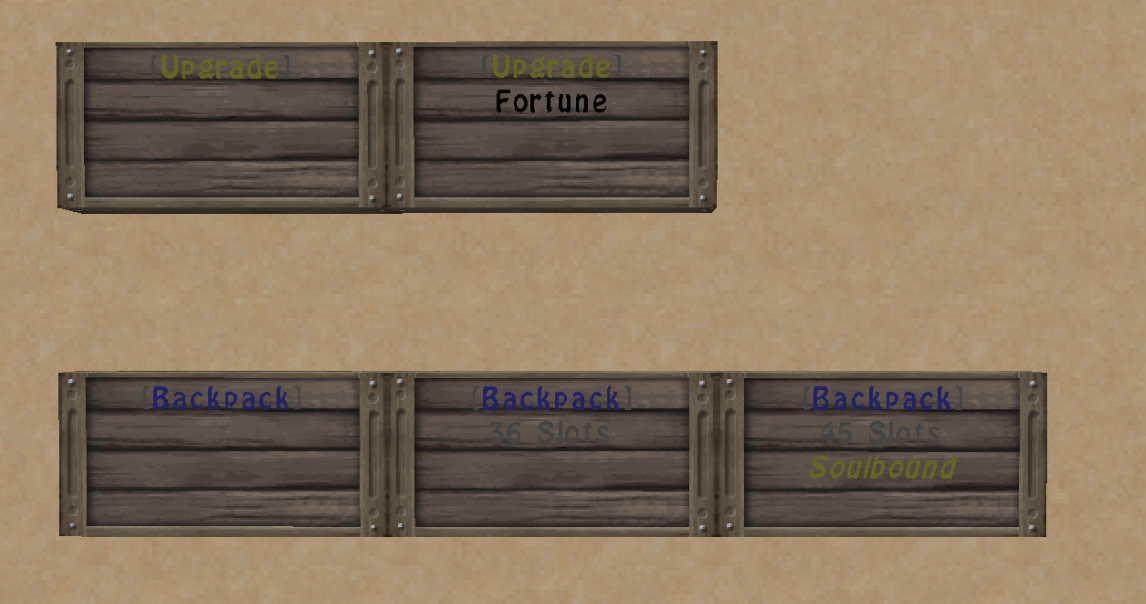
Signs
Note: All empty lines can be replaced with a text of your Choice. Example: "Cost: 10 Gems" / "Click to buy" / ...
[Upgrade] Signs
These Signs will open the Upgrade Menu or will simply upgrade your Enchantment if you specify one.
- [Upgrade]
- <Enchantment> (optional)
Required Permission for creating Signs: gems.sign
[Backpack] Signs
These Signs will open up the Backpack Shop Or will act as a Shop Sign if you specify an amount of lines in the second line of your Sign.
- [Backpack]
- <Number of lines> (optional)
- soulbound (optional)
Required Permission for creating Signs: backpacks.sign
Configuration
upgrades: DIAMOND_SWORD: ## Specify the Name of your Item here DAMAGE_ALL: ## The Name of your Enchantment base-cost: 3 ## The Amount of Gems it costs to apply increment: 2 ## How many Gems will be added to the Cost per level max: 20 ## The Max Level of that Enchantment gems: starter: 0 ## Whats the start balance for new Players? drop-chance: 10 ## The Chance of dropping a Gem when breaking Blocks unlock-editor: 5 ## The Amount of Gems which is required to open the Upgrade Menu repair-cost: 25 ## The cost of Gems for repairing Items enable-give-command: true ## Specify whether /gems give is enabled enable-withdraw-command: true ## Specify whether /gems withdraw is enabled auto-pickup: false ## Specify whether Gems are automatically added to your Balance or dropped as an Item world-blacklist: ## Those worlds will be excluded from dropping Gems - world_nether - world_the_end sign-prefix: '&7[&aUpgrade&7]' ## Whats the Sign Prefix for the Upgrade Sign? backpacks: sign-prefix: '&7[&9Backpack&7]' ## Whats the Sign Prefix for the Backpack Sign? tiers: '1': enabled: true ## Whether a Backpack with 9 Slots is enabled cost: 100 ## How much it costs '2': enabled: true cost: 250 '3': enabled: true cost: 500 '4': enabled: true cost: 750 '5': enabled: true cost: 1000 '6': enabled: true cost: 2000 soulbound: '1': enabled: true ## Whether a Backpack with 9 Slots is enabled cost: 100 ## How much it costs '2': enabled: true cost: 250 '3': enabled: true cost: 500 '4': enabled: true cost: 750 '5': enabled: true cost: 1000 '6': enabled: true cost: 2000 enchantment-aliases: LOOT_BONUS_BLOCKS: ## Specify some Aliases for the Upgrade signs, so you can use Fortune instead of LOOT_BONUS_BLOCKS - Fortune DAMAGE_ALL: - Sharpness DURABILITY: - Unbreaking DIG_SPEED: - Effciency
Auto-Updater and Metrics
All my Plugins are using an Auto-Updater to make sure, you're always using the latest and hopefully most bug free version of my Plugin. If you don't want this Plugin to be auto-updated, you can turn it off in the config file at "options -> auto-update: true/false"
They also use a Metrics-System which collects the following Informations:
A unique identifier The server's version of Java Whether the server is in offline or online mode The plugin's version The server's version The OS version/name and architecture The core count for the CPU The number of players online The Metrics version Opting out of this service can be done by editing plugins/Plugin Metrics/config.yml and changing opt-out to true.
Kako instalirati PrisonGems
A server on Paper or Spigot
The plugin runs on the server core for Minecraft 1.8–1.8.1; players do not need to install anything.
File goes into the plugins folder
Download the file PrisonGems_v1.3.jar (44 KB) and put it into the server’s plugins folder.
Restart the server
On startup the plugin creates its own settings folder in plugins.
Use the “To server” button
On Millida Hosting, the button at the top of the page uploads the file to your server and restarts it for you.
Minecraft 1.8.1 runs on Java 8: with a different Java version the game may close right after launch.
Verzije
Sa zavisnostima
| Minecraft | Loader | Fajl | Datum | Akcije |
|---|---|---|---|---|
| 1.8.1 | — | PrisonGems v1.343.6 KB |
Česta pitanja
Which Minecraft versions does PrisonGems work on?
There are files for 1.8.1, 1.8. The newest is 1.8.1.
Do players need to install PrisonGems?
No, the plugin goes only on the server, into the plugins folder: players do not need to download anything.
Which Java does PrisonGems need?
Minecraft 1.8.1 runs on Java 8. If the game closes right after launch, the usual cause is the wrong Java version in the profile settings.
Where can I download PrisonGems safely?
On this page: the file PrisonGems_v1.3.jar (44 KB) is stored on Millida’s server, with no link shorteners. SHA-1 checksum: 7bb7d5142d8bcd1d23f7e3eac62e17961a432327.
Recenzije
Budi prvi koji će oceniti PrisonGems


