

O Exotic Garden pluginovu
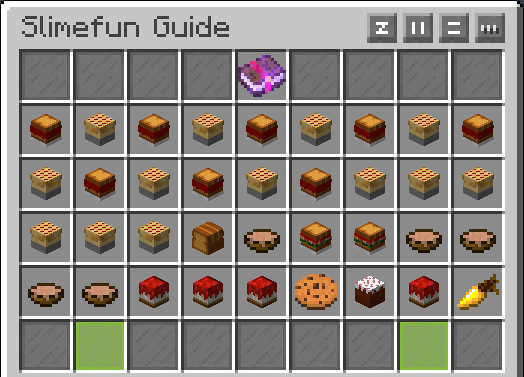
Exotic Garden is a Slimefun Addon which generates new Plants all over your World. It includes several new Fruits as well as their trees and new Berries and Berry Bushes. But of course it also adds a couple new Food Sources to the game. For every Berry there is also a Juice, a Smoothie and a Pie available. However there are only some Fruits which also come with their Juice and Pies. And if you dont happen to be lucky and find a Bush/Tree in the world, you can also obtain them by breaking tall grass.
This Project has moved to GitHub: https://github.com/TheBusyBiscuit/ExoticGarden
Versions from BukkitDev DO NOT WORK ON 1.13, 1.14 or later.
mrCookieSlime aka TheBusyBiscuit retired in 2016 but Slimefun's community continues to publish updates, for more Info, check the GitHub page.
This Plugin was heavily inspired by the famous Pam's HarvestCraft Mod by MatrexsVigil and the famous Magical Crops Mod by Mark719
Source Code
You want to take over this Project? Start so by submitting Pull Requests on GitHub!
Check out Exotic Garden's Source Code, if you want to keep this Project alive, maybe even consider contributing to it by making a Pull Request!

List of new Items
Trees
- Apple Oak Tree
- Coconut Palm
- Pomegranate Tree
- Cherry Tree
- Lemon Tree
- Plum Tree
- Lime Tree
- Orange Tree
Bushes
- Raspberry Bush
- Blueberry Bush
- Cranberry Bush
- Blackberry Bush
- Grape Bush
- Elderberry Bush
- Cowberry Bush
Plants
- Strawberry Plant
- Tomato Plant
- Corn Plant
- Lettuce Plant
- Tea Leaf Plant
- Cabbage Plant
- Sweet Potato Plant
- Mustard Seed Plant
Food
- Juices
- Smoothies
- Coconut Milk
- Wine
- Various Iced Tea flavours
- Thai Tea
- Sweetened Tea
- Pies
- Jelly Sandwiches
- Pumpkin Bread
- Potato Salad
- Chicken Sandwich
- Fish Sandwich
- Egg Salad
- Tomato Soup
- Strawberry Salad
- Grape Salad
- Cheesecake
- Cherry Cheesecake
- Blueberry Cheesecake
- Biscuit
- Blackberry Cobbler
- Pavlova
- Corn on the Cob
- Creamed Corn
- Sandwich
- BLT
- Leafy Chicken Sandwich
- Leafy Fish Sandwich
- Hamburger
- Cheeseburger
- Bacon Cheeseburger
- Deluxe Cheeseburger
- Carrot Cake
- Jammy Dodger
- Bacon
- Chickenburger
- Chicken Cheeseburger
- Bacon Burger
- Bacon Sandwich
- Taco
- Fish Taco
- Pancakes
- Blueberry Pancakes
- Fries
- Popcorn
- Shepard's Pie
- Chicken Pot Pie
- Chocolate Cake
- Cream Cookie
Magical Plants
- Coal Plant
- IronPlant
- Gold Plant
- Redstone Plant
- Lapis Plant
- Slime Plant
- Ender Plant
- Glowstone Plant
- Obsidian Plant
- Diamond Plant
- Emerald Plant
- Quartz Plant
Misc
- Crook
- Grass Seeds
- Mayo
- Cornmeal
- Mustard
- BBQ Sauce
Screenshots of those Plants would be much appreciated. If you could take one or two and send me the link, I will add some of them here.
Custom Player Heads (1.8)
IMPORTANT: Since 1.8 Player Heads render in your Inventory, therefore ExoticGarden provides the ability for all the Dishes and Fruits to be displayed using a custom Texture.
However if this somehow does not seem to work or you are using 1.7 (or below), you can simply disable that Feature by setting options: item-heads to false in your ExoticGarden config.yml
You have a Texture for a new/existing Item in ExoticGarden, feel free to send me the .png File via my contact Page and I will gladly consider implementing it
Also a huge thank you to AquaLazuryt for making most of the Textures you can see in this Plugin
Screenshots
Commands/Permissions
There are no Commands and no permissions!
Auto-Updater and Metrics
All my Plugins are using an Auto-Updater to make sure, you're always using the latest and hopefully most bug free version of my Plugin. If you don't want this Plugin to be auto-updated, you can turn it off in the config file at "options -> auto-update: true/false"
They also use a Metrics-System which collects the following Informations:
A unique identifier The server's version of Java Whether the server is in offline or online mode The plugin's version The server's version The OS version/name and architecture The core count for the CPU The number of players online The Metrics version Opting out of this service can be done by editing plugins/Plugin Metrics/config.yml and changing opt-out to true.
Kako instalirati Exotic Garden
A server on Paper or Spigot
The plugin runs on the server core for Minecraft 1.9–1.11; players do not need to install anything.
File goes into the plugins folder
Download the file ExoticGarden v1.6.3.jar (72 KB) and put it into the server’s plugins folder.
Restart the server
On startup the plugin creates its own settings folder in plugins.
Use the “To server” button
On Millida Hosting, the button at the top of the page uploads the file to your server and restarts it for you.
Minecraft 1.11 runs on Java 8: with a different Java version the game may close right after launch.
Verzije
Sa zavisnostima
| Minecraft | Loader | Fajl | Datum | Akcije |
|---|---|---|---|---|
| 1.9 | — | ExoticGarden v1.6.371.9 KB |
Česta pitanja
Which Minecraft versions does Exotic Garden work on?
There are files for 1.11, 1.10, 1.9. The newest is 1.11.
Do players need to install Exotic Garden?
No, the plugin goes only on the server, into the plugins folder: players do not need to download anything.
Which Java does Exotic Garden need?
Minecraft 1.11 runs on Java 8. If the game closes right after launch, the usual cause is the wrong Java version in the profile settings.
Where can I download Exotic Garden safely?
On this page: the file ExoticGarden v1.6.3.jar (72 KB) is stored on Millida’s server, with no link shorteners. SHA-1 checksum: dca1e76973ad6a55d68a6b1810e9105f1bfea46e.
Recenzije
Budi prvi koji će oceniti Exotic Garden


